
Vandaag of morgen in huis

Kwaliteit gegarandeerd

Welkomstaanbiedingen ontgrendelen: GRATIS bezorging | Tot 80% korting | Gratis 30 dagen JoyPlus-proefperiode
Download de app
A wireless Bluetooth headphone might seem straightforward to choose at first glance. Yet models vary greatly in comfort, battery life, microphone quality and sound isolation. A low price can be tempting, but a poor fit or vague battery claim can quickly lead to a bad buy.
Joybuy's Product Recommendation Officer helps you tell the key specifications apart. That way, you can choose more purposefully for music, calls, travel, work or gaming.
Manufacturers usually state battery life under specific conditions. Noise cancelling, high volume, phone calls and using a codec such as LDAC can all affect playback time. So always compare:
A headphone with long battery life is handy for travel and workdays, but check whether the claimed playback time matches your usage.
A headphone with noise cancelling uses microphones and electronic processing to reduce ambient noise. Low, constant sounds like train engines or aircraft noise are generally a different kind of burden than voices or sudden noises. According to the manufacturer's own information, performance can vary by environment and ANC mode.
Also note the difference between:
Bluetooth can cause delay between picture and sound. For competitive gaming, a wired gaming headset is often more practical. Also check whether the microphone is clear enough and whether the connection works with your PC, PlayStation, Xbox, Nintendo Switch or phone.
A wireless gaming headset and a regular Bluetooth headphone therefore don't always have the same features.
An over-ear headphone completely encloses your ear. This can help with passive sound isolation and often offers room for larger ear cushions. Do bear in mind the weight, warmth and dimensions of the headband.
An on-ear headphone rests on your ear. This type is often lighter and more compact, but the pressure on your earlobe varies from person to person. The Sony WH-CH520 weighs 147 grams according to the product specifications and has an adjustable headband. The product information states a battery life of up to 50 hours; another specification display mentions 40 hours. So check the current product listing before you order.
A newer Bluetooth version is no guarantee of better sound, but it can be relevant for connection and energy consumption. More important is whether the headphone supports the features you want:
According to the product information, the Sony WH-CH520 supports multipoint and Bluetooth audio via AAC and SBC.
For calls and online meetings, the number of microphones, wind noise processing and the placement of the microphone are more important than just the word "clear" in an advert. With a headphone for music and calls, it's wise to also look at buttons, mute function and how calls are answered.
For gaming, models like the Razer BlackShark V2 X and JBL Quantum 300 offer a dedicated microphone and a 3.5mm connection. These are wired and therefore don't fall under a fully wireless Bluetooth solution.
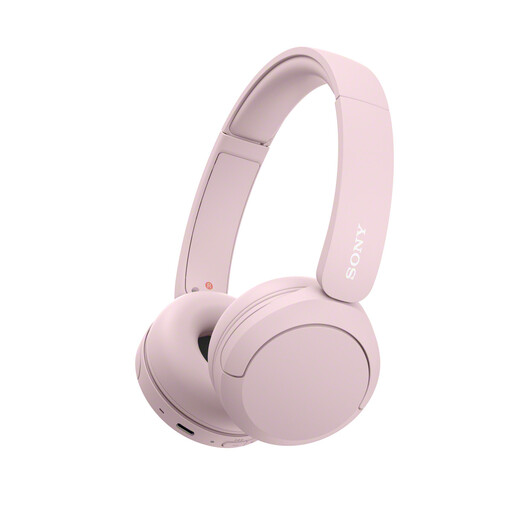
Why this fits the profile: A lightweight on-ear headphone for daily listening, commuting and phone calls. The colour is an extra choice alongside the blue, beige and yellow versions.
The compact shape and low weight make this model easier to carry. Do check the current battery information, as the product specifications show different playback times.
147 grams, multipoint connection, USB-C and a built-in microphone according to the product information.
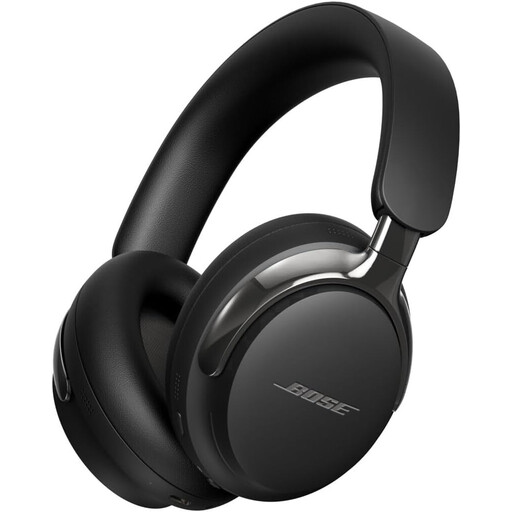
Why this fits the profile: Aimed at users who value active noise cancellation, spatial audio and both wireless and wired connections.
The inclusion of a cable offers an alternative when Bluetooth isn't desired. According to the product information, the charger is not included and the model does not support PD fast charging.
Bluetooth 5.4, active noise cancelling, spatial audio and a detachable cable with 3.5mm connection.
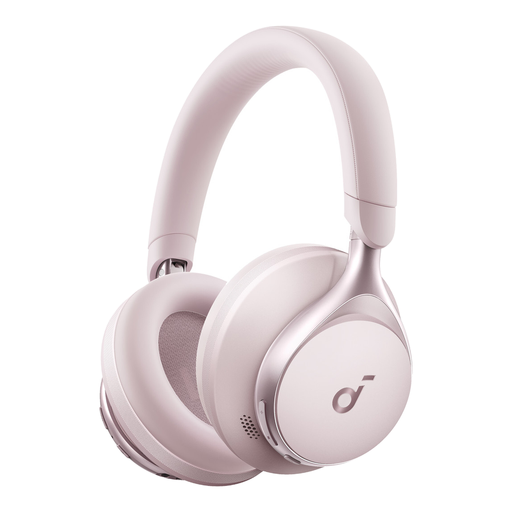
Why this fits the profile: An over-ear model for daily use, music and calls, with an emphasis on comfort and long usage time.
The wide ear cushions and soft headband are, according to the product description, designed for prolonged wear. The stated battery life of up to 55 hours is a product specification; actual use may vary.
Over-ear design, Bluetooth connectivity, USB-C and a stated battery life of up to 55 hours.
For gaming with a priority on microphone and low connection latency, the Razer BlackShark V2 X and JBL Quantum 300 are practical wired alternatives. Both use a 3.5mm connection; check your device's ports beforehand.
We've put together a full, up-to-date list of products that fully meet these strict selection criteria and comply with current European safety regulations.
Turn on the headphone and activate pairing mode. Then open the Bluetooth settings on your smartphone and select the model from the list. On some models, Google Fast Pair, Microsoft Swift Pair or the accompanying brand app help with the initial connection.
The usage time depends on battery capacity, charging habits, volume and use of ANC. The physical lifespan is affected by hinges, ear cushions and the built-in battery. A model with replaceable ear cushions, such as the CMF Headphone Pro according to the product information, can be practical for long-term use.
Yes, active noise cancelling uses extra electronics. Manufacturers therefore often state a separate battery life with ANC on and off. Check both values and look out for the fast charging feature if you often use the headphone on the go.
