
Vandaag of morgen in huis

Kwaliteit gegarandeerd

Welkomstaanbiedingen ontgrendelen: GRATIS bezorging | Tot 80% korting | Gratis 30 dagen JoyPlus-proefperiode
Download de app
Buying a wired headset may seem simple: choose a connection, check the price and place your order. In practice, most disappointing purchases are caused by the wrong connector, an uncomfortable fit or features that do not work with every device. A headset for PC, for example, is not automatically suitable for a console, and a USB headset does not work in the same way as a headset with a 3.5mm jack.
With this guide, you can compare wired headsets and earphones based on verifiable specifications. This makes it easier to find a suitable model for gaming, music, online lessons, working from home or making calls.
A headset with a 3.5mm jack usually works straight away with a controller, laptop, smartphone or Nintendo Switch with a suitable port. On some PCs, however, audio and microphone connections are split between two ports. In that case, you may need a splitter.
A USB headset processes the audio signal digitally through the USB port. This is practical for a computer, but check first whether your PlayStation, Xbox, tablet or laptop supports USB audio. A USB Type-C headset, such as the Samsung EO-IC100, depends on a USB-C audio port. Not every USB-C port supports audio.
Words such as “surround”, “noise cancelling” and “studio sound” can have different meanings. Therefore, check the actual specifications:
According to brands’ own information, certain software features may only be available on PC. With the Logitech G432, for example, DTS Headphone:X is linked to Logitech G HUB, and the feature is not offered in the same way on every platform.
A lightweight headset can be more comfortable during long lessons or gaming sessions. Pay attention to the product weight, the adjustability of the headband and the material used for the ear cushions. In-ear earphones are compact, but the fit varies considerably from person to person. Check whether several sizes of eartips are included.
Also consider the cable. A 2-metre cable is useful with a PC or console, while 1.2 metres may be more practical for mobile use. A fixed cable is straightforward, but a detachable cable can be replaced if it becomes damaged.
First, choose the device you will use the headset with most often:
For online lessons, meetings and gaming, a gaming headset with microphone or a headset for music and calls is more practical than a model without a microphone. Check whether the microphone is adjustable, foldable or detachable. A mute button on the cable or earcup saves time during conversations.
According to the product description, a directional boom microphone may be designed to focus on capturing your voice. Do not present this as a guarantee of interference-free recordings: the surroundings, software and microphone positioning still have an impact.
Over-ear models surround the ear and are often suitable for gaming. On-ear models are more compact. Wired earphones are lightweight and easy to take with you for music, podcasts and phone calls.
Also check the impedance and sensitivity when using the headset with different devices. A 32-ohm model, such as several gaming headsets in this range, is generally intended for use with standard computers and controllers. The final volume also depends on the device.
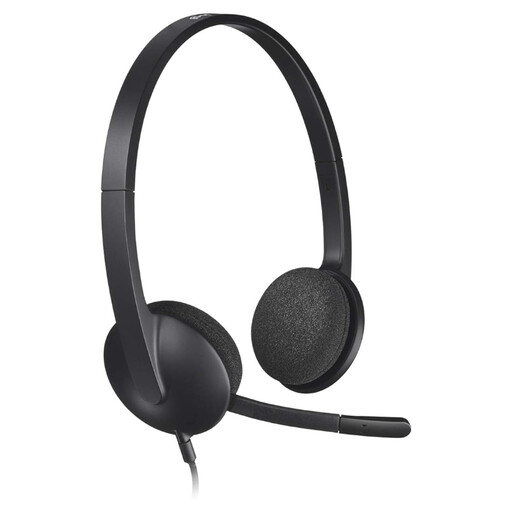
Why it suits this profile: The USB connection and lightweight design are practical for online lessons, video calls and everyday computer use.
The plug-and-play USB connection avoids the hassle of dealing with a separate microphone connector on a computer. However, check that your device has a free USB port.
USB connection, adjustable headband, stereo sound, 1.8-metre cable and an integrated microphone.

Why it suits this profile: This over-ear model is aimed at gamers looking for a microphone, broad platform compatibility and additional audio features.
The 3.5mm connection makes the basic connection simple. A splitter may be needed for separate PC ports; according to the product information, virtual 7.1 requires software activation.
50mm drivers, cardioid microphone, memory foam ear cushions, 240 grams and compatibility with PC, Mac, PlayStation, Xbox and Switch.
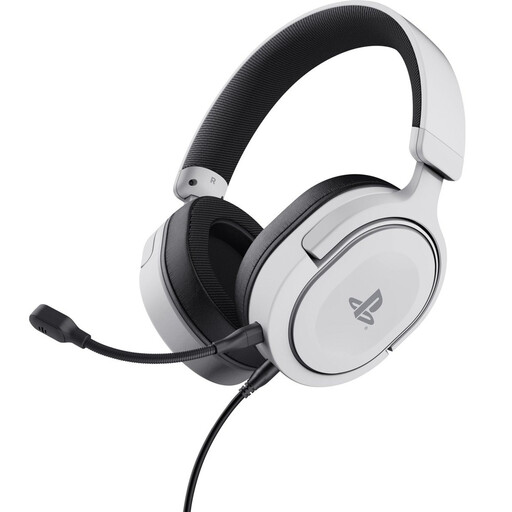
Why it suits this profile: A targeted choice for PS5 and PS4 users who want a wired headset with a detachable microphone.
The detachable 3.5mm cable and microphone make it clear which components you need to connect. This is a stereo-focused model; do not expect genuine multichannel sound.
50mm drivers, 3.5mm connection, detachable microphone, earcup controls and a weight of 253 grams.
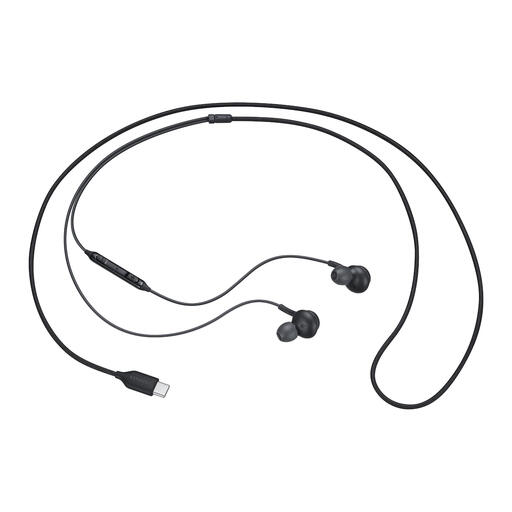
Why it suits this profile: The compact in-ear design and USB Type-C cable are suitable for compatible phones, tablets and laptops.
There is no need for Bluetooth or charging. However, check beforehand that your USB-C device supports audio.
USB Type-C connection, built-in controls, microphone, in-ear design, 18.35 grams and ear tips in multiple sizes included.
We have put together a complete, up-to-date list of products that fully meet these strict selection criteria and the applicable European safety regulations.
That depends on the connection. A headset with a 3.5mm jack can usually be connected to the PS5 controller. Check that the microphone works through the same 4-pole connection. USB models require USB audio support, which can vary between consoles.
The lifespan mainly depends on how the cable, hinges and ear cushions are treated, as well as how you store the headset. Do not pull on the cable, avoid sharply bending the connector and store the model in a dry place. Many products are covered by a minimum two-year legal guarantee under EU consumer law; additional rights may apply under Dutch law.
A wired headset has no battery and does not need charging. This means you avoid charging cables and battery ageing. On the other hand, a cable can wear out. Therefore, choose a detachable cable if being able to replace it is important to you.
