If you mainly stay at your desk during a tutorial, a wired headset could be a good fit, provided the cable gives you enough room when the desk is at its highest setting and the connection is compatible with your computer. If you move further away from your computer, a wireless headset gives you more freedom, but check the model, connection and stated talk time. Before your lesson, test both the microphone and speaker in your teaching app. Logitech and Jabra provide product specifications, not comparative measurements of speech quality.
Who is this relevant for?
Teachers who move around while explaining
You give demonstrations or step away from your desk. Freedom of movement and a microphone that remains usable as you move are important considerations. Jabra states that the Evolve2 65 Flex has a Bluetooth range of up to 30 m; this is a stated figure, not a guarantee for every room.
Teachers who stay at their desk
You mainly teach from your computer and want a compatible connection, easy-to-reach mute controls and enough cable length to use the headset while standing. Logitech lists a USB-A connection and a 1.9 m cable for the H390.
Teachers with long lessons
You wear your headset for longer periods and want to weigh up fit, listening comfort and how much of your surroundings you can hear. Manufacturers offer different styles, including mono, stereo and ANC models. The right choice depends on what you want to hear during your lesson.
What should you look for when choosing?
First, consider whether you need to move beyond the reach of a cable while teaching. Then check the connection, fit and audio settings in the teaching app you use.
| What to consider |
What to look for when buying |
Who is it most important for? |
| Clear speech |
Check whether the microphone boom is adjustable and easy to mute, then make a test recording in your teaching app. |
If your students need to follow your explanations clearly, you’ll want to hear how your voice sounds in your teaching environment. Around 33% of consumers prioritise clear speech. |
| Freedom of movement |
Measure the cable route from the port you use with the desk at its highest setting, or check the wireless connection and stated talk time. |
If you step away from your computer during a demonstration, you’ll benefit from room to move without a cable getting in the way. Around 27% of consumers give freedom of movement top priority. |
| Comfort |
Compare mono and stereo models, adjustability and ear cushions; check whether you can try the fit. |
For longer tutorials, you’ll want a comfortable style that suits how much of your surroundings you want to hear. Comfort comes first for around 20% of consumers. |
| Connection and getting started |
Check the ports and exact model; select the headset as both the microphone and speaker in your teaching app, and test it beforehand. |
If you want to start without having to switch audio devices, it’s especially helpful to choose a connection and device setting that work with your computer and teaching app. Around 20% of consumers consider a smooth start to a lesson most important. |
Common pitfalls
-
Not checking what ‘noise cancellation’ actually means
Microphone noise cancellation affects the sound sent to the people you’re speaking to; ANC affects the sound you hear. Having one feature doesn’t automatically mean the other is included.
Check both features for the exact model and make a test recording in the environment where you teach.
-
Looking only at cable length
A cable may look long enough on paper, but a tall desk or a poorly positioned computer port could still limit your freedom of movement.
Measure the route from the port you use with the desk at its highest setting, and make sure the cable won’t snag. Choose a wireless headset if you need to move beyond cable range while speaking.
-
Confusing playback time with talk time
The original JLab GO Work and the second generation have different specifications. Stated talk time can also vary depending on the settings: Jabra lists different figures for the Evolve2 65 Flex depending on whether ANC and the busy light are on.
Check the full model name and variant, and plan your lessons around the stated talk time for the settings you use.
Brands to consider
Logitech
Offers both straightforward wired computer headsets and business-grade USB models.
- According to Logitech, the H390 has USB-A, an in-line mute control and a 1.9 m cable.
- Features and certifications for the Zone Wired 2 for Business vary between the Teams and UC versions. A noise-cancelling microphone is not the same as ANC.
Jabra
The Evolve2 65 Flex is a wireless on-ear option for teachers who move around during lessons.
- Jabra specifies a foldable design and a Bluetooth range of up to 30 m for the stereo version.
- Stated talk time varies depending on the ANC and busy light settings. Certifications and items included in the bundle depend on the version.
HP Poly
The Voyager Focus 2 is a wireless stereo headset with adjustable ANC.
- HP lists three ANC levels and a noise-cancelling microphone boom.
- The talk time of up to 25 hours stated by HP applies under specific settings, including ANC and the call indicator switched off; don’t treat this as a figure that applies to every situation.
JLab
According to JLab, the original GO Work combines wireless use with an included cable for wired use.
- JLab lists Bluetooth multipoint and a mute indicator for the original version.
- Stated playback time is not the same as talk time. The second generation has different specifications and accessories, so check which generation you’re looking at.
EPOS
The IMPACT 1000 series includes professional Bluetooth headsets, including mono and ANC versions.
- An EPOS factsheet describes wireless connectivity options and features that may vary by version.
- Claims about voice capture or concentration come from EPOS and are not an independent comparison. Check the full variant number and bundle.
Headsets at Joybuy
This selection includes headsets with microphones for teaching online, where moving around without being tied to a headset cable may be useful. Some models also list a wired mode; check the connections on the exact version.
 No image available
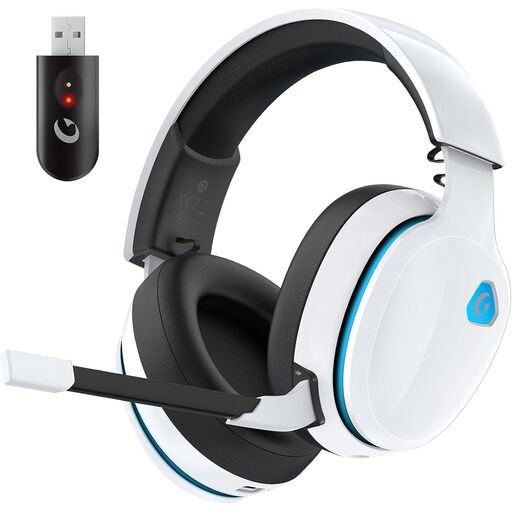
AOC 2.4GHz Wireless Gaming Headset, White
An option for anyone who wants to move around wirelessly while explaining, with the option of using a wired mode too.
The description lists 2.4 GHz, Bluetooth and a 3.5 mm wired connection.
The microphone is detachable and omnidirectional; the description also lists noise cancellation.
View at Joybuy
 No image available
Jabra Evolve2 75 Headset
A wireless option for anyone who moves away from their computer during a tutorial.
The product description lists Bluetooth with a stated range of up to 30 m, as well as ANC.
A USB-C cable, connection to two devices and HD Voice are also listed. The product description gives the microphone sensitivity as -35 dB.
View at Joybuy
 No image available
Jabra Evolve2 55 Wireless Stereo Headset
A stereo headset with a microphone boom for anyone who wants to move around wirelessly while explaining.
The product description lists Bluetooth with a stated range of up to 30 m and a Link 380 USB-C adapter.
The description lists ANC, two noise-cancelling microphones, a mute function and connection to two devices.
View at Joybuy
 No image available
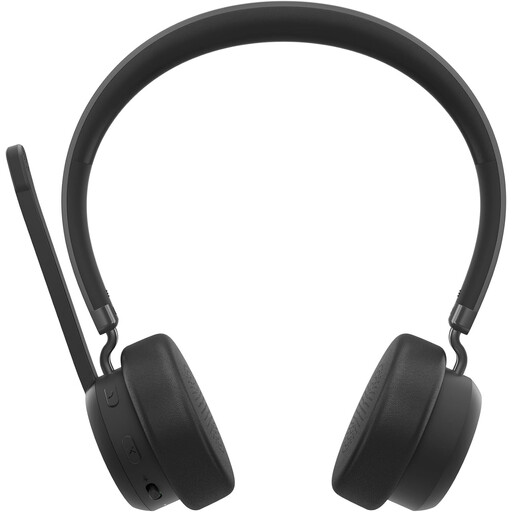
Lenovo 4XD1Q30302 Wireless Headset
A wireless headset option for anyone who needs room to move during a tutorial.
The product description lists Bluetooth with a stated range of up to 30 m.
It also lists a foldable microphone, mute controls and up to 31 hours of talk time.
View at Joybuy
 No image available
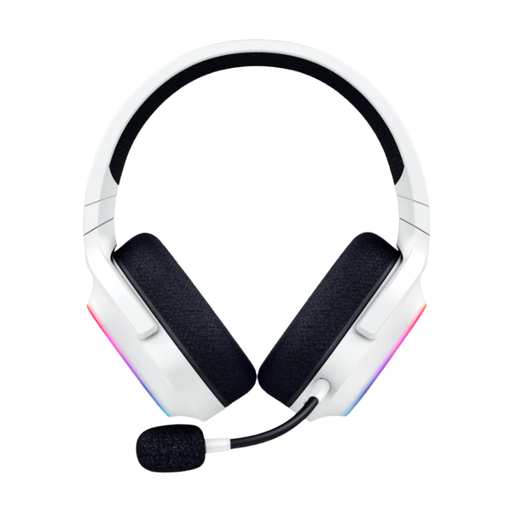
Razer Barracuda X Chroma Wireless Gaming Headset, White
A wireless option for anyone who wants to move around while explaining without being tied to a headset cable.
The product description lists Razer HyperSpeed 2.4 GHz and Bluetooth.
According to the product description, the microphone is detachable and cardioid.
View at Joybuy
Frequently asked questions
How do you check your headset before your first tutorial?
Select the headset as both the microphone and speaker in your teaching app, then make a test call or recording. Microsoft Support explains how to select devices and make a test call in Teams; Zoom offers a speaker and microphone test.
Where should you position the microphone boom when speaking?
Adjust the boom and check the recorded sound. For the SM35, Shure advises positioning the microphone beside the corner of your mouth, rather than directly in front, to reduce plosive sounds. This is placement advice for that type of microphone, not a universal distance recommendation for all computer headsets.
Can you return a headset bought online?
When you buy from a business at a distance, you generally have a 14-day cooling-off period, but there are exceptions. The Dutch government advises checking the terms that apply to the specific product; purchases from private sellers aren’t covered by the same distance-selling rules.
Can you use playback time to work out how long you can teach for?
No. Playback time and talk time are different specifications. Check the talk time for the exact headset version and the settings you’ll use during lessons; manufacturers may give different figures depending, for example, on whether ANC is on or off.


