
Gamer with few spare sockets
You want to know whether your computer can power the keyboard via USB, or whether wireless gaming would suit your setup better. Also think about where you could charge a rechargeable model.


If you have few spare wall sockets, a wired USB keyboard could be a practical choice if your computer has a suitable free port: the keyboard won’t need its own wall socket. Wireless gaming gives you more freedom to move, but still requires a power source and may need a USB port for the receiver. Also check that the layout includes the keys you use in your game.
You want to know whether your computer can power the keyboard via USB, or whether wireless gaming would suit your setup better. Also think about where you could charge a rechargeable model.
You want easy access to the arrow, function and other keys you use in your game. So check the physical layout before choosing a compact keyboard.
You’re weighing up the convenience of wireless gaming against battery management and lighting. Any stated battery life also depends on the conditions under which it was measured.
A good fit if: you play close to your computer, have a suitable free USB port and don’t want to manage a battery.
The trade-off: the cable limits where you can position it; check that the port is within reach and the cable is long enough.
A good fit if: your computer supports Bluetooth and you want to connect without a USB receiver.
The trade-off: check how the model is powered and charged.
A good fit if: you want to game without a keyboard cable and have a suitable USB port available for the receiver.
The trade-off: the receiver uses a USB port, and rechargeable models still need charging.
| What to consider | What to look for | Who is this most important for? |
|---|---|---|
| Connecting without an extra wall socket | Check that you have a suitable free USB port for the cable or receiver, or Bluetooth support if you want to connect without a receiver. | I don’t want to use an extra wall socket and can free up a suitable computer port if needed. That’s why around 36% of consumers prioritise connectivity and power. |
| Easy-to-reach keys | Compare your game commands with the arrow, function, navigation and any number keys. Also check the physical layout and key legends. | I want the keys I use in my game to be easy to reach, without relying on an awkward function layer. Around 29% of consumers prioritise layout and access to gaming keys. |
| Charging and play time | Check how the keyboard charges and the conditions behind any battery-life claims, including whether the lighting is on. See if you can use it wired while it charges. | I don’t want charging to interrupt my gaming, and I want to know how to keep track of the battery. Around 21% of consumers focus mainly on charging and play time. |
| Key feel and customisation | Check the switch type and whether the exact version supports remapping or hot-swappable switches. | I want a key feel that suits both gaming and typing, or the option to customise keys if I’ll genuinely use it. Around 14% of consumers prioritise key feel and customisation. |
Wireless means you don’t need a keyboard cable while gaming, but rechargeable models still need charging. A wireless receiver also uses a USB port.
Compare the ports available on your computer and the charging method with your gaming setup. Don’t rule out a wired USB model just because you have few wall sockets.
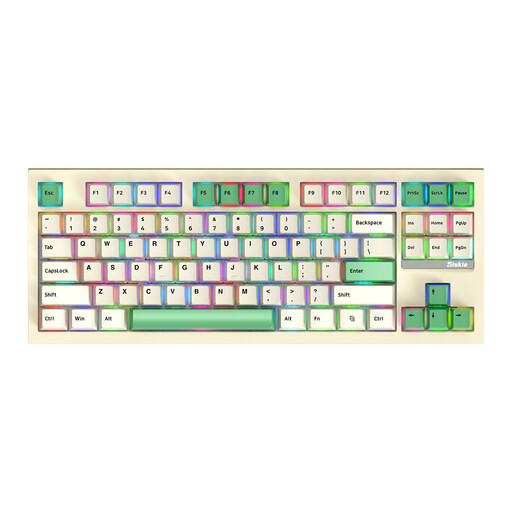
Compact layouts may leave out keys or put them behind a function layer. For example, a TKL keyboard doesn’t have a number pad.
Compare the keys you use in your game with the layout of the exact version, including the arrow, function and any number keys.
Lighting can affect the stated battery life. Wired and wireless versions in the same product range may also have different connections.
Check the full model name, connection type and conditions attached to the battery-life claim on the product page.
The G915 X LIGHTSPEED TKL is an example of a TKL model with several connection options.
The K65 PLUS Wireless Tactile is a 75% model for anyone considering separate arrow keys and tactile switches.
According to HyperX, the Alloy Rise 75 Wireless combines a 75% layout with separate arrow and function keys, as well as a choice of connection types.
The K8 Pro is a TKL alternative for anyone looking for Bluetooth, USB-C and key remapping.
The BlackWidow V4 Tenkeyless HyperSpeed is a TKL model to consider if you’re also weighing up wireless connectivity and hot-swappable switches.
This selection includes wired USB keyboards and models with both wired and wireless connection options, for gaming setups with few spare wall sockets.
 No image available
A wired option if you can use a suitable USB port on your computer and don’t need a number pad.
The product information lists a USB connection, a TKL layout and anti-ghosting for up to 10 simultaneous key presses.
Check that the cable reaches your gaming setup and that the QWERTY layout suits your preferences.
 No image available
A compact option if you want tactile switches and the flexibility to choose between wireless and wired use.
The product information lists a 75% layout, MLX Fusion tactile switches and 2.4GHz, Bluetooth and wired modes.
The 2.4GHz receiver uses a USB port; wireless use also means managing the battery and charging via USB.
 No image available
An option to compare if you’re considering a keyboard with fewer keys than a full-size model and a wired mode.
The product information lists 94 keys, red switches and a hot-swappable PCB. The product name mentions wired, Bluetooth and 2.4GHz modes.
Check the exact version and connection options before you choose.
 No image available
A good fit if you’re looking for a compact keyboard with separate arrow and function keys and several connection options.
The product information lists 82 keys and Bluetooth, 2.4GHz and wired USB-C modes.
Check that the US QWERTY layout matches the layout you want to use.
 No image available
An option if you want the flexibility to switch between wireless gaming and wired use.
The product information lists 87 keys and Bluetooth, 2.4GHz and wired USB-C connections.
Check that the size and layout suit the keys you use in your game.
No, not necessarily. Corsair describes USB charging for the K65 PLUS Wireless; if you have a suitable free port on your computer, this could save you a wall socket. A wired USB model can also draw power from a suitable computer port.
Check that you have a suitable free USB port for a cable or 2.4GHz receiver, or that your computer supports Bluetooth if you want to connect without a receiver. Also compare the keys you use in your game with the exact keyboard layout; for example, a TKL model doesn’t have a number pad.
Keep an eye on the battery indicator and follow the charging and usage instructions for the exact version. Corsair describes a battery indicator and USB charging for the K65 PLUS Wireless. HyperX lists different maximum usage times for the Alloy Rise 75 Wireless with and without lighting; these are manufacturer figures, not a guaranteed play time in your setup.
Since 28 December 2024, EU common charger rules have also applied to keyboards within their scope. According to the European Commission, this covers radio equipment with a rechargeable battery that can be charged via a cable; it’s therefore not a general requirement for every keyboard, such as one with non-rechargeable batteries.
For a standard online purchase, you generally have a statutory 14-day cooling-off period after delivery, with some exceptions. The seller must also put right, free of charge, a product that doesn’t provide what you could reasonably expect under normal use, according to ACM ConsuWijzer. This statutory right isn’t automatically limited to a fixed two-year manufacturer’s warranty.