If you read from a fixed position and your phone or recorder supports the connection, a wired lapel microphone is a straightforward option. If you move around the room or want to record two voices, compare complete wireless kits and check how many transmitters and which connections are included. Make a test recording with the microphone attached to your clothing. For wireless systems, also check the battery life and applicable frequency regulations.
Who is this choice relevant to?
Newsreader recording from a fixed position
You’re reading to camera from one spot and mainly want clear speech and a connection that works with your phone or recorder. Shure explains how contact between clothing and the microphone or cable can cause handling noise; RØDE and IK Multimedia describe wired microphones with a TRRS connection.
Presenter who moves around
You change position while recording, so freedom of movement matters. Compare complete kits and check that the receiver, power supply and frequency use suit your setup. The Dutch Authority for Digital Infrastructure provides information about frequency regulations for wireless microphones.
Bulletin maker recording interviews
You regularly record two voices and want to know in advance whether the version you’re considering actually includes two transmitters. RØDE describes the Wireless ME Dual as having two transmitters; DJI says the Mic Mini receiver can pair with two transmitters.
What should you look for when choosing?
| What to consider |
What should you check? |
Who is this most important for? |
| Clear speech |
Attach the microphone so that neither clothing nor the cable touches the capsule, then test your voice where you’ll be reading. Shure identifies clothing rubbing against the capsule or cable as a cause of handling noise. |
When I record a bulletin, I want the voice to be easy to follow without distracting rustling. Around 29% of consumers put speech clarity first. |
| Connection to your device |
Note the exact recording device and check whether it requires a TRRS, TRS or USB input. RØDE describes a TRRS-to-TRS adapter for using the smartLav+ with the Wireless GO II transmitter. |
If you want to connect the microphone to a phone, camera or recorder you already own, you’ll want to make sure the plug matches the input first. Around 29% of consumers put compatibility first. |
| Moving around or recording two voices |
Check the number of transmitters in the exact version on offer, as well as the receiver and any cables you’ll need. A receiver that can pair with two transmitters doesn’t automatically mean every bundle includes two transmitters. |
If I’m moving around the room or want to record two speakers at once, freedom of movement or a second microphone matters more than a simple wired setup. Around 24% of consumers put this at the top of their list. |
| Keeping important takes safe |
If you want a local backup recording, check whether the transmitter you’ve chosen offers this feature and whether you can retrieve the files afterwards. RØDE says the Wireless PRO transmitters support local 32-bit-float recording. |
For a bulletin that would be difficult to record again, I might prioritise extra peace of mind when saving a take over a simple kit. Around 18% of consumers give recording security top priority. |
Buying pitfalls
-
Assuming a 3.5 mm plug means guaranteed compatibility
A TRRS microphone won’t necessarily work with a TRS microphone input. RØDE describes using a TRRS-to-TRS adapter with the smartLav+ and Wireless GO II transmitter.
Before buying, check both the plug type and the requirements of the specific input.
Some setups need a suitable adapter or a different version of the microphone.
-
Buying a standalone lavalier microphone for a bodypack as if it were a complete wireless kit
Shure describes the WL185 as a microphone for use with a wireless bodypack transmitter. The microphone itself is therefore not the same as a complete kit with a transmitter and receiver.
Check that the microphone, transmitter and receiver are actually included and compatible with one another.
-
Confusing battery life with a charging case with uninterrupted recording time
Hollyland distinguishes between the operating time on a single transmitter charge and the total operating time with the charging case.
Compare the transmitter and receiver’s operating time without recharging with the length of your recording session.
-
Assuming noise processing will eliminate clothing rustle
Shure notes that contact between clothing and the capsule or cable can cause handling noise. A noise-processing feature doesn’t guarantee that this will disappear in your setup.
Position the microphone clear of rubbing fabric and listen to a test bulletin first.
If handling noise is distracting, you may need to record the bulletin again.
Brands to consider
RØDE
RØDE offers both wired TRRS microphones and wireless kits for a range of recording setups.
- According to RØDE, the smartLav+ has a 1.2 m cable; the Wireless ME Dual comes with two transmitters, and the Wireless PRO transmitters support 32-bit-float audio recording, according to the manufacturer.
- Check the connection and kit contents for each model. These product features aren’t an independent comparison of sound quality.
DJI
The DJI Mic Mini is a wireless option for a compact, portable recording setup.
- DJI says the receiver can pair with two transmitters at the same time.
- Not every version includes two transmitters. DJI’s stated range is measured without obstacles or interference, so check the bundle and your recording conditions.
IK Multimedia
According to IK Multimedia, the iRig Mic Lav is designed for wired mobile recording with a compatible analogue TRRS connection.
- The manufacturer says this microphone doesn’t need batteries.
- Check that your recording device supports TRRS. You’ll need a second microphone for another speaker to wear.
Hollyland
According to the manufacturer, the Hollyland LARK M2 is available in several versions for mobile devices and cameras.
- Hollyland lists the transmitter weight as 9 g.
- Check whether your chosen version has Lightning, USB-C, camera connections or a combination of these. Operating time with the charging case isn’t the same as the uninterrupted operating time of a single transmitter.
Shure
According to Shure, the Shure WL185 is designed for use with a wireless bodypack transmitter.
- Shure says the WL185 has a TA4F connection for a bodypack transmitter.
- A standalone microphone isn’t a complete wireless recording kit; check which compatible transmitter and receiver you need.
Wireless lapel microphones on Joybuy
This Joybuy selection includes wireless lapel microphones for mobile recording setups, moving around or bulletins with multiple speakers. Check that each model’s connection and number of transmitters suit your device and recording plans.
 No image available
DJI Mic Mini 2S (2 TX + 1 RX + charging case)
The kit lists two transmitters and one receiver, making it a setup for recording two voices.
Bundle: 2 TX + 1 RX + charging case.
View on Joybuy
 No image available
Hollyland LARK M2
A wireless lavalier system to consider if you want freedom of movement while recording a bulletin.
Specifications stated in the product title: 48 kHz/24-bit, transmitter weight 9 g and range 300 m. Check that the version is compatible with your recording device.
View on Joybuy
 No image available
SYNCO P2XT wireless USB-C microphone
According to the product name, this version has a USB-C connection. Check that it works with the device you’ll use to record your bulletin.
View on Joybuy
 No image available
Moman M1CXT (USB-C, 2 TX + 1 RX)
The product name lists two microphones and a USB-C receiver. Consider this setup for recording two speakers with a compatible device.
Bundle: 2 TX + 1 RX.
View on Joybuy
 No image available
Moman CP1A (1 TX + 1 RX)
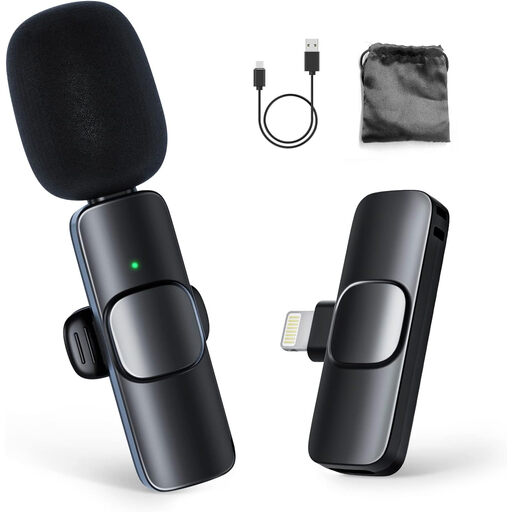
The product name lists one transmitter and one receiver, making this a setup for one wireless speaker.
The product name mentions use with iPhone; check that the connection works with your exact device.
View on Joybuy
Frequently asked questions
Where should you attach a microphone when reading a bulletin?
Attach the microphone high on your chest and make sure the capsule or cable doesn’t rub against your clothing. Shure identifies contact with clothing as a cause of handling noise; check the position with a test recording.
Can you connect a TRRS lapel microphone directly to any camera or wireless transmitter?
No, the connection must match the device’s input. RØDE specifies TRRS for the smartLav+ and describes a TRRS-to-TRS adapter for use with the Wireless GO II transmitter. So check the connection on your exact recording device.
Do you need a licence for a wireless lapel microphone in the Netherlands?
According to the Dutch Authority for Digital Infrastructure, a licence is usually not required for wireless microphones, but you must use the correct frequency band and comply with the relevant conditions. Some bands require a licence, and the frequencies available locally can vary. This doesn’t mean that every system can be used anywhere without restriction.
What can you do if a microphone unexpectedly develops a fault during normal use?
Contact the seller. ACM ConsuWijzer explains that under the statutory guarantee, the seller must provide a solution if a product breaks sooner than you could reasonably expect. A manufacturer’s guarantee doesn’t replace these consumer rights.
Do you always need consent to record identifiable people?
There’s no one-size-fits-all answer; the purpose and context matter. The Dutch Data Protection Authority says organisations need a valid legal basis to process personal data, and consent is one possible basis. Inform the people involved appropriately for the specific recording and any publication.


