What should you look for?
Start by considering how clearly your voice comes through in the room and whether the mic connects to your recording device. Then think about how much freedom of movement you need and whether recording directly onto the transmitter matters for your explanation.
| What to consider |
What should you check? |
Who is this important for? |
| Clarity |
Make a test recording where you’ll be explaining, wearing the same clothes and with the usual level of noise in the room. |
When I explain a recipe in a room with reverberation or background noise, I want to be able to hear clearly what I’m saying in the recording. Around 36% of consumers prioritise clarity in the room. |
| Connector |
Check the exact input, whether it’s TRS or TRRS, any adapter you may need, and whether a test recording contains audio from the external mic. |
I want to make sure my phone, camera or recorder recognises the mic before weighing up other features. Around 29% of consumers prioritise a connector that works with their device. |
| Freedom of movement |
Follow your usual route during a test recording and check that the cable gives you enough room, or that the transmitter and receiver stay connected. |
When I move between workstations during a demonstration, I don’t want a cable to the recorder to restrict me. Around 21% of consumers prioritise freedom of movement. |
| Recording on the transmitter |
Check the manual for the exact model to see whether it can record independently on the transmitter, and test that you can export the file. |
If an explanation would be difficult to record again, I want to know whether a separate file is saved on the transmitter. Around 14% of consumers prioritise this added recording security. |
Products available at Joybuy
This selection includes wireless clip-on kits for greater freedom of movement or multiple speakers, and wired lavalier mics for a fixed setup with a compatible connector.
 No image available
DJI Mic Mini 2S, 2 TX + 1 RX, with charging case
This wireless kit may suit explanations where you move around or record two voices; the product description lists two transmitters and one receiver.
The description also lists internal 32-bit float recording on the transmitters and a charging case. Before using it in the Netherlands, check that this version’s frequency complies with the applicable requirements. According to the Dutch Authority for Digital Infrastructure, a licence is required for some frequency bands.
View at Joybuy
 No image available
RØDE Wireless Micro, camera kit with two microphones, USB-C
This wireless kit may suit a demonstration with two speakers or when you’re moving between workstations; the product name lists two microphones.
The product name lists a camera receiver, smartphone receiver, charging case and USB-C. Check that the receivers work with your recording device, and check the applicable requirements for this wireless version’s frequency before using it in the Netherlands.
View at Joybuy
 No image available
SYNCO P2XT wireless microphone, USB-C
This wireless lavalier mic may suit a demonstration where you want to move around and are recording with a compatible USB-C device.
The product name lists USB-C. Check that the connector and recording function work with your device. Before using it in the Netherlands, also check the applicable requirements for this wireless version’s frequency.
View at Joybuy
 No image available
Moman MA6 wired lapel microphone, 6 m, 3.5 mm
This wired lavalier mic may suit a fixed recording setup with a compatible 3.5mm input.
The product name lists a 6 m cable and a 3.5mm connector. Check that the connector is compatible with your recording device; the cable length means you’ll need a setup where it can be routed safely.
View at Joybuy
 No image available
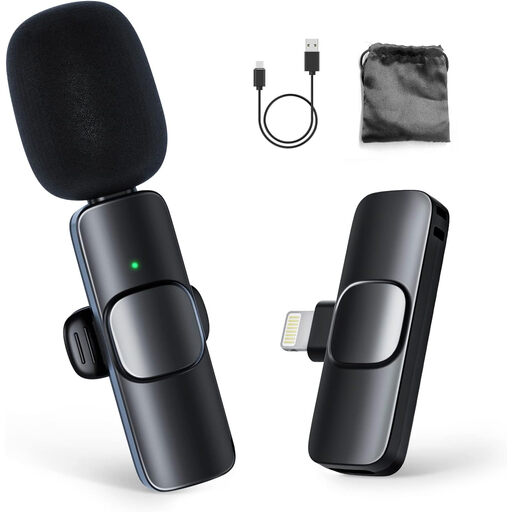
Moman CP1A wireless lavalier microphone for iPhone, 1 TX + 1 RX
This wireless clip-on kit may suit a demonstration with one speaker who moves around while recording.
The product name lists one transmitter and one receiver for use with iPhone; the product description mentions a built-in rechargeable battery. Check that the kit works with your exact device and that its frequency complies with the applicable requirements in the Netherlands.
View at Joybuy
Frequently asked questions
How do you position a lapel mic when explaining a recipe?
Clip the mic at chest height, about a hand’s breadth or 20–30 cm from your mouth, as RØDE recommends. Keep the capsule clear of rubbing clothing, secure the cable if needed, and listen back while carrying out your usual tasks.
Can noise cancellation fix a reverberant or noisy rehearsal room?
Don’t assume it will without making a test recording in the room. DJI lists noise cancellation as a feature of the Mic Mini, but RØDE explains that mic placement also affects how much reverberation and background noise you can hear.
How can you check whether a wired mic works with your phone or recorder?
Compare the mic’s connector type and power requirements with your exact device, then make a test recording. A 3.5mm plug alone doesn’t prove compatibility: the Sennheiser XS Lav Mobile uses TRRS, while the RØDE Lavalier GO specifies TRS and plug-in power.
Do you need a licence for a wireless microphone in the Netherlands?
Not always. According to the Dutch Authority for Digital Infrastructure, a licence is usually not needed if you use the right frequency range and comply with the relevant requirements. Some frequency bands do require a licence. So check the frequency of the exact model and the information for the place where you’ll use it. This transmitter-licence question doesn’t apply to a wired mic.
Which accessories should you check before buying?
Check everything included in the kit and whether you need a suitable adapter for your phone. DJI, for example, notes that a separate adapter may be needed for the Mic Mini when using a phone with a Lightning connector; this doesn’t automatically apply to every kit.


