What should you look for?
First decide whether you’re recording only your own voice or other people’s too. Then choose the connection and freedom of movement that suit your recording space.
| What to consider |
What to look for when buying |
Who is this important for? |
| Clarity of your own voice |
Check how adjustable the microphone is and its directional characteristics, then make a test recording in the intended space. |
If I’m recording my own ideas in a lively room, I want to be able to position the microphone properly and hear how the recording sounds in that space first. Around 33% of consumers say clarity of their own voice is their top priority. |
| Freedom of movement |
Check whether it’s a complete set with a headset, transmitter and receiver, how the receiver connects, and whether the frequency variant can be used at your venue. The RDI says the available UHF frequency space can vary by location. |
If I’m walking around the room while speaking, I don’t want to be tethered to the recording equipment by a cable. I need a suitable wireless setup. Around 27% of consumers prioritise freedom of movement. |
| Connection to the recording device |
Check whether your device needs USB-A, a suitable adapter or an XLR microphone input, and whether your recording software can use the microphone as an input. |
If I’m recording on a computer, I want to be able to connect and select the microphone without having to put together a different signal chain. Around 20% of consumers say a straightforward computer connection is their top priority. |
| Contributions from other people in the room |
Decide whose voices need to be clear in the recording, then consider a separate microphone setup and what information to provide to the people concerned. |
If I also want to record ideas from people around the room, I need to look beyond one speaker’s headset. Around 20% of consumers say recording contributions from a group is their top priority. |
Joybuy products
These Joybuy products are wired and wireless headsets with microphones for hands-free speaking. Check that the connection and recording device are compatible for each model.
 Image unavailable
Turtle Beach Airlite Fit (Black/White)
The adjustable boom microphone can be positioned close to your mouth for hands-free speaking.
Wired via 3,5 mm; the microphone can be flipped up to mute it. The cable limits your freedom of movement.
View at Joybuy
 Image unavailable
Turtle Beach Recon 70 (Green Camo)
The product description mentions a microphone boom that flips up to mute.
Wired via 3,5 mm. Check that your recording device supports this connection and can use the microphone as an audio input; the cable limits your freedom of movement.
View at Joybuy
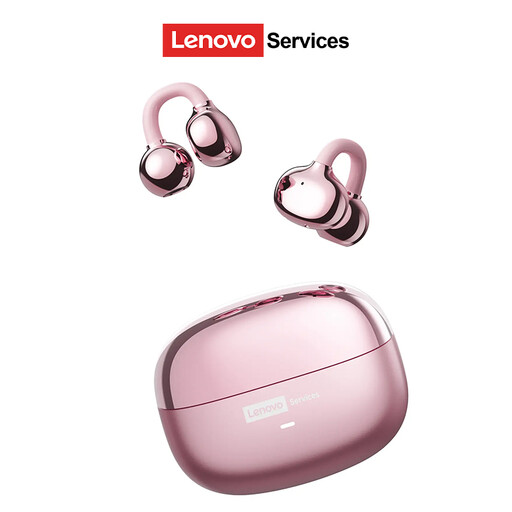 Image unavailable
Lenovo LE302
This wireless headset is described as being for calls; its open-ear design lets you hear sounds around you.
Check that it connects to your recording device and that you can select the microphone as an input.
View at Joybuy
 Image unavailable
Razer BlackShark V2 X 7.1 (Black)
The product description mentions a cardioid microphone positioned close to the mouth.
Wired via 3,5 mm, with a stated cable length of 1,3 m. Check that your recording device supports the connection and microphone input.
View at Joybuy
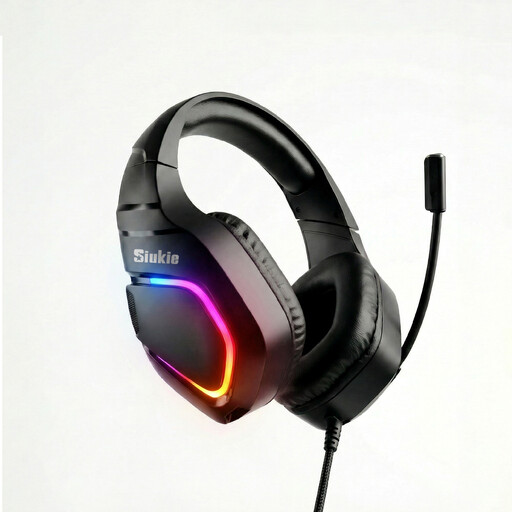 Image unavailable
Siukie H100 (RGB)
This wired headset is sold with an omnidirectional microphone.
The product name lists USB and 3,5 mm connections. Check which connection your recording device supports and whether you can select the microphone as an input; the cable limits your freedom of movement.
View at Joybuy
Frequently asked questions
Can I record everyone’s ideas in the room using just a headset?
Don’t assume so without making a test recording. The headworn microphones reviewed are designed to pick up the wearer’s voice; plan a separate recording setup for other speakers.
How can I avoid plosive sounds when wearing the microphone?
Shure recommends positioning the microphone at the corner of your mouth, rather than directly in front of it. Check the position with a short test recording; this guidance isn’t a guarantee for every headset.
Which components should I check on a wireless headset?
Check whether the set includes a headset, transmitter and receiver, how the receiver connects to your recording device, and what power supply it needs. Sennheiser lists a lithium-ion battery, available separately, as an alternative to the supplied AA batteries for the EW-D ME3 Set.
Do I need a licence to use a wireless headset microphone in the Netherlands?
It depends on the frequency band. According to the RDI, many wireless microphones can be used without a licence, subject to certain conditions. However, the available UHF space varies by location, and some bands require a licence. Check the exact variant and location before using the set.
Can I record other people in the room without asking?
There’s no general yes or no answer. If an organisation processes personal data, the Dutch Data Protection Authority says it needs a lawful basis under the GDPR and must tell the people concerned how their data will be used. Consent is one possible lawful basis; who makes the recording, what it’s used for and who it’s shared with are all relevant to the assessment.


