Who is this relevant to?

Long-session listener

You listen to an extended discussion in one sitting and want to avoid your headphones starting to press on your ears. The Consumers’ Association describes over-ear models as often comfortable for long listening sessions; try a pair yourself to assess the fit.

Listener in a shared space

You work around background noise and want fewer distractions. Compare closed-back earcups and, if it suits the way you listen, active noise cancellation. It won’t make an unclear recording any clearer.

Listener switching between devices

You might switch between a computer and phone, or want to listen without managing a battery. Check whether the exact wireless model supports multipoint, or make sure the wired connection is compatible with your playback device.

What should you consider when choosing?

Wireless over-ear headphones with active noise cancellation

A good fit for: long listening sessions in a noisy space, when you want freedom to move around.

Bear in mind: you’ll need to charge them, and battery life depends on which features you use; noise cancellation can’t restore speech that is already unclear in the recording.

Wired, closed-back over-ear headphones

A good fit for: listening at a single computer or recorder when you want a connection without Bluetooth or battery management.

Bear in mind: the connection on your source device and the cable length; passive isolation is not the same as active noise cancellation.

What to consider What should you check? Who is this important to?
Wearing comfort Try the earcups and headband; check that the ear cushions enclose your ears and still feel comfortable after a while. If I listen for hours at a time, I want my headphones to stay comfortable. Around 33% of consumers put comfort throughout the session first.
Background noise Compare how well the earcups seal and check whether the model has active noise cancellation. When sounds in my workspace are distracting, I want to focus more easily on the recording. Around 27% of consumers give reducing background noise their highest priority.
Wireless listening Check whether the exact model supports multipoint, and compare battery figures with the same features switched on or off. If I listen wirelessly for a long time or switch between devices, I don’t want to keep reconnecting or have to charge unexpectedly. Around 20% of consumers prioritise uninterrupted wireless listening.
Wired connection Check the audio output on your computer or recorder, which plug or adaptor you need, and the cable length. When I’d rather listen without Bluetooth or battery management, I want to be sure the cable fits my source device. Around 20% of consumers put the reliability of a wired connection first.

Things to watch out for when buying

  • Comparing the highest battery-life figure without checking the conditions

    Stated battery life can vary depending on whether noise cancellation is on or off. For example, Sony states up to 30 hours with NC on and 40 hours with NC off for the WH-1000XM6. JBL quotes up to 70 hours for the Tune 770NC with ANC off.

    Only compare battery-life figures under the same conditions, and consider how long your listening sessions are.

    If actual battery life with your chosen features switched on doesn’t cover your session, charging may interrupt it.

  • Expecting noise cancellation to fix an unclear recording

    Active noise cancellation targets sounds in your listening environment, not participants’ voices or background noise already present in the audio file.

    Listen to a clip of your own recording and choose noise cancellation based on the space where you’ll be listening.

  • Choosing a model without checking the fit or connection

    Headphones that aren’t comfortable during a long session can be distracting. With a wired model, the connection also needs to match the output on your source device.

    Try the headphones and check the output on your device, the plug and the cable length before buying.

    Depending on your source device, you may need a compatible connection adaptor.

Brands compared

Sony

The WH-1000XM6 is a useful comparison model if you want to listen wirelessly and may also want to use an audio cable.

  • Sony lists multipoint, passive operation and up to 30 hours of music playback with NC on.
  • Battery life varies depending on whether NC is on or off; you’ll need to assess comfort and how clearly seminar speech comes through for yourself.

Sennheiser

The MOMENTUM 4 Wireless is a wireless over-ear model to compare if battery life, noise cancellation and a transparency mode matter to you.

  • Sennheiser lists up to 60 hours of playback and adjustable sound.
  • Fit and speech reproduction depend on your own experience, so assess them for yourself.

JBL

The Tune 770NC is a model to compare for wireless features such as multipoint and an ambient sound mode.

  • JBL quotes up to 70 hours with Bluetooth on and ANC off, and also states 44 hours in its product information.
  • These battery-life figures are based on different conditions, so don’t compare them as if they mean the same thing.

Audio-Technica

The ATH-M50x represents the wired, closed-back over-ear option for a compatible computer or recorder.

  • Audio-Technica lists a detachable cable and passive isolation from the earcups.
  • According to the product specifications, this model doesn’t have active noise cancellation; check the connection and fit.

Bose

The QuietComfort Ultra Headphones (2nd Gen) are a wireless over-ear model to compare if noise cancellation and an audio cable in the box are important to you.

  • Bose lists up to 30 hours per charge and includes an audio cable in the box.
  • Bose’s description of its noise cancellation as its best is a brand claim, not an independent comparison with the other models.

Headphones at Joybuy

This selection of Joybuy products includes wireless and wired headphones and headsets to compare for listening back to long seminar discussions. Check the fit, connection and features you need for each model.

Sennheiser MOMENTUM 4 Wireless, black

Sennheiser MOMENTUM 4 Wireless, Black

Wireless over-ear headphones to consider if you want noise cancellation and the option to listen using a cable.

Sennheiser lists up to 60 hours of playback, a transparency mode, adjustable EQ and wired listening via a 3.5mm cable.

The padded headband and deep ear cushions are product claims; decide for yourself whether the fit feels comfortable.

View at Joybuy
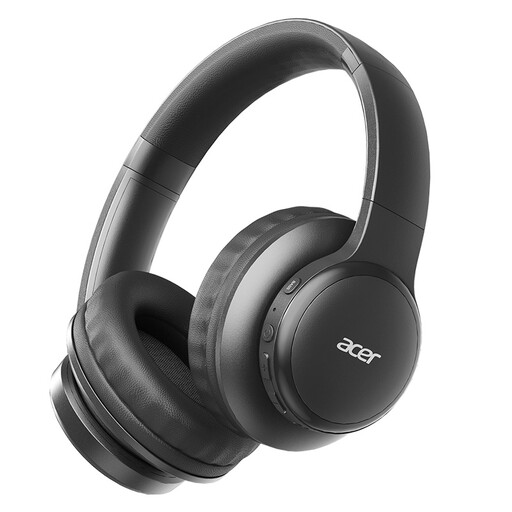
Acer OHR559 OWS wireless headphones

Acer OHR559 OWS

A wireless option to compare if you don’t want a permanent cable connection to your playback device.

The product description lists Bluetooth 5.3, a foldable design and Type-C charging.

View at Joybuy
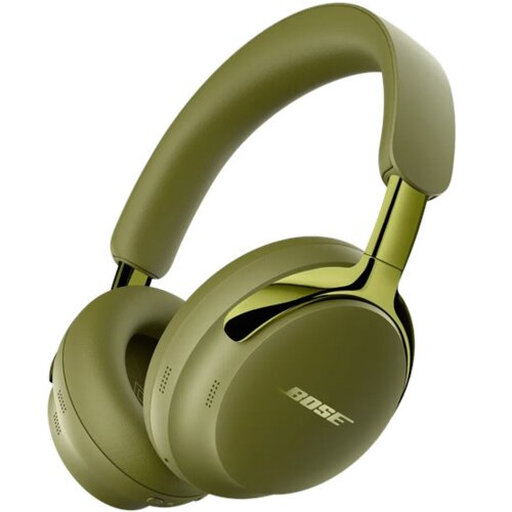
Bose QuietComfort Ultra Headphones (2nd Gen), olive green

Bose QuietComfort Ultra Headphones (2nd Gen), Olive Green

A wireless model with noise cancellation and cable options to compare if you also want to listen using a cable.

The product description lists Bluetooth 5.4, active noise cancellation and a detachable cable with USB-C and 3.5mm connections.

According to the product listing, a charger isn’t included; it recommends a 1.8–2.5 W charger and says PD fast charging isn’t supported. The listing also mentions magnets and advises consulting a doctor if you have a medical implant.

View at Joybuy

Razer Kraken V3 X headset, black

Razer Kraken V3 X, Black

A wired headset to consider if your playback device has a compatible USB connection.

The product description lists a wired USB connection and a weight of 285 grams.

View at Joybuy

Bose QuietComfort Ultra Bluetooth Headphones, black

Bose QuietComfort Ultra Bluetooth Headphones, Black

Wireless over-ear headphones with noise cancellation and an audio cable to compare for your listening needs.

The product description lists Bluetooth 5.3, up to 24 hours of battery life and an audio cable that lets you listen without battery power.

Claims about the comfort of the ear cushions don’t replace trying them for fit; try the headphones yourself if comfort is a deciding factor.

View at Joybuy

Frequently asked questions

Does noise cancellation help when participants talk over one another in a recording?

No, not with sounds already in the audio file: active noise cancellation targets sounds in your listening environment. If you’re unsure, listen to a clip of your own recording before deciding.

How can you listen to a long session without continually turning up the volume?

Make sure your headphones fit well and keep the volume down. The World Health Organization gives 80 dB for up to 40 hours a week as an example of safe exposure and recommends taking breaks; this is health advice, not a statutory volume limit in the Netherlands.

What should you check before connecting to your computer or recorder?

Check which audio output your device has and which cable fits the exact model. Sony specifies a stereo mini-jack and passive operation for the WH-1000XM6; Audio-Technica lists a detachable cable for the ATH-M50x.

What if your headphones turn out to be faulty or uncomfortable after you buy them?

For a faulty product, the seller is the point of contact for a solution, according to the Dutch government. Many online consumer purchases come with a 14-day cooling-off period; check the terms that apply to your purchase and, ideally, try the model before using it for a long time.

Can you record a seminar discussion yourself to listen back to later?

That depends on the circumstances and the policy that applies to the seminar; don’t assume there is one general rule about consent. The Dutch Data Protection Authority highlights the need for agreements about recording, storage and informing those involved in online video calls in education. Ask the institution about its policy, and consider recording and sharing separately.
