What should you consider when choosing?
Compare sound, comfort, microphone and connection options with the way you review footage and the devices you use.
| What to consider |
What should you check? |
Who is this important to? |
| Voice chat and game audio |
Listen to your own clips and check whether any spatial audio features work on your platform. Megekko Academy notes that stereo isn’t automatically less suitable for gaming. |
If I want to follow speech and relevant game sounds, I don’t want to rely on a surround sound label alone. Around 36% of consumers prioritise speech clarity. |
| Fit and noise isolation |
See how the ear cups fit and whether the material feels comfortable. VeiligheidNL recommends well-fitting headphones so you don’t have to turn up the volume as much to drown out background noise. |
In a shared room, I want to listen comfortably without turning up the volume to drown out noise. Around 29% of consumers prioritise fit and noise isolation. |
| Microphone and communication |
Check whether the microphone can be muted or detached, and whether the software features you want work on your device. Logitech G says that the wired PRO X features are only available on PC via G HUB. |
If I discuss clips with others, I want to be heard clearly and be able to mute the microphone easily. Around 21% of consumers prioritise communication. |
| Connection and freedom to move |
Compare your device’s ports with the headset’s connection. For wireless models, check the receiver, Bluetooth support and battery details for the exact version. |
If I want to switch between devices or have more freedom to move, the connection needs to suit my setup. Around 14% of consumers prioritise connection and freedom to move. |
Gaming headsets at Joybuy
This Joybuy selection includes gaming headsets for reviewing tournament footage, with both wired and wireless options. Check that the connection and features of each model suit your device.
 No image available
JBL Quantum 300, Hybrid Wired Over-Ear
A wired over-ear headset for reviewing match footage in one place without needing to recharge it wirelessly.
The product name lists a flip-up microphone. Check the connection and platform support for your device.
View at Joybuy
 No image available
Turtle Beach Airlite Fit, 3,5 mm, blue/red
A wired option if you don’t want to recharge a battery while reviewing footage.
The product name lists a 3,5 mm connection and a flip-to-mute microphone. Check that your device supports this connection.
View at Joybuy
 No image available
Razer Kraken V3 X, black
A model to include in your comparison of gaming headsets for reviewing match audio.
Before choosing, check the connection and support for the features you want to use on your playback device.
View at Joybuy
 No image available
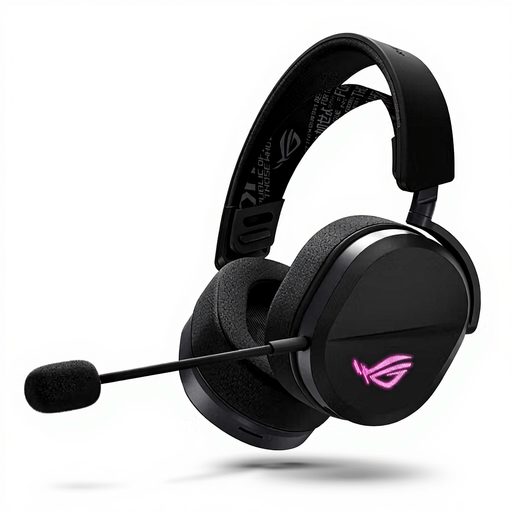
ASUS ROG Pelta, wired and wireless, Bluetooth, black
A good fit if you want to compare different connection types; wireless use means you’ll need to recharge it.
The product information lists wired USB-C, 2,4 GHz via a receiver and Bluetooth. Check which connection works with your device.
View at Joybuy
 No image available
HyperX Cloud III S, black/red
An option for reviewing footage wirelessly and muting the microphone when chatting with others.
The product information lists 2,4 GHz and Bluetooth, as well as a detachable microphone with a mute indicator. Wireless use means you’ll need to recharge it.
View at Joybuy
Frequently asked questions
Do I need 7.1 surround sound to review tournament footage properly?
No, a 7.1 label isn’t essential for following match footage. Megekko Academy notes that stereo isn’t automatically less suitable for gaming. For models with virtual spatial audio, check which platforms support the feature.
How do I connect my headset before discussing clips with others?
First, compare the port on your playback device with the headset’s connection or receiver. Then check that the microphone is selected and the mute control works. The software features Logitech G lists for the wired PRO X require a PC and G HUB.
How can I listen without turning up the volume to drown out noise in the room?
VeiligheidNL recommends well-fitting headphones so you don’t have to turn up the volume as much to drown out background noise. Also pay attention to the volume and how long you listen for; a good seal or noise cancelling doesn’t make listening at high volumes safe.
What are my rights when buying online or if a product is faulty in the Netherlands?
According to ACM ConsuWijzer, online purchases generally come with a statutory 14-day cooling-off period from delivery, with some exceptions. If a product is faulty, you also have rights against the seller if it doesn’t do what you could reasonably expect. A manufacturer’s warranty doesn’t replace those statutory rights.
What rules apply to wireless headsets in the Netherlands?
Product rules for radio equipment apply to wireless devices offered on the Dutch market. Ondernemersplein explains that manufacturers of equipment with Bluetooth or a radio frequency module, among other requirements, declare its conformity with a CE mark. This isn’t a separate registration or licence requirement for normal use of a gaming headset.


