
Coaching a beginner
You sit close to the player and give instructions out loud. Look for easy-to-reach volume and mute controls, and check together that your instructions are clear without having to turn up the game sound.


Start with the gaming device and consider whether you need the headset microphone for online voice chat, or whether the player mainly needs to hear your coaching beside the desk. A wired headset never needs charging, but you’ll need to make room for the cable. A wireless one keeps the cable out of the way while you play, provided the connection and microphone work with your device. Check the fit too, and keep the listening volume at a sensible level.
You sit close to the player and give instructions out loud. Look for easy-to-reach volume and mute controls, and check together that your instructions are clear without having to turn up the game sound.
You might use the headset with a PC and a console, for example. Check that both the audio and the microphone function you need work with each device via your chosen connection.
You’d rather not have a cable running across a cluttered desk. For a wireless model, check the connection it supports, whether there’s room for a receiver if needed, and how it charges.
| What to consider | What should you check? | Who is this important for? |
|---|---|---|
| Coaching and communication | Check that the volume and mute controls are easy to reach, and consider whether you need online chat. | When I’m sitting beside a beginner, I want to give instructions without talking over the game sound. Around 33% of consumers give clear instructions and communication top priority. |
| Audio and microphone | Check your device model and ports; test separately whether audio and voice chat work. | When I use a headset with a console or PC, I want to be sure the microphone works too. Around 27% of consumers prioritise the connection and chat function. |
| Cables and desk space | Check where the port is and how a cable will run. For wireless, make sure there’s room for a receiver if needed. | When desk space is limited, I want to keep cables out of the way while also accounting for charging. Around 20% of consumers give available desk space top priority. |
| Fit and listening volume | Check the fit on the player; start at a low volume and take listening breaks. The World Health Organization warns that listening louder and for longer increases the risk of hearing damage. | When a headset is worn regularly during practice, I want it to feel comfortable and keep the volume at a sensible level. Around 20% of consumers prioritise fit and listening volume. |
Nintendo says Bluetooth audio does not support microphone input on the Switch or Switch 2. So a headset may play audio without its microphone working over Bluetooth as you’d like.
Before buying, check how your console and the game in question support voice chat.
You may need to use a different supported connection for chat.
SteelSeries says the Arctis Nova 1’s advertised AI noise reduction uses Sonar software. Razer says the BlackShark V2 X’s 7.1 feature is only available on Windows 11.
Check which features work with your device, and don’t assume software features are guaranteed to work on consoles.
A wireless headset keeps an audio cable off your desk, but it needs charging and may require a USB port for its receiver. SoundGuys also reports that the Logitech G435 has no wired audio input.
Check the connection, available ports and how you’ll use the headset when it needs charging.
The wired Arctis Nova 1 is worth considering if you’re looking for a 3.5mm connection, an adjustable fit and a retractable microphone.
The G435 is a wireless option if you’re looking for a lightweight headset with a connection supported by Logitech.
The wired Quantum 100M2 is worth considering if you’re looking for a detachable boom mic and fabric ear cushions.
The wired BlackShark V2 X is worth considering if a flexible boom mic and closed-back earcups matter more to you than wireless use.
Below are wired and wireless gaming headsets. Check for each model that the connection, microphone and chat function you need work with your device.
 No image available
An option if you’re looking for a cardioid microphone and play on PC or PS4.
The product description lists a weight of 285 g.
 No image available
A wireless option if you want to keep a cable off your desk. The product description mentions a USB receiver and a flip-up microphone that mutes when raised.
The product title lists Xbox Series X|S, Xbox One, PC, Switch 2 and mobile. Wireless use requires charging and a USB connection for the receiver.
 No image available
A wired option if you’re looking for a detachable cardioid boom mic.
The product description lists a 3.5mm connection.
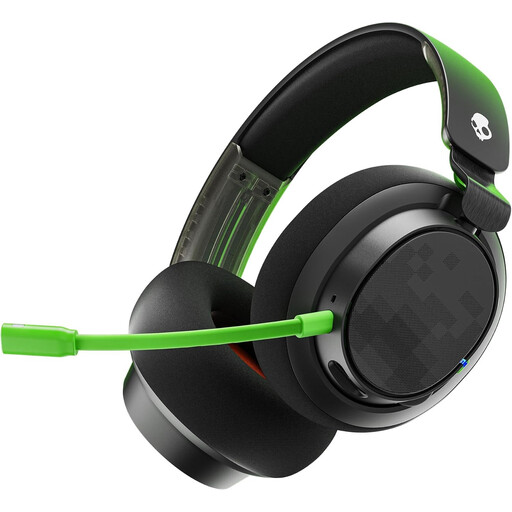 No image available
A wired option if you want to adjust the volume or mute the microphone quickly while coaching.
The product description lists 3.5mm and USB cables, a removable microphone, a mute button and volume control.
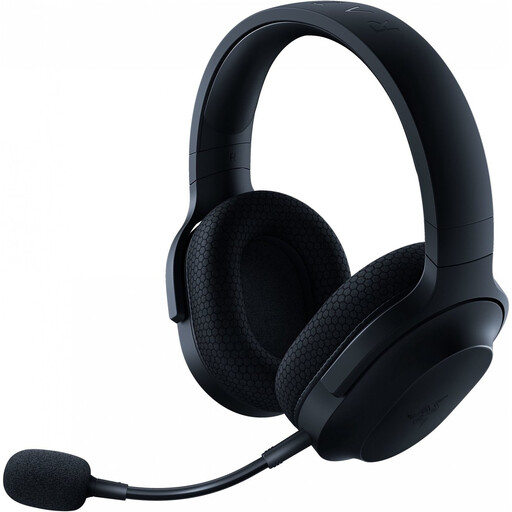 No image available
A wireless option if you’re looking for a detachable cardioid microphone and play on PC or PlayStation.
The product description mentions a USB-C dongle, Bluetooth and a 3.5mm connection. Wireless use requires charging and room for the receiver.
Not over Bluetooth audio: Nintendo says microphone input isn’t supported on either console. Check how voice chat works for the game and console in question; Bluetooth audio alone doesn’t confirm that the microphone will work.
Microsoft says you can connect a compatible headset directly to an Xbox Wireless Controller with a 3.5mm port. Check whether your controller has one. You can adjust the volume, chat mix and mic monitoring in the controller’s audio settings.
Start at a low volume, avoid listening at high volume for long periods and take breaks. The World Health Organization explains that safe listening time decreases as sound levels rise; the volume setting alone doesn’t measure how much sound reaches your ears.
The Dutch government says that purchases made online from a business generally come with a 14-day cooling-off period, although exceptions may apply depending on the purchase. In the Netherlands, there is no fixed statutory period for the legal guarantee; if a product is faulty, contact the seller.