Start with a headset whose audio and microphone both work with the device you play on, then test whether your voice comes through clearly. A wired headset suits a fixed desk setup where a cable won’t be a problem; wireless gives you more freedom to move, but you’ll need to check the receiver, the right platform version and charging requirements. Also check how to mute the microphone and whether the fit stays comfortable.
Who is this headset guide for?
Player who gives lots of instructions
You give verbal instructions while playing and want to be able to mute the microphone quickly. Test how your voice sounds before the session; on Windows, you can use the microphone test described by Microsoft Support.
Player with a PC and console
You switch between gaming devices and want to check in advance that both the headphones and microphone work with each one. With wireless models, also check the exact platform version, such as SteelSeries’ Nova 5X for Xbox.
Long-session player at a desk
You wear your headset for longer sessions and need to consider fit and cable space. Comfort doesn’t make listening at high volume for long periods a good idea: the World Health Organization points out that both sound level and listening time matter.
What should you look for when choosing?
Wired
Best if: you stay at your desk while giving instructions and don’t want to charge a battery.
Keep in mind: the cable should run comfortably around your workspace, and the connector must suit your device.
Wireless
Best if: you want to move around your desk without a headset cable.
Keep in mind: the receiver, the right platform version and charging. With the SteelSeries Arctis Nova 5, 2.4 GHz and Bluetooth cannot be active at the same time.
| What to consider |
What should you check? |
Who is this important for? |
| Clear instructions |
Check the microphone and mute control, and make a test recording beforehand. |
If I give instructions while playing, I want the new player to hear my voice clearly, and I want to be able to mute the microphone quickly. Around 36% of consumers say clear instructions are their main concern. |
| Compatibility |
Check which port is available and whether both audio and the microphone work with the specific device. |
If I switch between a PC and a console, I don’t want to find out that a connection or microphone function is missing on one of them. Around 29% of consumers put compatibility first. |
| Comfort |
Assess the headband, ear cushions and fit during normal use. |
For longer gaming sessions, I want a fit that stays comfortable for me; descriptions of materials can’t predict exactly how a headset will feel on my head. Around 21% of consumers name comfort as their main concern. |
| Freedom to move |
Decide whether a cable will get in the way; for wireless models, check the receiver, platform version and any charging requirements. |
If I regularly get up or move around my workspace, I don’t want a headset cable restricting my movement. Around 14% of consumers prioritise freedom to move. |
Common pitfalls
-
Assuming ‘surround’ guarantees a feature will work on every console
According to Logitech, DTS Headphone:X 2.0 and EQ presets on the Logitech G432 are only available on Windows with G HUB.
First, choose a headset with a connection and microphone that work with your device. Then assess the software features, bearing the platform requirements in mind.
-
Assuming Bluetooth and 2.4 GHz can deliver audio at the same time
SteelSeries says that with Quick-Switch on the Arctis Nova 5, only one of these connections can be active at a time.
If you want to hear two audio sources at once while giving instructions, check that the exact model supports this feature.
-
Confusing an extended warranty with your statutory rights
The Dutch government distinguishes between statutory rights and any manufacturer’s, seller’s or extended warranty. There is no fixed statutory warranty period in the Netherlands; what you can expect also depends on the product.
Read what an extended warranty actually covers and compare it with your statutory rights and the included terms.
An optional service plan may cost extra and, according to the Dutch government, is not needed to obtain your statutory rights.
Brands to compare
Logitech G
The wired G432 is one option to compare for giving instructions from a fixed desk setup.
- According to Logitech, the G432 has a flip-to-mute microphone and comes with a USB DAC and a 3.5 mm cable.
- According to Logitech, DTS Headphone:X 2.0 and EQ presets require Windows and G HUB, so don’t assume these features work on a console without checking.
HyperX
The wired Cloud III is worth considering if you want to compare different connections and microphone muting.
- HyperX lists 3.5 mm, USB-C and USB-A, as well as a mute indicator and memory foam in the headband and ear cushions.
- Manufacturer specifications and comfort claims are not independent assessments of voice clarity or personal fit.
SteelSeries
The Arctis Nova 5 Wireless is a wireless option for PC and PlayStation, among other platforms; SteelSeries lists the Nova 5X as the Xbox version.
- SteelSeries lists a USB-C receiver and up to 60 hours of battery life for the Nova 5.
- Quick-Switch switches between 2.4 GHz and Bluetooth; according to SteelSeries, they cannot be active at the same time.
JBL
The wired Quantum 200 is an option to compare if your device has a suitable 3.5 mm connection.
- JBL describes the Quantum 200 as a headset with a flip-up, directional microphone and a 3.5 mm connection.
- JBL’s product description is not an independent microphone test for home-office use.
Gaming headsets at Joybuy
These options include wired headsets for a fixed desk setup and wireless models for more freedom to move while giving instructions.
 No image available
SteelSeries Arctis Nova Pro Wireless, PlayStation Black
A wireless option to compare if you don’t want to be tethered to a headset cable while giving instructions.
The product description lists a USB-A base station and support for Windows PC and PlayStation.
According to the product description, you can flip the microphone up to mute it; check the stated platform support for your device.
View at Joybuy
 No image available
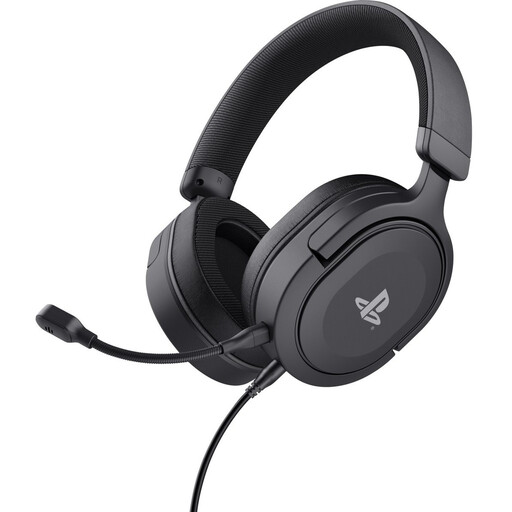
Trust GXT 498 Forta, wired, PS5, black
A wired option to compare for giving instructions from a fixed position.
The product description lists a 1.2 m cable, an earcup mute control, a padded headband and soft ear cushions.
The stated weight is 253 g. Check that the 3.5 mm cable is long enough and compatible with your device.
View at Joybuy
 No image available
Corsair VOID RGB V2 Wireless, white
A wireless option to compare if a headset cable restricts your movement around the desk.
The product description lists a USB receiver, Bluetooth 5.3 and a flexible microphone with an earcup control.
Battery life is stated as up to 70 hours. According to the product description, NVIDIA Broadcast noise cancellation requires a compatible NVIDIA GeForce RTX graphics card.
View at Joybuy
 No image available
Turtle Beach Recon 70, wired, Green Camo
A wired option to compare if you want to give instructions from a fixed desk setup.
The product description lists a 3.5 mm connection, an earcup volume control and a flip-to-mute microphone.
Check that your gaming device has a compatible 3.5 mm connection.
View at Joybuy
 No image available
Skullcandy Slyr Pro Multi-Platform, wired, Black/Red
A wired option to compare if you want to control volume and mute the microphone from the headset.
The product description lists USB-C and 3.5 mm, with support for PC, PlayStation, Nintendo Switch and Xbox.
The product description also mentions a lightweight design and memory foam ear cushions; check your own device’s connection and compatibility.
View at Joybuy
Frequently asked questions
How can you test whether your microphone works before giving instructions?
Test the microphone using the audio settings on the device you play on. On Windows, go to Settings, System and Sound, then select Input to start a test and listen back to the recording. On PS5, use Mic in the control centre to check the input device, mute setting and microphone level.
Can you hear game audio through the receiver and phone audio over Bluetooth at the same time with the SteelSeries Arctis Nova 5?
No. According to SteelSeries, with Quick-Switch on the Arctis Nova 5, only one of the two connections can be active at a time. If you want to hear both sources while giving instructions, check for a model that explicitly supports simultaneous audio.
What should you bear in mind during longer listening sessions?
Keep the volume moderate and take breaks. The World Health Organization points out that both sound level and listening time matter; comfort alone says nothing about whether your listening volume is safe.
What warranty and cancellation rights apply when buying online in the Netherlands?
According to the Dutch government, there is no fixed statutory warranty period in the Netherlands; you are entitled to a product that works as it should, in addition to any manufacturer’s or seller’s warranty. For eligible distance purchases, you generally have a 14-day cooling-off period. Check the terms of the specific purchase.
Are there safety rules for wireless headsets sold in the Netherlands?
Radio equipment covered by the European Radio Equipment Directive must meet requirements relating to areas such as safety, electromagnetic compatibility and radio spectrum use. These are product requirements, not registration or licensing requirements for buyers; check the product and conformity information for the specific model.


