
Vandaag of morgen in huis

Kwaliteit gegarandeerd

Welkomstaanbiedingen ontgrendelen: GRATIS bezorging | Tot 80% korting | Gratis 30 dagen JoyPlus-proefperiode
Download de app
A gaming headset needs to do more than play sound. You want to hear your teammates clearly, pinpoint footsteps and play for hours without pressure on your ears. However, there are several pitfalls that can make a headset less suitable in practice than its product page suggests.
For example, a high frequency response does not automatically mean that you will prefer the sound. “7.1 surround sound” can also refer to virtual software, while a headset may support only stereo or platform-specific 3D audio on a console. And a USB gaming headset will not necessarily work with every Xbox controller, Nintendo Switch or smartphone.
In this buying guide from the Joybuy Product Recommendation Officer, we compare the most important features and match different models to recognisable use cases.
A 7.1 surround sound headset can provide virtual positional audio via software on a PC. That does not automatically mean the same feature is available on PS5, Xbox or Nintendo Switch. So always check:
A wired headset with a 3.5mm connection generally delivers stereo sound and may support platform features such as PS5 3D Audio. This is different from genuine multi-channel playback.
A USB gaming headset is practical for PCs with a single USB port, but may be limited when used with consoles. You will usually connect a 3.5mm gaming headset to the controller or headphone socket. If your PC has separate connections for audio and microphone, you will need a Y-splitter or extension cable.
Also consider the cable length. A 1.2-metre cable is convenient for a controller, but may be too short if you connect it directly to a PC. A USB headset may also require additional software for the equaliser, RGB lighting or surround sound.
An over-ear gaming headset surrounds the ear and can partially block out ambient noise. Pay attention to the weight, the shape of the ear cushions and the adjustability of the headband. Faux-leather cushions feel soft, while breathable fabric may be more comfortable in a warm room. No single fit works for everyone, so comfort is partly a matter of personal preference.
Also check whether the microphone folds up, swivels, is flexible or can be detached. A detachable microphone is useful if you also want to use the headset for music or films.
The driver diameter gives an indication of the speaker units used. This selection mainly includes 40mm and 50mm drivers. A larger driver is not in itself a guarantee of better sound, but it can contribute to powerful audio reproduction.
The frequency range, for example 20 Hz to 20 kHz, describes the frequencies reproduced. A range of 20 Hz to 40 kHz may look impressive on paper, but it does not tell you everything about how the headset sounds in games. Also consider the sound mode: stereo, virtual 7.1 audio or platform-specific 3D audio.
For voice chat, a stable microphone position and easy mute controls are important. A flip-to-mute microphone mutes the sound when you flip the microphone upwards. Other models use a button on the earcup or a control on the cable.
Look out for terms such as “noise reduction”. According to the manufacturer’s own information, this can help to reduce background noise, but the final clarity also depends on the room, software and distance from your mouth.
Use this checklist before ordering:
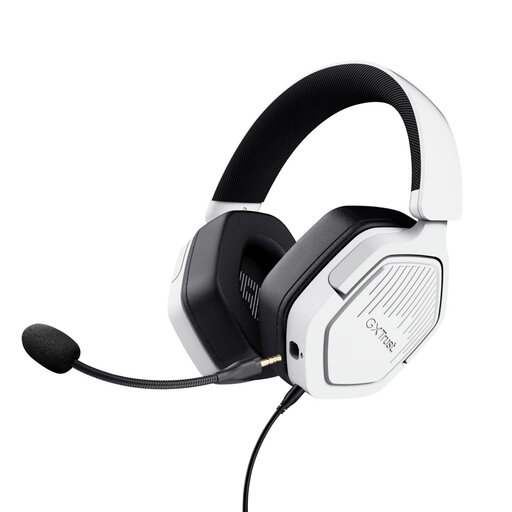
Why it suits this profile: According to the product specifications, this wired gaming headset uses a 3.5mm connection and is suitable for PC, laptop, PlayStation, Xbox and Nintendo Switch. This makes it practical if you use several devices.
The product information clearly states that this is a stereo headset without virtual 7.1 functionality. You therefore do not pay for a surround feature that you may not use.
50mm drivers, over-ear ear cushions, detachable microphone and volume controls on the earcup.
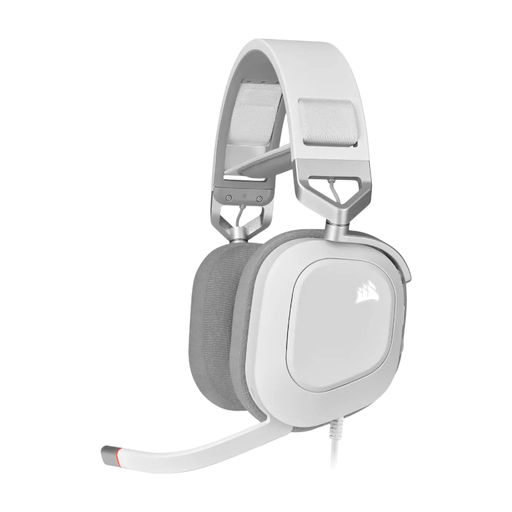
Why it suits this profile: This USB model is aimed at PC gamers who value digital audio, controls on the headset and customisable RGB lighting.
The specifications state that Dolby Audio 7.1 True Surround Sound is intended for PC. This makes the platform limitation clear from the outset.
50mm neodymium drivers, 20 Hz–40 kHz according to the product specifications, USB audio, flip-up microphone and RGB lighting.
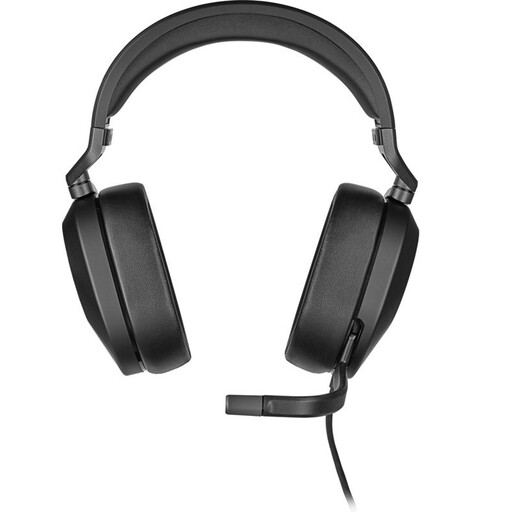
Why it suits this profile: This model combines a 3.5mm connection with a supplied USB adapter. This allows you to switch between consoles and PC, with additional features on PC and Mac.
The connection options and platform features are clearly separated: Dolby Audio 7.1 is listed for PC and Mac via USB, while consoles use the 3.5mm connection.
282 grams, 50mm drivers, flip-to-mute microphone, USB adapter and support for PC, Mac, PS5, Xbox and Switch.
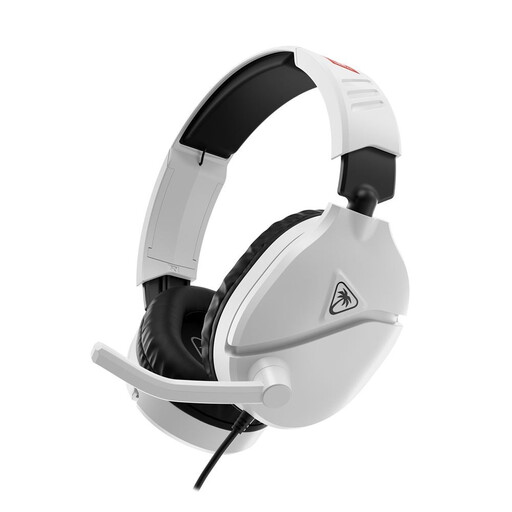
Why it suits this profile: The product specifications list Nintendo Switch, Switch Lite, Switch OLED and Switch 2 as compatible devices. The 3.5mm cable connects directly to the console.
You do not need a battery, USB software or an additional wireless receiver. The flip-to-mute microphone and volume control are available straight away.
232 grams, 40mm speakers, 3.5mm connection and a microphone that mutes when flipped upwards.
We have put together a complete, up-to-date list of products that fully meet these strict selection criteria and the applicable European safety regulations.
Yes. A model with a 3.5mm cable or USB connection draws the power it needs for audio and the microphone from the connected device. With USB models, the lighting or software may use additional power, but charging is not required. A cable also means you will not run out of battery during a gaming session.
Not automatically. Virtual surround sound can reproduce positional audio differently, but some players find stereo clearer or more natural. You should also check whether the feature works on your platform. For example, Dolby Audio 7.1 is listed for PC on the Corsair HS80 RGB USB, while the Trust GXT 492W Carus uses stereo according to the product information.
Its lifespan mainly depends on cable use, hinges, ear cushions and the microphone arm. Do not pull on the cable, store the headset in a dry place and clean the cushions carefully according to the instructions. Use a moderate volume during long sessions and take regular breaks. This helps limit wear and reduces strain on your hearing.
