
Vandaag of morgen in huis

Kwaliteit gegarandeerd

Welkomstaanbiedingen ontgrendelen: GRATIS bezorging | Tot 80% korting | Gratis 30 dagen JoyPlus-proefperiode
Download de app
A wired headset seems simple: plug it in and you’re ready to go. Yet many consumers buy a model that isn’t suitable for their computer, console or workspace. The wrong connection, an uncomfortable fit or a microphone that doesn’t sufficiently reduce background noise can quickly make using it frustrating.
With this practical checklist, you can compare a wired headset based on its connections, microphone, comfort and intended use. Afterwards, you’ll find three recommendations for different types of user.
A 3.5mm headset only works directly if your device has a suitable combined audio jack. Some PCs have separate ports for headphones and microphones. In that case, you’ll need a splitter. A smartphone or laptop without a 3.5mm port may require an adapter.
A USB headset is generally easy to connect to a PC or laptop, but it won’t necessarily be compatible with every games console or smartphone. Before buying, check the following:
With a noise-cancelling headset, the term may refer to the microphone or to active noise cancellation in the earcups. These are different features. A noise-cancelling microphone attempts to reduce background noise during conversations. That doesn’t automatically mean that you’ll hear less of the surrounding noise yourself.
For online meetings, calls and customer service, the microphone is particularly important. For travelling or working in a busy environment, active noise cancellation on the listening side may also be relevant. Check whether the headset instead uses passive isolation, for example through closed over-ear earcups.
A lightweight headset may feel comfortable during a short video call, but the fit, pressure on your ears and heat build-up determine how comfortable it is during prolonged use. Look out for the following:
For a headset for PC, both USB and 3.5mm are common options. USB is generally plug-and-play and uses its own digital audio connection. A 3.5mm headset is more flexible for devices with an audio jack and often works without software.
For a headset for PS5 or headset for Xbox, you shouldn’t just look at the plug. Also check whether chat is supported via the chosen connection. A 3.5mm model connected directly to the controller is often practical. Some USB models are only suitable for PCs or specific consoles.
A headset with microphone is suitable for meetings, online lessons, calls and gaming. Consider its position and controls:
Brands may make their own claims about voice quality or noise cancellation. According to product information from Logitech, Trust, EPOS and other manufacturers, these features are intended to support communication; performance may vary depending on the room, device and software.
A stereo headset uses two audio channels and is suitable for music, video, conversations and general gaming. Virtual 7.1 surround sound is simulated through software. This can alter the sense of space in games, but depends on the software, platform and personal preference.
A frequency range such as 20 Hz to 20 kHz doesn’t, by itself, indicate how good a headset sounds. Driver size, tuning, seal and source also play a role. Use technical figures as a point of comparison, not as a guarantee of a particular listening experience.
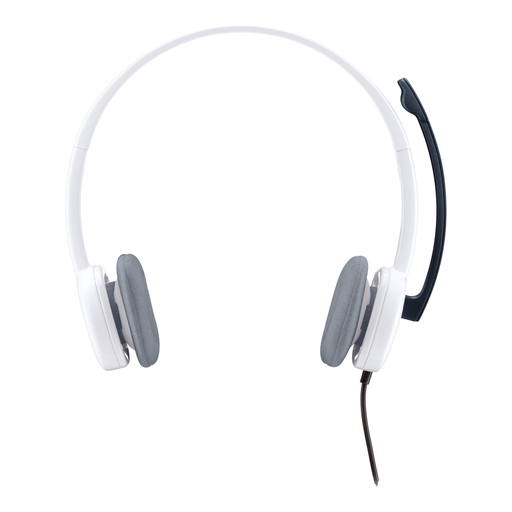
Why it suits this profile: The simple 3.5mm connection and low weight of 80 grams make this model suitable for conversations, music and multimedia without additional software.
The connection is clearly specified as 3.5mm. According to the product information, a splitter is required for a PC with separate ports; it is not included.
Stereo audio, adjustable microphone, volume control and a 180cm cable. Suitable for most computers, smartphones and tablets with the appropriate connection.

Why it suits this profile: This over-ear gaming model is designed for extended gaming sessions and combines several connection options with controls on the earcup.
The product information lists compatibility with PC, PS5, Xbox, Nintendo Switch, Mac and mobile devices. However, check which cable or adapter is used for each device.
53mm drivers, memory foam in the headband and ear cushions, detachable microphone, USB-C, USB-A and 3.5mm connections. Virtual DTS Headphone:X 2.0 is listed for compatible applications.
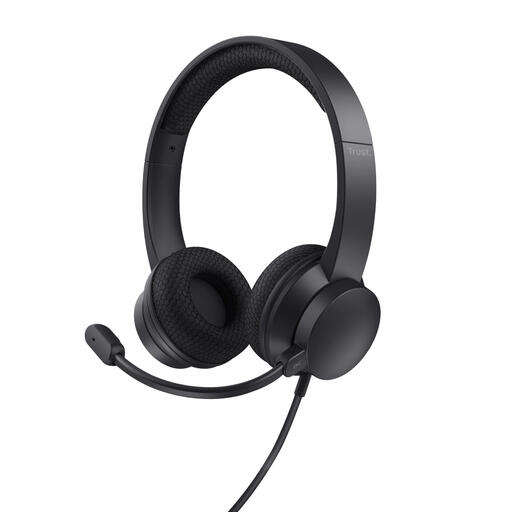
Why it suits this profile: For homeworkers, students and business users, this USB headset offers practical controls for online meetings and calls.
The product description distinguishes between a noise-cancelling microphone and the USB connection. A USB-C adapter cable is included, but check your device’s ports.
On-ear design, stereo audio, 180cm cable, USB-A and USB-C, volume control on the earcup and flip-to-mute microphone.
We’ve put together a complete, up-to-date list of products that fully meet these strict selection criteria and the applicable European safety regulations.
Choose a cable that suits your desk or gaming area. A cable that’s too short limits your freedom of movement, while a long cable can get caught around chair wheels or across walkways. Use the volume control to keep the level moderate and take regular breaks during prolonged use, as indicated in the products’ safety information.
Also check the warranty terms. According to the product information, the products mentioned come with at least the statutory two-year guarantee under EU consumer rules. Additional rights may apply under Dutch law.
Yes. A model with an adjustable microphone, mute function and suitable USB or 3.5mm connection is suitable for Teams, Zoom, Skype and other calling software. After connecting it, check in the software that the correct microphone and speaker have been selected.
Its lifespan depends on strain on the cable, frequency of use and maintenance. Don’t pull on the cable, store the headset in a dry place and regularly check whether the cable or plug is damaged. Ear cushions can wear out over time, particularly with intensive daily use.
Not in terms of a separate energy bill. A USB headset draws power through your computer’s USB port. A 3.5mm model receives its audio signal through the device. The main cost difference usually lies in the purchase price, adapters and any replacement accessories.
