
Vandaag of morgen in huis

Kwaliteit gegarandeerd

Welkomstaanbiedingen ontgrendelen: GRATIS bezorging | Tot 80% korting | Gratis 30 dagen JoyPlus-proefperiode
Download de app
A wired headset might seem simple: plug it in and listen. Yet many people buy a model that disappoints after a short time. The cable turns out to be too short, the connection doesn't fit the computer, or the microphone picks up too much background noise. Terms like “surround sound” and “noise cancellation” can also create the wrong expectations.
This buying guide helps shoppers in the Netherlands compare specifications and choose a headset that suits gaming, working from home, making calls or listening to music.
A USB headset doesn't work the same as a 3.5 mm headset. A USB model processes the audio signal through its built-in electronics and is usually intended for a computer or other device with USB. A headset with a 3.5 mm jack is generally more flexible for laptops, controllers, smartphones and games consoles.
So check beforehand:
A wired gaming headset with a 3.5 mm connection is often practical for multiple devices. USB can be more convenient if you mainly work on a PC and want plug-and-play functionality.
“7.1 surround sound” doesn't automatically mean that spatial audio is available on every device. With some models, virtual surround sound only works via software on Windows. On a PlayStation, Xbox or Nintendo Switch, the headset may then simply play in stereo.
Pay attention to the difference between:
One example is the Trust GXT 490 Fayzo. According to Trust's product information, the virtual 7.1 function works via USB on PC, while consoles can output stereo. That's useful information to check before you buy.
A headset can have lots of technical features, but be uncomfortable to wear because of hard ear cushions, a heavy frame or limited adjustability. For long gaming sessions and a headset for working from home, weight, the type of ear cushion and the fit are especially important.
An over-ear headset encloses the ear and can be comfortable during prolonged use. An on-ear model rests on the ear and is often lighter, but can put more pressure on after a while. Also check whether the microphone is foldable, flexible or detachable.
Don't just look at the word “wired” – look at the exact type of connection. A 1.2-metre cable is suitable for use with a controller, but can be short when you're sitting at a desk. For a headset for PC, around 1.8 to 2 metres is often more practical.
A 3.5 mm connection usually works without software. With USB headsets, additional software may be available for an equaliser, lighting or surround settings. Check whether that software is needed for the basic function or only for additional settings.
With a headset with microphone, the placement and design are more important than just the sensitivity. A flexible microphone arm can be positioned towards your mouth. A foldable microphone can mute automatically, while a detachable one is handy when you also want to use the headset for music.
“Noise cancelling microphone” usually means the microphone tries to reduce background noise. According to the product information from the relevant brands, this can improve clarity, but how well it works also depends on keyboard noise, fans and the acoustics of the room.
The diameter of the driver – for example 40 or 50 mm – doesn't on its own tell you how the headset sounds. It's just one part of the audio engineering. A wide stated frequency range doesn't give a complete picture of the sound balance either.
Pay particular attention to the combination of:
Use the volume sensibly and take breaks during long listening sessions. No headset makes high volumes without risk.
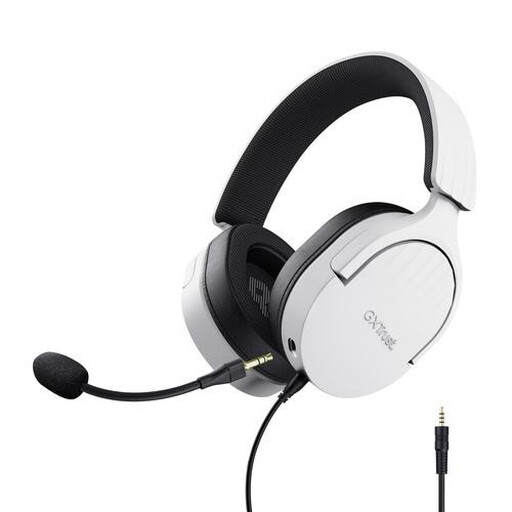
Why this fits the profile: The 3.5 mm connection makes this over-ear headset suitable for PC, laptop, PlayStation, Xbox and Switch. That's practical when you don't want to buy multiple headsets straight away.
The product information clearly states that this model uses stereo and has no virtual 7.1 function. That way, you don't buy a surround feature you don't need.
50mm drivers, soft breathable ear cushions, a detachable microphone and an included PC extension cable.
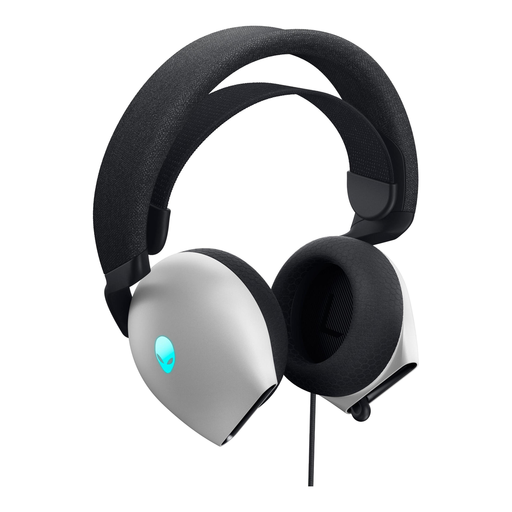
Why this fits the profile: This model combines USB and 3.5 mm connectivity. That makes it suitable for users who value flexibility and extra PC features.
The available connections are clearly stated: USB 2.0 and 3.5 mm jack. Do check which features are available per connection and device.
Hi-Res certified drivers according to the product information, support for Dolby Atmos and soft memory foam ear cushions.
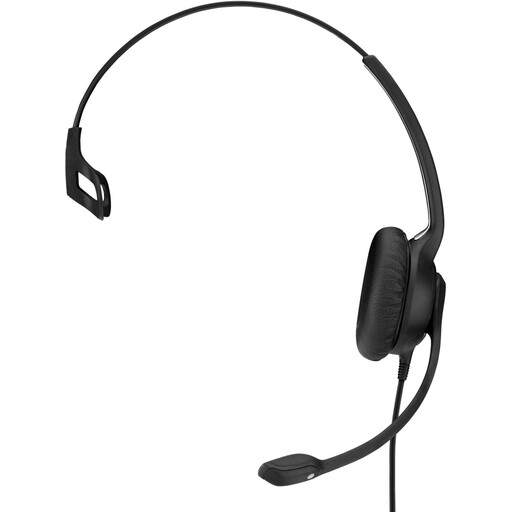
Why this fits the profile: This single-sided USB headset is designed for office, call centre and home working use. The long 2.9-metre cable gives you room to move at a desk.
The adjustable microphone arm and built-in volume control make operation straightforward. The on-ear design is less isolating than an over-ear headset, though.
USB connection, 2.9-metre cable, flexible microphone arm and spare ear cushions according to the product information.
We've put together a full, up-to-date list of products that fully meet these strict selection criteria and current European safety regulations.
That depends on the connection and the specific model. A 3.5 mm headset can often be plugged directly into the controller. USB models only work when the console supports the relevant USB audio function. Always check the manufacturer's compatibility list.
A wired headset doesn't have a battery that loses capacity over time. On the other hand, the cable and connector are prone to pulling, kinking and wear. A detachable cable can be practical for heavy use, because you can replace it more easily if the connection gets damaged.
A USB headset draws power from the computer or connected device. The consumption is usually limited, but features like RGB lighting can require extra power. A 3.5 mm headset typically receives the audio signal through the device and doesn't need its own charge. That makes wired use simple for long working days or gaming sessions.
