
Vandaag of morgen in huis

Kwaliteit gegarandeerd

Welkomstaanbiedingen ontgrendelen: GRATIS bezorging | Tot 80% korting | Gratis 30 dagen JoyPlus-proefperiode
Download de app
A wired headset seems simple: plug it in and you’re ready to go. Yet many people end up buying a model that isn’t suitable for their device or intended use. For example, a 3.5mm connection won’t always work with a laptop without the right port, while a USB headset may be less practical for a games console. Terms such as “noise cancelling” and “surround sound” are not always used consistently either.
This buying guide compares the most important connections, microphones, wearing styles and compatibility considerations. You’ll also find several popular choices for different types of user.
A 3.5mm headset usually works straight away with a controller, laptop or PC port. With a desktop PC, check whether a single combined port supports both audio and microphone input. Sometimes you’ll need a splitter.
A USB headset processes the audio signal digitally. That’s convenient for a PC or laptop, but not every PlayStation, Xbox or smartphone supports every USB model. A USB-A plug also won’t connect directly to a device with USB-C only.
On a headset with a microphone, noise cancelling may refer to the microphone. It attempts to make background noise less audible to the person you’re speaking to. This is different from active noise cancellation in the earcups, which reduces surrounding noise while you’re listening.
That’s why you should check the product specifications. If it only says “noise-cancelling microphone”, it probably refers to voice recording. For a quiet working environment, that may be enough. If you want to reduce train or office noise while listening to music, look specifically for active noise cancellation. You may also wish to browse our selection of wired noise-cancelling headphones.
A 50mm driver may sound impressive on paper, but it doesn’t tell you everything about the listening experience. Fit, seal, tuning and the source device all play a part too. A frequency range of 20 Hz to 20 kHz is a commonly quoted specification, but it doesn’t guarantee a particular sound profile.
Also consider the weight and shape of the ear cushions. A lightweight headset may be more comfortable during long sessions, while an over-ear model can provide a better seal around your ears.
Start by choosing based on your devices:
Always check whether your device supports the microphone function. With consoles, platform policies or the controller connection may also determine compatibility.
For online meetings, calls and gaming, the microphone is at least as important as the speakers. Look for:
“Clear voice” is a product description, not a universal guarantee. According to the manufacturer’s product information, the Trust Ayda has a noise-cancelling microphone. The EPOS IMPACT SC 230 USB MS II also has a noise-cancelling microphone and inline call control, according to its description.
For a comfortable headset, check its weight, headband and ear cushion material. According to the product specifications, the Logitech G335 weighs 240 grams and uses memory foam ear cushions. The Trust GXT 489W Fayzo weighs 244 grams and has soft, breathable ear cushions.
A long cable is useful beside a desktop PC, but it can also get in the way. The Trust GXT 415W Zirox has a 2-metre cable, while the Logitech PC 960 USB has a 2.4-metre cable according to the product information. Position the cable so that it doesn’t cross a walkway or get caught in the wheels of your office chair.

Why it suits this profile: According to the product information, the 3.5mm connection works with PC, laptop, PlayStation, Xbox and Nintendo Switch. This makes it a practical entry-level option for use with different devices.
The connection doesn’t require charging, and the microphone can be folded away. Note, however, that according to the product information, this model offers stereo sound rather than virtual 7.1 audio.
50mm drivers, over-ear design, volume control on the earcup and a 2-metre cable.
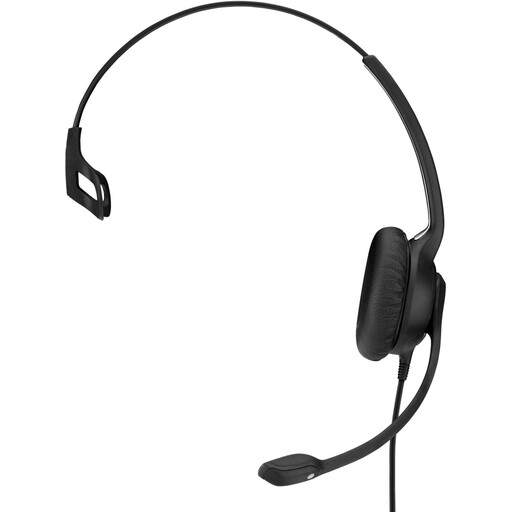
Why it suits this profile: This single-sided USB model is designed for office and call-centre use. Its low stated weight of 58 grams and 2.9-metre cable are practical for long working days.
The USB connection avoids any uncertainty about a combined 3.5mm port. The microphone boom is flexible and the controls are located on the cable.
USB connection, single-sided design, inline call control and, according to the product description, a noise-cancelling microphone.
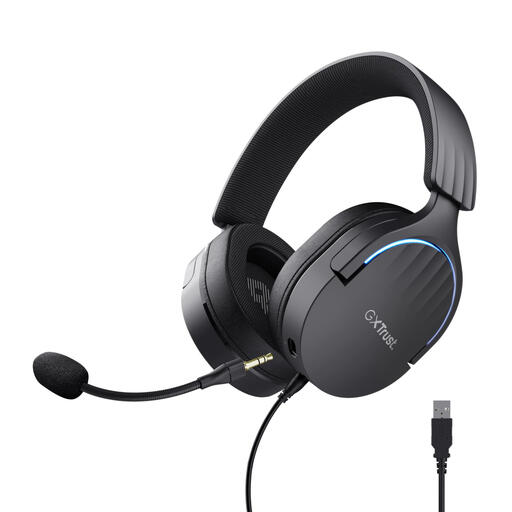
Why it suits this profile: According to the product specifications, this model is designed for PC and PlayStation 4 and 5. It’s suitable for gamers looking for USB connectivity, virtual 7.1 audio and a detachable microphone.
The product information clearly states that it uses USB connectivity and virtual 7.1 audio. However, check beforehand that your platform and software support these features.
50mm drivers, virtual 7.1 audio, detachable microphone, rotating earcups and a 2-metre cable.
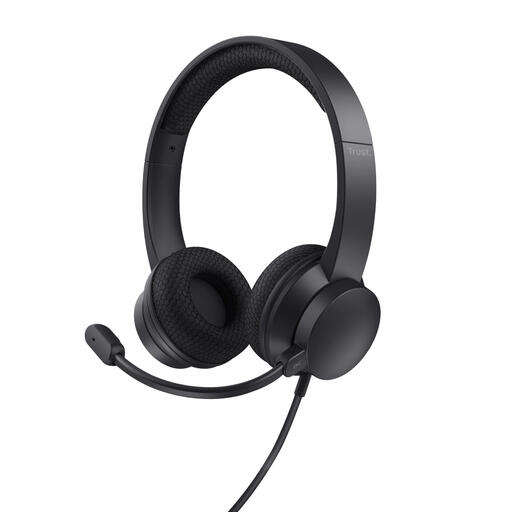
Why it suits this profile: This headset is designed for video meetings and online communication. USB-A and the included USB-C adapter offer flexibility when using it with a laptop or PC.
The specifications distinguish between the USB connection and the noise-cancelling microphone. So don’t expect active noise cancellation for your own listening environment.
141 grams, USB-A with USB-C adapter, volume control on the earcup and a microphone that flips up.
We’ve put together a complete, up-to-date list of products that fully meet these strict selection criteria and the applicable European safety regulations.
Yes, provided your computer supports the connection and the microphone is selected correctly in Teams, Zoom or other meeting software. A USB headset is often easy to set up. Once connected, check the audio settings to make sure both the headset speaker and microphone are active.
A wired headset doesn’t have a battery that needs charging or replacing over time. However, the cable, plug and microphone boom are still points that can suffer wear. Avoid pulling on the cable and store the headset without sharply bending it. A model with replaceable ear cushions may be more practical for intensive everyday use.
A USB headset draws power from the computer, but doesn’t need a separate battery or charger. With normal office or gaming use, its power consumption is limited. A 3.5mm headset generally doesn’t use its own power source, as the connected device supplies the audio signal.
