
Vandaag of morgen in huis

Kwaliteit gegarandeerd

Welkomstaanbiedingen ontgrendelen: GRATIS bezorging | Tot 80% korting | Gratis 30 dagen JoyPlus-proefperiode
Download de app
A wired gaming headset may seem easy to choose: check the price, plug in the cable and start playing. In practice, problems often arise because of the wrong connection, an uncomfortable fit or a microphone that does not work properly with your console. A few checks can help you avoid a disappointing purchase.
A headset may be described as suitable for several devices, but the connection determines what you can actually use. A 3.5 mm jack gaming headset will usually connect directly via the controller of a PS5, Xbox or Nintendo Switch. Some PCs, however, have separate ports for audio and microphones. In that case, you may need a splitter or USB adapter.
Before buying, check the following:
A speaker diameter of 40 or 50 mm tells you about the size of the driver, but not automatically about the sound quality. Also consider the type of connection, stereo reproduction, frequency range and any support for spatial audio. Features such as Dolby Atmos, Windows Sonic or Sony 3D Audio may also depend on your console, PC settings or subscription.
According to the product information for various Turtle Beach models, the 40mm speakers deliver clear treble and powerful bass. This is a manufacturer’s product specification and description, not a guarantee that every user will have the same listening experience.
An over-ear gaming headset can passively reduce surrounding noise because the earcups enclose your ears. At the same time, synthetic leather cushions may feel warmer than breathable mesh material. Therefore, pay attention to:
A lightweight headset is not automatically comfortable for everyone. The fit and pressure around your ears are at least as important.
A 3.5mm cable is practical for consoles, controllers, laptops and mobile devices with a compatible port. You do not need a battery and can start playing straight away. A USB connection can provide additional features on PC, such as software-based equaliser settings or virtual audio options. However, check whether the USB connection only powers the lighting or also carries audio.
According to its product name, the Siukie L200 Gaming Headset Wired USB+3.5 Plugs Blue Light combines USB and 3.5mm connections. With this type of product, always check the full product information to confirm which functions are available through each connection.
A gaming headset with microphone will usually have a fixed, detachable or foldable microphone. A flip-to-mute microphone is muted when you raise the microphone boom. This is useful during online chat, as you do not need to search for a button on the cable.
A detachable microphone is worth considering if you also want to use the headset for music, watching videos or when out and about. A fixed microphone is quicker to use and less likely to get lost.
For longer gaming sessions, weight and the headband are important practical considerations. According to the product specifications, the Turtle Beach Airlite Fit weighs 228 grams and uses jersey mesh ear cushions. The Nintendo version of the Turtle Beach Recon 70 is listed with a weight of 232 grams and a 1.2-metre cable. According to the product information, the Konix Nexus weighs 360 grams and has a 1.5-metre cable.
These details help you compare models, but do not tell you everything about personal comfort. Fit still depends on the shape of your head and ears.
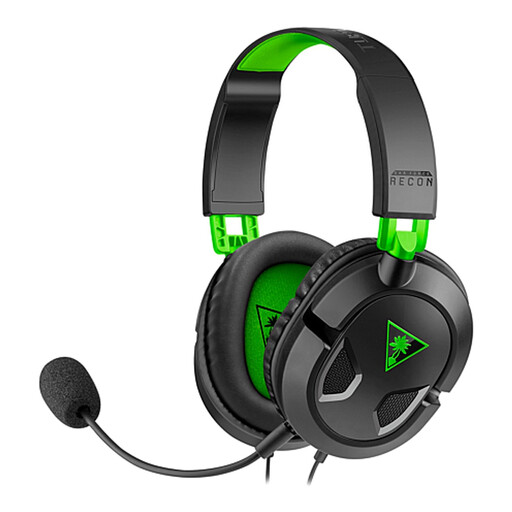
Why it suits this profile: This model is designed for players looking for a straightforward wired headset for Xbox, PlayStation, Switch, PC or mobile use.
The 3.5mm connection works without a battery or complicated installation. The microphone is detachable and has a mute button on the cable.
40mm neodymium speakers, synthetic leather ear cushions and volume control on the cable.
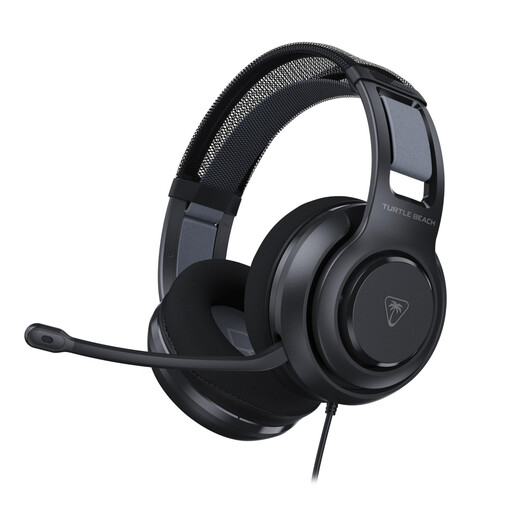
Why it suits this profile: Designed for PC gamers who want to use USB features and software-based settings as well as a 3.5mm cable.
The product information lists a USB adapter alongside the 3.5mm connection. This makes the connection more clearly suited to PC use than a purely analogue model.
50mm Nanoclear drivers, memory foam ear cushions, flip-to-mute microphone and Turtle Beach Swarm II software according to the product description.
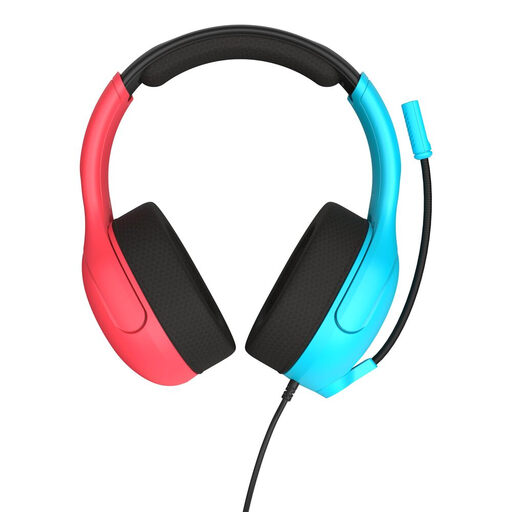
Why it suits this profile: A practical choice for Nintendo Switch players who also want to chat on PC or mobile and are looking for a lightweight headset.
The 3.5mm connection means you do not have to rely on a battery. The microphone folds upwards to mute, allowing you to switch quickly during chats.
40mm speakers, jersey mesh ear cushions, volume wheel on the earcup and a listed weight of 228 grams.
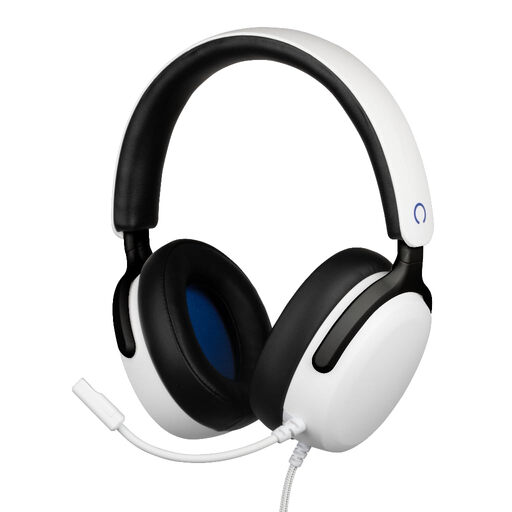
Why it suits this profile: Suitable for players specifically looking for a headset for PS5 with a longer cable and volume wheel on the earcup.
The product specifications list a 3.5mm connection, a 1.5-metre cable and a flexible microphone. However, check whether you also want to use the headset with other devices.
40mm speakers, a frequency range of 20 Hz to 20 kHz and ear cushions designed with comfort in mind according to the product description.
We have put together a complete, up-to-date list of products that fully meet these strict selection criteria and the applicable European safety regulations.
That depends on the connection and the specific model. A 3.5mm headset can usually be connected through the controller. With Xbox, check whether the model is compatible with your controller. On PC, you may need a splitter if the microphone and audio use separate ports.
A headset that works exclusively via 3.5mm will generally not need its own battery. This means you do not have to recharge it. Models with USB may use additional features, such as lighting or PC software. For these, check the product’s connection instructions.
Its lifespan depends mainly on how you handle the cable, how it is stored and the durability of the headband and ear cushions. Pull the plug out of the device by the connector, not the cable. Store the headset in a dry place and clean the cushions with a soft cloth. A detachable microphone or replaceable components can be useful if you want to keep using the headset for longer. Also avoid listening at high volume for extended periods to keep your listening experience comfortable.
