
Vandaag of morgen in huis

Kwaliteit gegarandeerd

Welkomstaanbiedingen ontgrendelen: GRATIS bezorging | Tot 80% korting | Gratis 30 dagen JoyPlus-proefperiode
Download de app
A wired gaming headset seems simple enough: plug it in, set the volume and start playing. Yet many gamers buy a model that disappoints after just a few weeks. A cable that’s too short, a microphone that doesn’t suit your voice or a connection that won’t work with your console can quickly spoil the fun.
So don’t focus only on a high number of millimetres for the drivers or terms such as “surround sound”. Pay particular attention to the connection, comfort, microphone and compatibility. Read on to find out which specifications really matter and which models suit different needs.
A gaming headset with a 3.5 mm connection often works straight through the controller on a PlayStation, Xbox or Nintendo Switch. Things can be different with a PC. Some computers have a single combined socket, while others use separate ports for the microphone and audio. Check this before you order.
A USB model usually works straight away with a PC, but it won’t necessarily be compatible with every console. A PS5 headset, an Xbox headset and a Nintendo Switch headset may all have different connection options.
“Surround sound” might mean genuine multi-channel audio, virtual processing or a software feature. On some models, the feature is also limited to Windows. For example, the Razer Kraken V3 X lists 7.1 Surround Sound for Windows, while the product specifications also mention stereo and a USB connection.
A headset with stereo audio isn’t necessarily unsuitable for gaming. For many users, clear voices, easy-to-use volume controls and a good fit are more important than a software-based surround feature.
A lightweight gaming headset won’t automatically prevent pressure on your ears. Also consider the shape of the ear cups, the cushion material and how adjustable the headband is. With an over-ear gaming headset, your ears should ideally fit inside the ear cups. A fit that’s too small can feel warm or uncomfortable during longer sessions.
You should also use your headset at a moderate volume and take regular breaks. Listening at a high volume for long periods can damage your hearing.
Check these points in the product information:
A gaming headset for PC and console is only truly versatile if the connection supplied works with both devices. So look beyond the term “multiplatform”.
A gaming headset with a microphone needs to offer more than just a microphone: practical controls matter too. A mute button on the ear cup or cable is useful during online chats. A flip-up microphone can be moved out of the way quickly, while a detachable microphone is easier to replace or remove when you just want to listen to music.
Brands may list noise cancellation or voice enhancement as features. Treat these as product details provided by the brand, not as a guarantee that every voice will sound equally clear in every room.
Weight is a useful first indication when looking for a lightweight gaming headset. Several models in the range weigh around 240 to 285 grams. According to the product specifications, the Trust GXT 415 Zirox weighs 244 grams, the Logitech G G335 weighs 240 grams and the Razer Kraken V3 X weighs 285 grams.
A larger driver, such as 50 mm, doesn’t tell you on its own how natural or balanced the sound will be. Consider this specification alongside information about stereo, frequency range, fit and the types of games you play. For competitive games, clear voices and sound direction are often more important than heavy bass.

Why it suits this type of user: A straightforward plug-and-play headset for anyone who wants to game on several devices without a battery or wireless settings to worry about.
The fixed 2-metre cable and 3.5 mm connection make compatibility clear. This model has stereo audio, so there are no ambiguous claims about virtual 7.1 audio.
244 grams, over-ear cushions, 50 mm drivers, flip-up microphone and on-ear-cup controls.
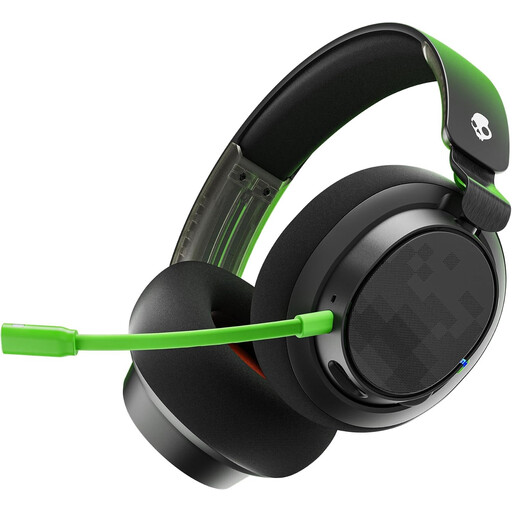
Why it suits this type of user: Designed for players who use multiple platforms and want to pay extra attention to comfort, microphone quality and connection options.
The product description lists both a 3.5 mm cable and a USB cable. Be sure to check which connection you want to use with your device.
50 mm drivers, soft memory foam ear cushions, detachable microphone and volume control with mute button.
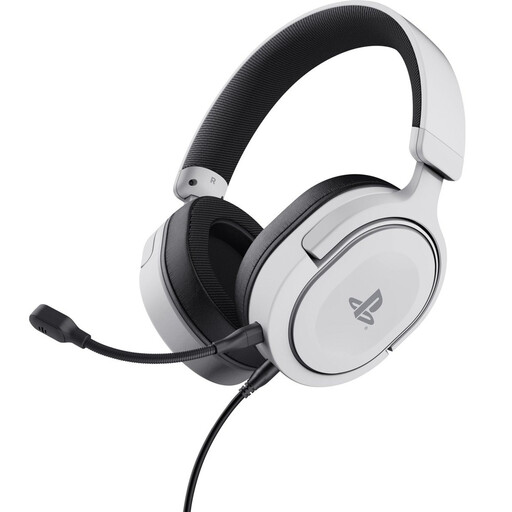
Why it suits this type of user: A sensible choice for PS5 and PS4 players looking for a wired headset with a detachable microphone.
The official PS5 licence and listed 3.5 mm cable make the intended use clear. This is a stereo model; PS5 3D audio needs to be enabled in the console settings.
253 grams, detachable microphone, soft ear cushions, 50 mm drivers and on-ear-cup controls.
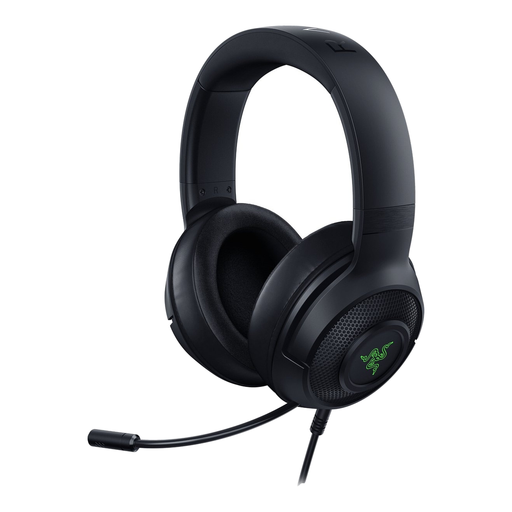
Why it suits this type of user: For PC gamers looking for a USB headset with software features and a lightweight build.
The product information clearly states that 7.1 Surround Sound is for Windows only. Check your operating system before expecting to use this feature.
285 grams, USB connection, 40 mm drivers, cardioid microphone and RGB lighting.
We’ve put together a complete, up-to-date list of products that meet these strict selection criteria and current European safety regulations.
It depends on the connection. Models with a 3.5 mm jack can usually be connected through the PS5 controller. Also check that the microphone is supported through the same connection. A USB headset may have different compatibility requirements.
Neither connection is automatically better. A 3.5 mm model is often more versatile for consoles and controllers. USB can offer extra software features on a PC, but always check that your platform and operating system are supported.
Its lifespan depends on how you use it, store it and treat the cable, plug and microphone. Don’t pull on the cable, bend the microphone beyond its range of movement or store the headset somewhere damp. A model with a detachable cable or microphone can be handy if you want to replace parts.
