
Vandaag of morgen in huis

Kwaliteit gegarandeerd

Welkomstaanbiedingen ontgrendelen: GRATIS bezorging | Tot 80% korting | Gratis 30 dagen JoyPlus-proefperiode
Download de app
A wired gaming headset may seem easy to choose: look at the design, pick a well-known brand and consider features such as surround sound or RGB lighting. However, these marketing terms can also lead to disappointment. A headset that looks impressive on paper may not always suit your PC, console, connections or gaming style.
Joybuy Product Recommendation Officer filters the most important information based on verifiable specifications. This helps you see what to look for in a gaming headset with a microphone and which features make a real difference in practice.
A 7.1 surround sound headset often uses virtual audio channels. This means the headset does not literally have seven separate speakers on each side. Software creates a spatial effect. This can help you identify the direction of sounds, but how well it works depends on the software, the game and the device.
So check:
Virtual surround sound is listed for the Edifier G2II and Razer BlackShark V2 X. On the Razer, the 7.1 feature is linked to software for PC. This makes the feature less straightforward to use on every console.
A product title may mention several platforms, but the connection determines what actually works. A USB gaming headset is generally easy to connect to a PC, but a USB Type-A connection is not automatically suitable for every console.
A 3.5mm headset is often more flexible for PC, PlayStation, Xbox and Nintendo Switch. However, check your PC’s connections. If your computer has separate ports for audio and microphone, you may need a splitter.
Check before buying:
A lightweight headset is not automatically comfortable. The shape of the ear cushions, the pressure from the headband and the materials used all affect how comfortable it is during long sessions. An over-ear gaming headset surrounds your ears, while an on-ear model rests on them. Over-ear models can provide better isolation, but may feel warmer.
Do not look only at the weight. The Logitech G335, for example, weighs 240 grams and has an elastic headband with memory foam ear cushions. The HyperX Cloud III weighs 308 grams, but also uses memory foam in the headband and ear cushions. Fit is still a personal matter.
For PC gaming, USB headsets are convenient when you want to use a single digital connection. The Logitech PC 960 USB and Logitech H540 are plug-and-play models for computers. The ASUS TUF Gaming H1 Gen II uses USB Type-A and is listed as compatible with PC and PlayStation 5.
For use with multiple devices, 3.5mm is often a practical choice. According to the product specifications, the Logitech G335, Razer BlackShark V2 X, Corsair HS55 and HyperX Cloud III are suitable for multiple platforms. Features may vary between Xbox, PlayStation and Nintendo Switch.
A good gaming headset with a microphone should above all make you easy to understand in voice chat. Pay attention to its positioning, the mute mechanism and the microphone’s directionality.
The Razer BlackShark V2 X has a cardioid microphone. The Corsair HS55 uses an omnidirectional microphone with flip-to-mute functionality. The HyperX Cloud III has a detachable microphone with a mute indicator.
A larger driver, such as 50 or 53mm, does not by itself indicate how the headset sounds. It is, however, a verifiable technical specification. Also consider:
A RGB gaming headset can complement the look of your setup, but RGB lighting does not change the sound quality. On some models, the lighting uses a separate USB connection.
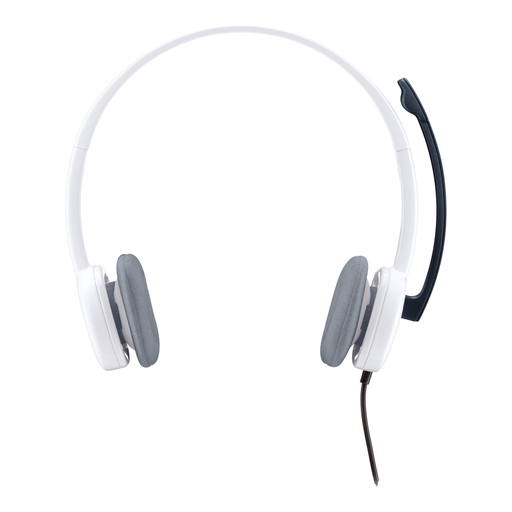
Why it suits this profile: A straightforward choice for PC use, online calls and casual gaming without additional software.
The 3.5mm connection makes it clear what you are buying: standard stereo without vague surround claims. However, check whether your PC needs a splitter.
80 grams, 180cm cable, adjustable microphone and in-line volume controls.

Why it suits this profile: Designed for gamers who play on PC and consoles and value additional connection options.
The product information lists USB-C, USB-A and 3.5mm, so you are less likely to need to look for a separate adapter. DTS spatial audio is virtual and platform-dependent.
53mm drivers, memory foam, detachable noise-cancelling microphone and support for PC, PS4, PS5, Xbox and Switch.
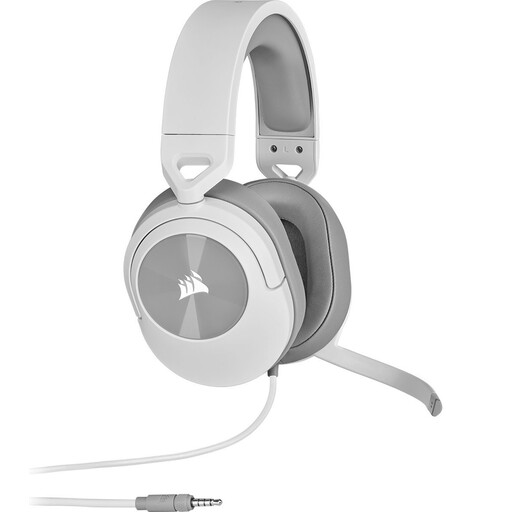
Why it suits this profile: Suitable for anyone who wants to use one wired headset with a PC, PlayStation, Xbox, Nintendo Switch and mobile devices.
The 3.5mm connection and included Y-splitter make the setup straightforward. This model uses stereo, so surround sound is not the reason to choose it.
273 grams, 50mm drivers, memory foam ear cushions and a flip-to-mute microphone with volume control on the earcup.

Why it suits this profile: An option for PC and PS4 players who want to combine a USB connection, software settings and RGB lighting.
The specifications explicitly mention PC, Mac and PS4, but not Xbox. This makes the platform limitation clear in advance.
50mm drivers, virtual 7.1 functionality, equaliser software and a detachable microphone with noise reduction, according to the product description.
We have put together a complete, up-to-date list of products that fully meet these strict selection criteria and the applicable European safety regulations.
A wired headset has no battery, so it does not need charging. Its lifespan mainly depends on the cable, connector, headband and ear cushions. Store the headset in a dry place and clean the ear cushions with a soft cloth. A detachable microphone or replaceable ear cushions can be practical if you use the headset for a long time.
That depends on your preference. Wired models have no battery and generally provide a direct connection without the need to recharge. On the other hand, the cable limits your freedom of movement. For a fixed PC setup or console station, wired is often the practical choice.
Not always. A 3.5mm model often offers broad basic compatibility, but microphone functions and adapters can vary between platforms. Always check the compatibility list for the specific model. According to the product information, the Edifier G2II is not intended for Xbox.
Usually not for basic audio and microphone use if the model is plug-and-play. However, additional features such as equaliser settings, RGB profiles or virtual 7.1 audio may require software. So check which features are available on PC and which are not supported on consoles.
