
Vandaag of morgen in huis

Kwaliteit gegarandeerd

Welkomstaanbiedingen ontgrendelen: GRATIS bezorging | Tot 80% korting | Gratis 30 dagen JoyPlus-proefperiode
Download de app
A wired gaming headset seems simple enough: plug it in, adjust the volume and start playing. Yet many gamers buy a model that disappoints after just a few gaming sessions. The most common problems are a cable that’s too short, a microphone that’s hard to understand or ear cushions that become uncomfortable after an hour.
A large driver diameter or the term “surround” doesn’t tell the whole story either. Pay particular attention to the connection, weight, fit and how the microphone works. Below, you’ll find practical criteria to help you choose, along with a selection of models for different needs.
A gaming headset with 50 mm drivers can deliver powerful sound, but driver diameter isn’t the only factor that affects sound quality. Tuning, the housing and the connection all play a part too. A 3.5 mm gaming headset will generally provide straightforward stereo audio. Virtual surround sound often only works via a USB adapter or specific software.
For many gaming headsets, surround sound is simulated using software. Check whether you’re getting stereo, virtual 7.1 audio or console features such as 3D audio. For example, the Logitech G432 uses a USB DAC and software for DTS Headphone:X. A headset with only a 3.5 mm connection, such as the Trust GXT 415 Zirox, delivers stereo sound.
An over-ear gaming headset can be comfortable, but its weight and the shape of the ear cushions make a difference. For example, the models in this selection range from around 240 to 308 grams. An adjustable headband, soft cushions and swivelling ear cups can help during longer sessions. Consider the material too: PU leather can create a good seal, while breathable fabric may feel less warm.
First, check which devices you use:
If you switch between PC, PlayStation, Xbox and Switch, a multi-platform gaming headset with a standard 3.5 mm cable is a good choice. You won’t need to charge a battery and you’ll be less reliant on wireless connections.
A good gaming headset with a microphone should be easy to use. Look for:
A detachable microphone is handy for listening to music or watching films. A flip-up microphone is quicker to mute during a game. Neither option guarantees a particular recording quality on its own; positioning and microphone technology are still important.
For long gaming sessions, a comfortable gaming headset is usually lightweight and easy to adjust. Consider the overall combination of weight, headband pressure and ear cushions. Check the cable length too. A 1.2-metre cable is a good fit for a console controller, while a PC setup may benefit from an extension cable or a cable around 2 metres long.
Turn the volume down before you start, then increase it gradually. Listening at high volume for long periods can damage your hearing. Take breaks during long sessions, and don’t use a headset in situations where you need to hear sounds around you.

Why it suits this type of user: This lightweight over-ear headset is designed for gamers looking for a simple connection and broad compatibility, without paying for wireless features.
The 2-metre cable means you don’t have to sit close to the screen when using a PC or console. The microphone can be flipped out of the way when you’re not chatting.
244 grams, 50 mm drivers, stereo audio and 3.5 mm compatibility with PC, PlayStation, Xbox and Nintendo Switch.

Why it suits this type of user: A good fit for anyone who values comfort, multiple connection options and software-based surround sound on PC and consoles.
The box includes 3.5 mm, USB-A and USB-C connection options, so the headset is less reliant on any one specific device.
53 mm drivers, memory foam cushions, a detachable microphone and DTS Headphone:X 2.0, according to the product specifications.
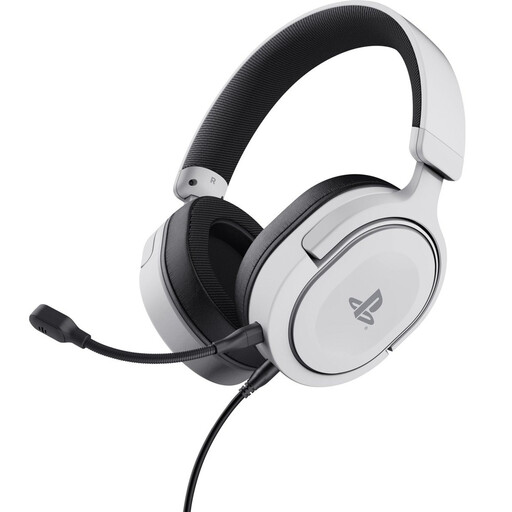
Why it suits this type of user: Designed for PlayStation gamers who often play for long sessions and want a headset with a detachable microphone.
The official PS5 licence and 3.5 mm cable make it clear which console connection it’s designed for. The cable is detachable, so it can be replaced if it wears out.
253 grams, 50 mm drivers, swivelling ear cups and a detachable microphone for PS4 and PS5.
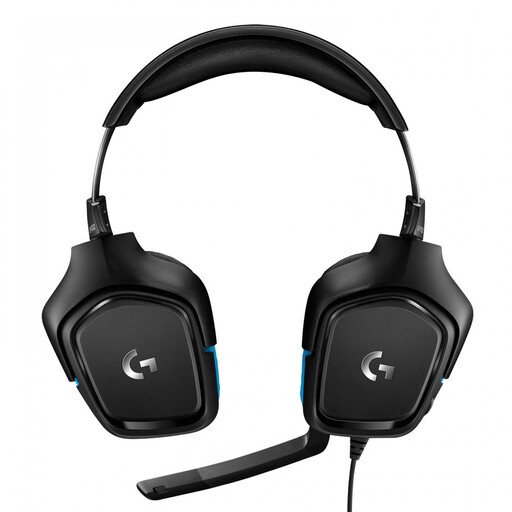
Why it suits this type of user: An option for PC and console users who want USB audio and software features as well as an analogue connection.
The 3.5 mm connection remains available if you don’t want to use USB or software. According to the product information, Logitech G HUB is required for DTS features.
50 mm drivers, USB DAC, a flip-to-mute microphone and software support for virtual 7.1 audio.
We’ve put together a complete, up-to-date list of products that meet these strict selection criteria and the applicable European safety regulations.
It depends on the connection. A model with a 3.5 mm jack will often work with PC, PlayStation, Xbox and Nintendo Switch, but a PC with separate audio and microphone ports may need a splitter or extension cable. Always check the compatibility list for the specific model.
A wired model doesn’t have a battery that loses capacity over time. However, the cable, plug, microphone and ear cushions can wear out. A detachable cable or microphone can make maintenance easier. Always pull the plug, not the cable, when disconnecting the headset.
No. An analogue headset connected via 3.5 mm doesn’t have its own battery and doesn’t need charging. USB models usually draw power directly from the PC or console. That makes wired gaming a practical choice if you don’t want to worry about charging or wireless pairing.
