
Vandaag of morgen in huis

Kwaliteit gegarandeerd

Welkomstaanbiedingen ontgrendelen: GRATIS bezorging | Tot 80% korting | Gratis 30 dagen JoyPlus-proefperiode
Download de app
A wired gaming headset may seem easy to choose: find a model with a microphone, connect the cable and start playing. Yet many disappointing purchases are caused by details that are less obvious in product titles. Think of a connection that is not compatible with your device, a microphone that cannot be muted easily, or ear cushions that feel too warm during longer sessions.
This buying guide helps you compare a gaming headset with microphone objectively for PC, PlayStation, Xbox or Nintendo Switch. You will find practical checks to make, along with some popular choices for different uses.
A headset may be compatible with several devices, but the connection determines how straightforward it is to use in practice. A 3.5 mm gaming headset will usually connect directly to a controller, laptop or handheld device with a combined audio connection. However, some PCs have separate ports for audio and the microphone. In that case, you may need a splitter.
Before buying, check the following:
A headset for PS5, Xbox or Nintendo Switch is often connected to the controller. For Xbox, also check whether the controller has a 3.5mm port.
Terms such as 7.1, spatial audio and surround emulation do not always refer to the same technology. Some features only work through software on a PC. For example, the Razer BlackShark V2 X lists 7.1 surround sound that requires software and an activation code. When used with a console, its actual performance will depend on the console’s and game’s audio settings.
So do not just look at the name of the feature. Also check:
A lightweight headset can be comfortable, but overall comfort also depends on the pressure of the headband, the space around your ears and the cushion material. An over-ear gaming headset will generally enclose your ears more effectively than an on-ear model, but it may feel warmer during long gaming sessions.
Pay attention to the dimensions, weight and description of the ear cushions. Memory foam, synthetic leather and fabric all feel different. An adjustable headband and soft cushions are useful, but the fit is still a personal matter.
For consoles, a 4-pole 3.5mm connection is often practical because audio and microphone signals run through the same plug. The Turtle Beach Recon 50X uses this type of connection and, according to the product specifications, is suitable for Xbox, PlayStation, Nintendo Switch, PC, Mac and mobile devices with a compatible port.
A USB-C model, such as the Samsung EO-IC100, is a different category. These wired earbuds use USB Type-C rather than a standard 3.5mm connection. They are lightweight, with a stated weight of 18.35 grams, and feature built-in controls. Do check that your console, laptop or phone supports audio via USB-C.
For online communication, it is not only the presence of a microphone that matters. Check how you mute the microphone and where the controls are located. A headset with a flip-to-mute microphone is muted by flipping the microphone boom upwards. This is practical when you want to speak to someone quickly without searching for a button.
Other models use a mute button on the cable or earcup. A detachable microphone can be useful if you also want to use the headset as wired headphones for music or video.
The number of millimetres in a driver indicates the size of the speaker unit, but on its own it does not tell you how the headset will sound. The selected models, for example, feature 40 mm, 50 mm or smaller in-ear drivers. A stated frequency range of 20 Hz to 20 kHz is common, but it does not describe the balance between bass, mid-range and treble.
Use sensitivity and impedance mainly to compare devices. A 32-ohm headset can generally be driven easily by a controller or laptop. Do not listen at high volume for extended periods; manufacturers warn that prolonged exposure to loud audio may cause hearing damage with these products.

Why it suits this profile: The 3.5mm connection makes this headset suitable for PCs, PlayStation, Xbox, Nintendo Switch and mobile devices with a compatible port.
The required 3.5mm connection is clearly stated. A splitter may be needed for a PC with separate ports.
50mm drivers, a stated weight of 240 grams, memory foam ear cushions and a HyperClear cardioid microphone according to the product specifications.
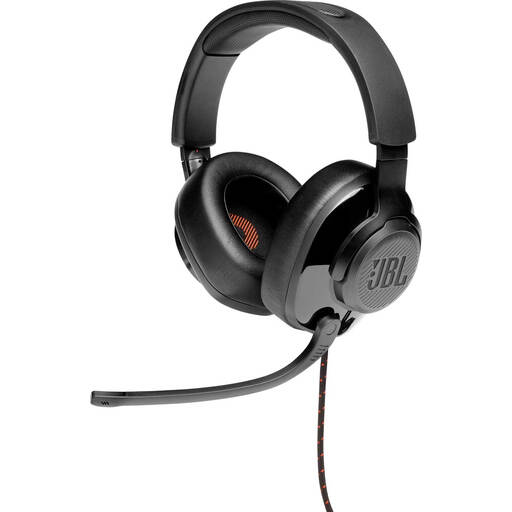
Why it suits this profile: This model combines a 3.5mm cable with a USB audio adapter and is aimed at gamers who want to use additional settings on a PC.
The product information states that QuantumSURROUND is only available on PC. This means you know in advance which features are not available on every platform.
50mm dynamic drivers, memory foam ear cushions, flip-up microphone and a stated weight of 245 grams.
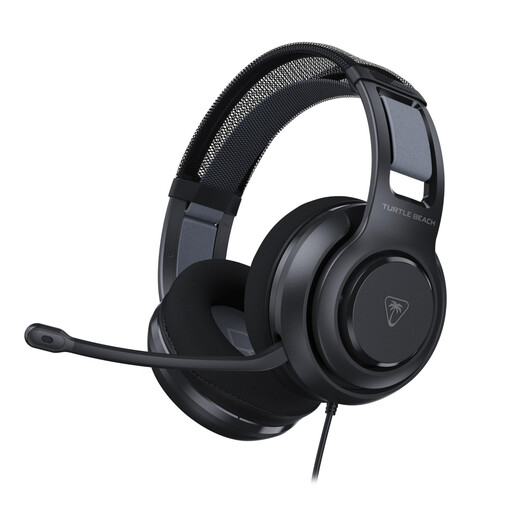
Why it suits this profile: The combination of a 3.5mm cable, USB adapter and PC software suits gamers who want to adjust their audio settings in greater detail.
The product description distinguishes between direct 3.5mm use and features available through the USB adapter and Swarm II software.
50mm Nanoclear drivers, memory foam with woven covering, volume wheel and flip-to-mute microphone.
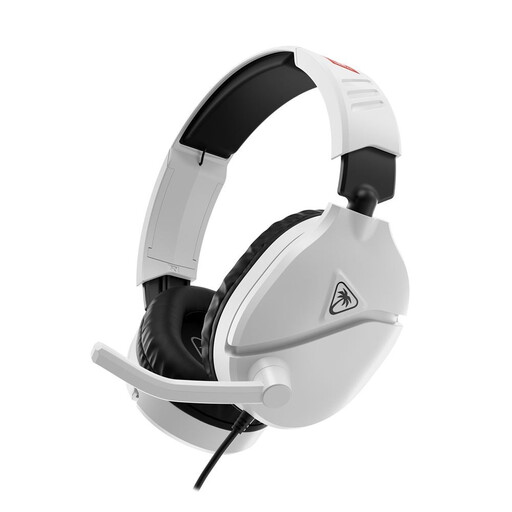
Why it suits this profile: This model is designed for Nintendo Switch and uses a 3.5mm jack to connect to the console or controller.
The product specifications explicitly mention Switch, Switch Lite, Switch OLED and Switch 2. The microphone is muted by flipping it upwards.
40mm speakers, 1.2-metre cable, flip-to-mute microphone and a padded headband with ear cushions.
We have put together a complete, up-to-date list of products that fully meet these strict selection criteria and the applicable European safety regulations.
Yes, many models work via the PS5 controller’s 3.5mm connection. Check that the headset has a combined connection for audio and the microphone. Features such as software-based surround sound may be limited when you use the headset through a controller.
That depends on how you use it. A wired headset does not need a battery and avoids interruptions caused by charging. On the other hand, the cable can get in the way and your freedom of movement is more limited. For fixed PC setups and consoles, wired is often practical.
Its lifespan mainly depends on how the cable, hinges and ear cushions are treated, as well as how the headset is stored. Always pull the plug rather than the cable, avoid sharp bends and store the headset somewhere dry. With normal use, replaceable parts such as ear cushions or a detachable microphone can extend its practical service life.
