
Vandaag of morgen in huis

Kwaliteit gegarandeerd

Welkomstaanbiedingen ontgrendelen: GRATIS bezorging | Tot 80% korting | Gratis 30 dagen JoyPlus-proefperiode
Download de app
A wired gaming headset might seem like a simple purchase: plug it in and start playing. But the wrong connection, vague surround sound claims or a microphone that doesn’t work well in practice can all lead to a disappointing buy. A few checks beforehand can help you avoid getting a headset that won’t work with your console, feels uncomfortable after a short time or needs extra accessories.
A headset’s product name might say it’s compatible with several platforms, even though the connection varies from one device to another. A 3.5 mm gaming headset will usually connect directly to a PlayStation, Xbox or Nintendo Switch controller. However, if your PC has separate headphone and microphone ports, you may need a splitter.
So check the following:
A pair of USB-C earphones won’t necessarily work with every console. The port needs to support audio, and some devices only accept specific USB audio equipment.
Terms such as 7.1, virtual surround sound and spatial audio sound appealing, but check how the feature works. According to the product information, the Razer BlackShark V2 X requires software and an activation code for 7.1 Surround Sound. The Sony INZONE H3’s product description says that 360 Spatial Sound is activated via PC software.
That doesn’t mean stereo is unsuitable for gaming. A good stereo headset can give you clear directional audio. Focus on the actual connection, the software supported and the settings available for your platform.
A 240 or 299-gram headset might seem light on paper, but fit is personal. Consider the shape of the ear cups, the cushion material and how adjustable the headband is. A comfortable gaming headset shouldn’t feel too tight or put pressure on your ears during long sessions.
The microphone is also more important for online gaming than eye-catching lighting. A flip-to-mute feature or mute button is handy, but check whether the microphone is detachable, foldable or adjustable too.
A wired headset doesn’t need a battery or wireless connection. This makes setup simple and means you don’t have to worry about charging. However, the cable can limit how far you can move. The models in this selection include cables measuring 1.2 to 1.5 metres. That’s usually suitable for use with a controller, but might feel short if you’re sitting at a desk.
For PC use, a headset with a 3.5 mm connection may need a splitter. A USB headset or one with a USB audio box may offer additional software features, but won’t always connect directly to an Xbox controller.
A gaming headset with a microphone should give you clear chat audio without complicated controls. Look for:
The Razer BlackShark V2 X product information lists a HyperClear cardioid microphone. The Turtle Beach Recon 70 is listed with a flip-to-mute microphone. These are product features you can check, but the actual voice quality may also depend on your settings and surroundings.
A large driver size, such as 40 mm or 50 mm, doesn’t necessarily mean a headset sounds better. It mainly describes the speaker unit. Also consider the frequency response, impedance and type of ear cup.
Over-ear models such as the Turtle Beach Recon 70 cover your ears and, according to the product information, provide passive noise isolation. On-ear models are often lighter, but let in more background noise. In-ear models are compact, but may not suit those looking for a large gaming headset with a headband.
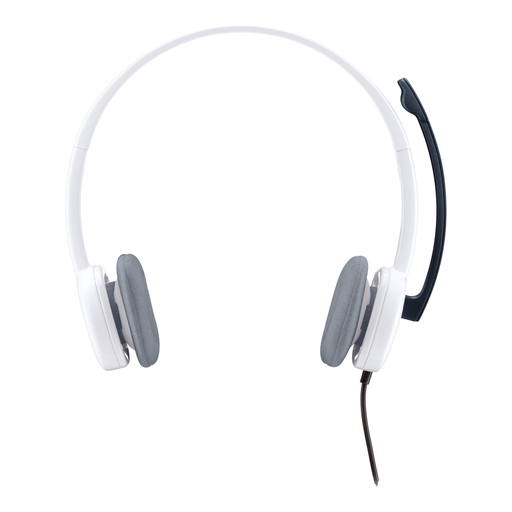
Why it suits this user: This lightweight on-ear headset is suitable for everyday use with a PC, laptop or mobile device with a 3.5 mm connection. The rotating microphone and in-line controls keep things simple.
The connection and 1.8-metre cable are clearly specified. If your PC has separate ports, check whether you’ll need a splitter.
80 grams, stereo audio, adjustable microphone and 3.5 mm connection.

Why it suits this user: This model is aimed at PC and multi-platform gamers looking for an over-ear design, a microphone and virtual spatial audio options.
The 7.1 feature isn’t presented as a given: according to the product information, you’ll need software and an activation code. The headset itself uses a 3.5 mm cable.
50 mm drivers, 240 grams, cardioid microphone and compatibility with PC, PlayStation, Xbox and Nintendo Switch.
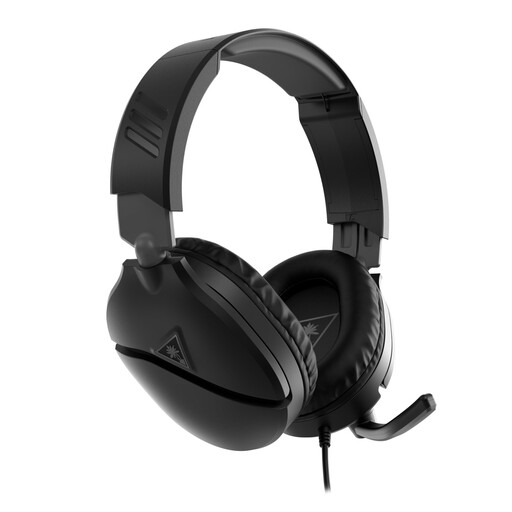
Why it suits this user: A practical choice for Xbox gamers who also want to play on PS5, PC or Nintendo Switch using the same 3.5 mm connection.
The flip-to-mute microphone has a clear physical control. The product information also lists support for various spatial audio technologies, depending on the device.
40 mm speakers, over-ear cushions, volume wheel and a microphone that flips up to mute.
We’ve put together a full, up-to-date list of products that meet these strict selection criteria and current European safety regulations.
It depends on the connection and the device. A headset with a 3.5 mm plug can usually connect via the controller or console port. For Xbox, check that your controller has a 3.5 mm connection. Also check whether the product description lists your specific console.
Yes, but check whether your PC has one combined headset port or two separate ports. If it has two separate ports, you may need a splitter. USB models may offer software features, but they won’t necessarily work with every console.
Lifespan depends mainly on how you handle the cable, how you store the headset and how well the headband and ear cups are made. Always pull on the plug rather than the cable, avoid sharp bends and store the headset somewhere dry. Product information for various models lists a minimum two-year legal guarantee under European consumer rules; additional rights may apply under national law.
