
Vandaag of morgen in huis

Kwaliteit gegarandeerd

Welkomstaanbiedingen ontgrendelen: GRATIS bezorging | Tot 80% korting | Gratis 30 dagen JoyPlus-proefperiode
Download de app
A wired gaming headset remains a practical choice for gamers who do not want to charge a battery and are looking for instant audio without Bluetooth pairing. However, the range can be more complex than it first appears. A headset may be suitable for PC without necessarily working well with an Xbox controller or Nintendo Switch. Terms such as “surround sound” and “noise cancellation” also do not always tell you what you actually need in practice.
As a Joybuy Product Recommendation Officer, I filter the most important product specifications and highlight the most common purchasing pitfalls.
“Multi-platform” does not always mean that every feature is available on every device. Check the following:
A headset with a 3.5 mm TRRS plug can often be connected to a PS5 controller, Xbox controller, laptop or Switch. A desktop PC with separate audio and microphone ports may require a splitter.
A headset with “7.1 surround sound” does not always use separate physical speakers for each audio channel. It may rely on software-based simulation. According to the product description of the Razer BlackShark V2 X, 7.1 Surround Sound is activated through software. JBL states that the QuantumSURROUND feature of the JBL Quantum 300 is made available via JBL QuantumENGINE on PC.
In practical terms, this means you should check whether the feature works on your console. On PS5 and Xbox, platform features such as 3D Audio, Windows Sonic, Dolby Atmos or DTS Headphone:X may be supported separately. A standard stereo headset can therefore still be a suitable choice, but do not pay extra solely for a surround logo without checking the software and device requirements.
A lightweight headset is not automatically comfortable. Also consider:
For long sessions, memory foam or soft fabric cushions can feel particularly comfortable. Faux-leather cushions are usually easier to clean, but may feel warmer. Fit is highly personal, so check the dimensions and weight rather than relying solely on the word “comfortable” on the packaging.
A 3.5 mm headset generally works without installation or a battery. That makes it convenient for consoles and controllers. A PC with separate microphone and headphone ports may require a splitter.
USB models can offer additional software features, but depend on the correct port and operating system. USB-C in-ear models such as the Samsung EO-IC100 are primarily designed for phones, tablets and other USB-C devices. This model has neither Bluetooth nor a 3.5 mm connection. Check in advance that your gaming device supports USB-C audio.
An integrated microphone is important when using a gaming headset with microphone for voice chat. A flexible boom microphone can be positioned close to your mouth. A headset with a flip-to-mute microphone mutes the microphone when you raise the boom arm. This is faster than searching for a button during a match.
Pay attention to the difference between:
Turtle Beach’s product descriptions mention a flip-to-mute function on several models. The Recon 50 is also listed as having a detachable microphone. Always check the model-specific connection and included accessories.
Larger drivers, such as 40 mm or 50 mm units, can provide a more expansive sound presentation, but size alone says little about the final sound signature. A frequency response of, for example, 20 Hz to 20 kHz describes the technical range; it does not fully predict how voices, footsteps or bass will sound.
Weight is useful for comparison. The Razer BlackShark V2 X is listed at 240 grams, while the JBL Quantum 300 weighs 245 grams. According to its product specifications, the Turtle Beach Airlite Fit weighs 228 grams. Consider this figure alongside the design of the headband and ear cushions.

Why it is a good fit: A practical choice for gamers who play on PC, PlayStation, Xbox, Switch or mobile and want to use a single 3.5 mm headset.
The product description explicitly lists multiple platforms and an analogue 3.5 mm connection. According to Razer, 7.1 requires software and an activation code.
50 mm drivers, a weight of 240 grams, on-earcup volume control and a cardioid microphone.
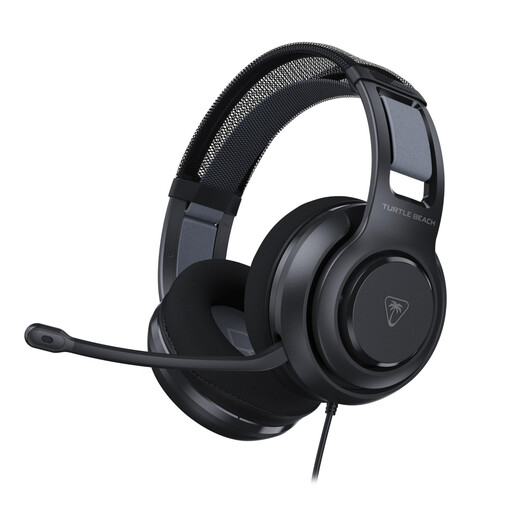
Why it is a good fit: Designed for PC gamers who value soft ear cushions, a flip-to-mute microphone and additional PC settings.
The connection is 3.5 mm and a USB adapter is listed. This allows you to verify the PC features before installing any software.
50 mm Nanoclear drivers, memory foam ear cushions, a volume wheel and a flip-to-mute microphone according to the product information.
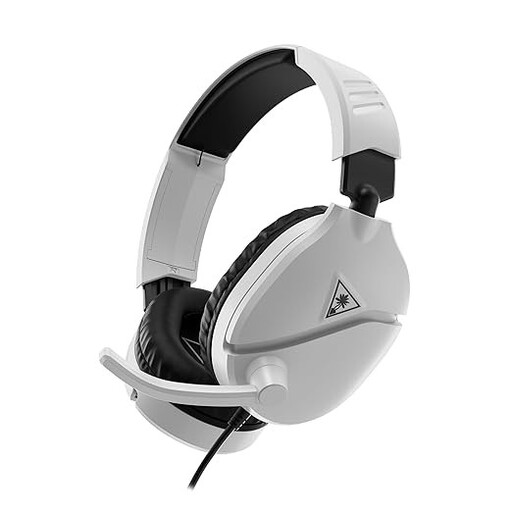
Why it is a good fit: Suitable for users who switch between PS5, Xbox, PC, Nintendo Switch and mobile with a single cable.
The product details clearly list a 3.5 mm jack, a 1.2-metre cable and flip-up mute. No battery or wireless pairing is required.
40 mm speakers, an on-earcup volume wheel and support for compatible platforms’ spatial audio features according to the product information.
Explore our current range and compare connections, microphones, wearing comfort and compatibility for each model.
That depends on how you use it. Wired models do not require a battery and generally work immediately via 3.5 mm. The trade-off is that the cable limits freedom of movement. For a fixed gaming setup, wired is often practical; for use at a distance, wireless can be more convenient.
Lifespan depends mainly on cable strain, usage and storage. Pull the plug out by the connector, not by the cable. Store the headset in a dry place, avoid sharp bends and clean the ear cushions with a soft, dry cloth. The statutory warranty in the EU is at least two years for the products mentioned, with possible additional rights under national law.
Not necessarily. Stereo can be perfectly adequate for music, chat and many games. Software-based surround can alter the sense of space, but availability varies by platform. First check whether the feature is supported on your PC or console and whether software or an activation code is required.
