
Vandaag of morgen in huis

Kwaliteit gegarandeerd

Welkomstaanbiedingen ontgrendelen: GRATIS bezorging | Tot 80% korting | Gratis 30 dagen JoyPlus-proefperiode
Download de app
A wired gaming headset might seem simple to choose: check the price, pick a model with a microphone and plug it in. In practice, problems often only come to light after you’ve bought it. The cable turns out to be too short, the headset doesn’t work with your chosen console or the microphone sounds less clear than you expected.
Use this buying guide to compare important specifications for a gaming headset with a microphone. Find out what to look for when gaming on PC, PlayStation, Xbox and Nintendo Switch, and which models suit different playing styles.
A surround sound headset may use multiple physical audio channels or virtual surround sound created by software. With virtual surround sound, software modifies stereo audio. The result therefore depends on the software, platform and settings used.
So check:
A headset with stereo audio isn’t automatically unsuitable for gaming. For many players, clear speech, comfort and a reliable connection matter more than a software feature.
A USB gaming headset may offer digital audio, software features and sometimes volume control via the USB connection. However, USB ports vary between devices. A PC usually supports more features than a console or controller.
Look out for the difference between:
For example, the Samsung EO-IC100 is a lightweight USB Type-C in-ear headset with a built-in microphone and controls. According to the product information, it’s mainly designed for modern devices with USB-C. It isn’t a traditional over-ear gaming headset, and the fit is different from that of large ear cups.
A 3.5 mm gaming headset will often work straight away when plugged into a controller, laptop or console. However, PCs with separate audio and microphone ports may need a splitter. Also check that your controller has the right port.
Before buying, check compatibility with:
A 3.5 mm connection is handy if you want plug-and-play compatibility with several devices. You don’t need a battery or charging cable, and the headset is ready to use as soon as you plug it in. However, the cable can get in the way, and wear and tear often occurs around the plug, controls or cable entry point.
A cable around 1.2 to 1.3 metres long works well when connected to a controller. For a PC under or beside a desk, a 1.8 to 2 metre cable is more convenient. On the other hand, an overly long cable can get caught more easily.
A microphone that flips up to mute, or can be detached, makes it easier to avoid fiddling with the controls while gaming. Don’t just look for phrases such as “clear communication”. Check whether the microphone:
According to Razer’s product information, the BlackShark V2 X has a cardioid HyperClear microphone. The Trust GXT 489W Fayzo has a flexible, fully detachable microphone. These are clear differences that matter when gaming online.
An over-ear gaming headset surrounds your ears and can passively reduce background noise. If you wear glasses or have larger ears, check the inside dimensions of the ear cups. Soft cushions feel comfortable, but leatherette can feel warmer during long sessions than breathable fabric.
Weight gives you an initial idea, but how evenly the headset distributes pressure matters just as much. According to the product specifications, the Razer BlackShark V2 X and Logitech G335 each weigh 240 grams, while the Trust GXT 415W Zirox weighs 244 grams. An adjustable headband and swivelling ear cups can help improve the fit.

Why it suits this profile: This wired headset for PC and consoles uses a 3.5 mm connection and, according to the product information, works with PC, laptop, PlayStation, Xbox and Nintendo Switch.
The product information clearly states that it has stereo audio rather than virtual 7.1 surround sound. So you won’t pay for a feature you don’t need.
50 mm drivers, a weight of 244 grams, a fixed 2-metre cable and a flip-up microphone.

Why it suits this profile: Suitable for players who use several systems and pay extra attention to microphone features and virtual positional audio.
The 3.5 mm connection works with several platforms. According to the product information, software is needed to activate the 7.1 feature, so don’t assume it will work as standard on every device.
50 mm drivers, a cardioid microphone, memory foam ear cushions and a product weight of 240 grams.
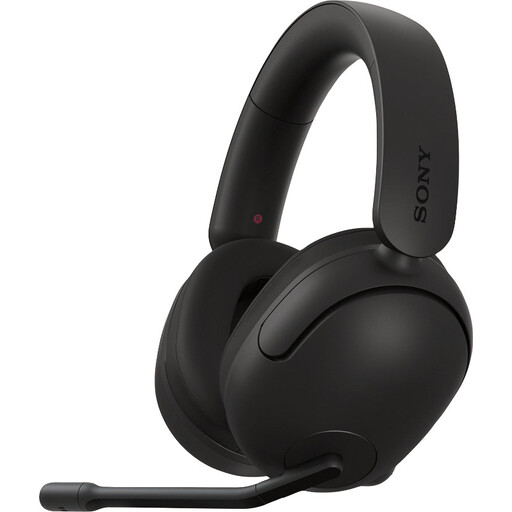
Why it suits this profile: According to the product specifications, this model is designed for PC and PlayStation, making it a good fit for players who mainly use the headset with those two platforms.
Its platform compatibility is more clearly defined than that of universal models. The spatial audio features depend on software and PC configuration, so check this before buying.
40 mm drivers, virtual surround sound according to the product information, USB audio and a flip-up mute microphone.
We’ve put together a complete, up-to-date list of products that meet these strict selection criteria and the applicable European safety regulations.
It depends on the connection and the specific model. A headset with a 3.5 mm jack will usually work via the controller or the Switch’s port. For Xbox, check whether your controller has a 3.5 mm port. USB models can vary between platforms and may sometimes require software.
Its lifespan mainly depends on how you handle and store the cable, as well as the quality of the hinges and microphone arm. Never pull on the cable, and store the headset somewhere dry. According to the product information, many models come with a minimum of two years’ legal guarantee within the EU. This doesn’t automatically cover normal wear and tear or damage caused by misuse.
A wired headset doesn’t need charging and has no battery that loses capacity over time. This means there are no charging costs or replacement batteries to worry about. However, the cable limits your freedom of movement while you’re using it, and if it gets damaged, it’s often the main part that needs repairing.
