
Vandaag of morgen in huis

Kwaliteit gegarandeerd

Welkomstaanbiedingen ontgrendelen: GRATIS bezorging | Tot 80% korting | Gratis 30 dagen JoyPlus-proefperiode
Download de app
A wired gaming headset seems simple: plug it in, set the volume and play. But there are clear differences in connection type, microphone, comfort and compatibility. A headset for PC won’t necessarily work fully with an Xbox controller or Nintendo Switch. Terms such as “surround sound” and “noise cancellation” also mean little without a clear technical explanation.
Use these checks to avoid paying for features you can’t use.
A product may be suitable for several platforms, but not every feature will work on every device. A 3.5mm gaming headset will usually provide stereo audio straight from a controller, laptop or handheld console. However, software features, virtual surround sound and equaliser settings may be limited to PC.
Check the following:
A USB gaming headset may offer useful software features, but can be less flexible with consoles and mobile devices. A USB-C model, such as the Samsung EO-IC100, is also a wired in-ear headset for devices with USB-C. It isn’t automatically a fully fledged gaming headset with a microphone for every console.
A headset with two speakers can use software to create a spatial audio effect. According to Razer, you can activate 7.1 Surround Sound on the BlackShark V2 X using the included software. Sony says 360 Spatial Sound on the Sony INZONE H3 is configured through PC software. These features depend on the device, software and configuration.
Check the exact specification:
Don’t expect a surround sound headset to sound the same on every platform without further setup.
A lightweight headset isn’t automatically comfortable. The shape of the ear cups, pressure from the headband and material of the cushions all affect how suitable a comfortable gaming headset is for long sessions. Faux leather cushions often provide a good seal, while mesh or nylon may feel cooler.
Pay attention to the microphone type, too. A headset with a flip-to-mute microphone mutes when you flip the mic upwards. This is handy for team chat, but check whether the microphone is detachable, foldable or fixed. A simple mute button on the cable or ear cup works differently.
For PS5, Xbox and Nintendo Switch, a 3.5mm connection is often the most flexible choice, usually via the controller or console port. A headset for PS5 may work through a controller, while advanced PC features may only be available through software.
For Xbox, pay particular attention to the controller: check whether it has a 3.5mm port or needs an adapter. A splitter may be required for PCs with separate microphone and headphone ports.
An adjustable boom microphone is usually practical for online communication. Check whether the microphone:
A gaming headset with a microphone isn’t necessarily suitable for streaming. For chat and team communication, the product specifications and connection matter more than marketing terms.
The stated weight is useful for comparison, but doesn’t tell you everything about comfort. According to the product information, the Razer BlackShark V2 X weighs 240 grams, while the Sony INZONE H3 is listed at 299 grams. A heavier headset can still feel comfortable if the headband and ear cushions distribute the pressure well.
Check the cable length, too. A 1.2 to 1.5-metre cable is usually suitable for use with a controller. It may be too short for a PC set further away from your chair. Position the cable so it isn’t stretched tight or creating a trip hazard.
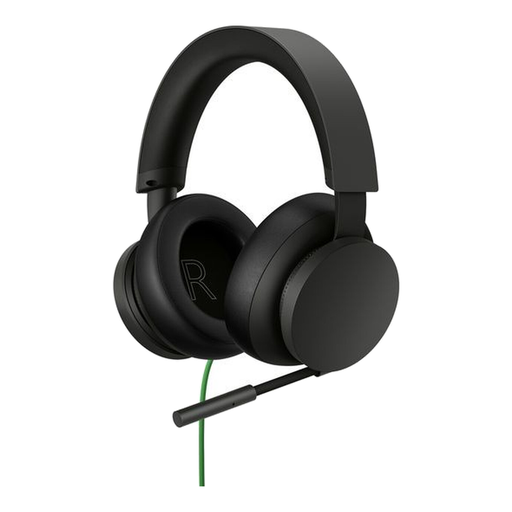
Why it suits this user: The direct 3.5mm connection and on-headset controls make setup simple for Xbox and PC users.
The connection and compatibility are clearly listed as 3.5mm and Xbox Series X|S, Xbox One and Windows PC. No battery or wireless pairing is needed.
40mm drivers, adjustable microphone, volume control and mute control on the headset.
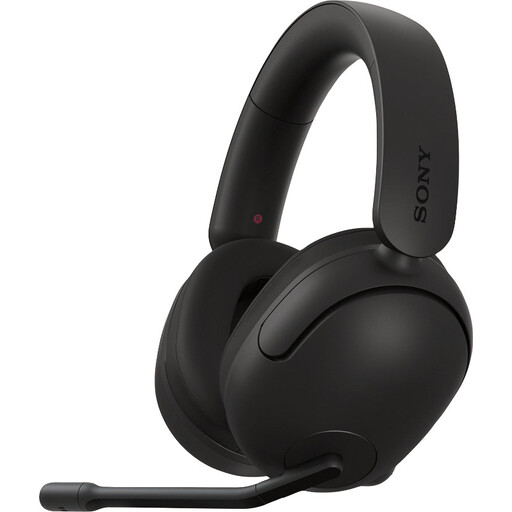
Why it suits this user: This headset is aimed at PC and PS5 users who value spatial audio settings and team communication.
The product information lists both a 3.5mm cable and a USB audio box. This makes it clear that PC spatial audio features don’t work in the same way through a direct 3.5mm connection.
40mm drivers, an adjustable headband, nylon ear cushions and a foldable microphone with a mute function.

Why it suits this user: The combination of 3.5mm compatibility, 50mm drivers and a cardioid microphone suits players who game on multiple platforms.
The main connection is analogue via 3.5mm. According to Razer, the stated 7.1 feature requires additional software and an activation code; check this before buying.
50mm TriForce drivers according to the product description, a product weight of 240 grams and compatibility with PC, PlayStation, Xbox and Switch.
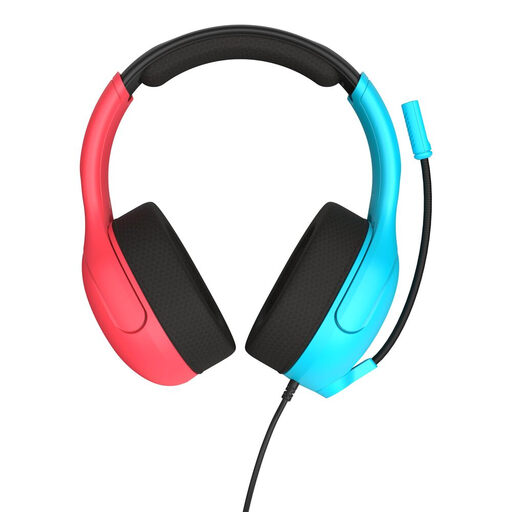
Why it suits this user: The 3.5mm connection, low stated weight of 228 grams and flip-to-mute microphone are practical for handheld gaming.
The connection is suitable for Nintendo Switch, PC and mobile devices with a 3.5mm port. You can see the mute function in action by flipping the microphone upwards.
40mm speakers, breathable jersey mesh ear cushions, volume wheel and bidirectional flip-to-mute microphone.
We’ve put together a complete, up-to-date list of products that meet these strict selection criteria and the applicable European safety regulations.
It depends on the connection and controller. A model with a 3.5mm plug will usually work with devices that have a combined headphone port. For Xbox, check whether the controller has a 3.5mm connection. A PC with separate audio and microphone ports may need a splitter.
Lifespan depends mainly on how you handle the cable, hinges and ear cushions, as well as how you store the headset. Never pull on the cable, avoid sharply bending the plug and store the headset somewhere dry. A wired headset doesn’t have a battery that loses capacity over time, but the cable or microphone can still wear out.
A wired headset doesn’t need charging or a replacement battery. That means you won’t need charging accessories or battery replacements. On the other hand, you’ll need to consider cable wear and the distance to your device. A wired headset is often practical for a fixed PC or console setup, while wireless can be more convenient if you want to move around.
