
Workshop participant in a Wi-Fi dead zone
Your workshop is behind thick walls, and the picture or sound keeps cutting out. You want to know whether there’s a spot before the walls where a repeater can connect to the router.


A wireless repeater is only a sensible choice if it can still connect to the router where you place it; putting one in a room with no signal won’t solve the problem of a weak connection coming in. If you can run a network cable to the workshop, an access point can avoid sending the wireless signal through the walls. Powerline is another option to test at the location if there’s no cable route or suitable place for a repeater. Test the connection during a trial call and check that the device you’re buying carries the CE mark.
Your workshop is behind thick walls, and the picture or sound keeps cutting out. You want to know whether there’s a spot before the walls where a repeater can connect to the router.
You can run a network cable to the workshop and want to avoid sending the wireless connection through the walls.
There’s no practical route for a cable and no suitable spot for a wireless repeater. You want to check whether powerline works at the sockets where you plan to plug in the adapters.
Choose this option if: there’s still a spot between the router and the workshop with a usable Wi-Fi signal.
Bear in mind: the repeater still connects to the router wirelessly, so placing it where the signal has already dropped out won’t help.
Choose this option if: you can run Ethernet to the workshop and the device has a suitable access point or LAN bridge mode.
Bear in mind: you’ll need a working cable route.
Choose this option if: there’s no cable route and no suitable spot for a wireless repeater.
Bear in mind: performance can depend on the sockets and electrical appliances in your home.
Choose this option if: you want to cover several rooms as well as the workshop, and can connect the points to each other effectively.
Bear in mind: adding more points makes the setup larger; mesh alone doesn’t guarantee a strong enough signal through thick walls.
| What to consider | What should you check? | Who is this most important for? |
|---|---|---|
| Signal in the workshop | Test the router signal at a possible midway spot, then make a trial video call from the intended workspace. | If my main concern is keeping video and sound working in the workshop, I’ll first check whether a repeater can still connect to the router. Around 36% of consumers prioritise signal in the workshop. |
| Wired connection | Check that Ethernet actually reaches the required location and that the device supports access point or LAN bridge mode. | If I can run a cable to the workshop, I want to avoid the connection still having to pass through the walls wirelessly. Around 29% of consumers prioritise a wired connection to that location. |
| Multiple rooms and devices | Work out how many areas need coverage, how the points will connect to the router and whether the mesh features you want will work with your router. | If other rooms and devices also need a connection, I’ll factor in coverage across all those areas. Around 21% of consumers prioritise coverage for multiple rooms and devices. |
| Powerline as an alternative | Check which adapters are included in the set and test them directly in the wall sockets you plan to use. | If there’s neither a cable route nor a suitable spot for a repeater, I want to know whether a connection through the mains works at my sockets. Around 14% of consumers prioritise this kind of alternative. |
A repeater needs to be able to connect to the router itself in order to extend that connection.
First, look for a midway spot where the router signal is still available. If there isn’t one, compare a wired access point with a powerline set that you can test in the intended locations.
Connecting a laptop to a wireless repeater with a cable doesn’t make the connection between the repeater and router wired.
Check whether the device has access point or LAN bridge mode, and whether Ethernet actually reaches the router.
According to devolo, some sockets and electrical appliances can reduce powerline performance.
Plug the adapters directly into the wall sockets you plan to use, then assess the connection there with a trial call. You may need to try a different location or solution.
Your legal rights if a product is faulty aren’t determined solely by the warranty period quoted by the manufacturer.
Keep your proof of purchase and contact the seller if a fault develops unexpectedly.
The RE505X is an option for an extra wireless point or, when connected by cable, an access point. OneMesh requires a compatible TP-Link router.
The FRITZ!Repeater 1200 AX is an option as a wireless repeater or LAN bridge, particularly if you already have a FRITZ!Box.
The EAX15 is a Wi-Fi 6 repeater that extends an existing router connection, with an Ethernet port for a wired device.
The Magic 2 WiFi 6 next Starter Kit is a powerline set with two adapters, for situations where a wireless connection through the walls doesn’t work.
These Joybuy products cover a range of options: powerline, multiple mesh points, a wireless repeater or a wired access point. The right option for you depends on the connection in the places where you’ll be taking part in the workshop.
 No image available
A powerline set to consider if there’s no suitable spot for a repeater; test the connection at the sockets you plan to use.
The product title describes it as a powerline adapter starter kit.
 No image available
A set with multiple points to consider if you need coverage in other areas as well as the workshop.
The product title specifies a 3-pack, dual-band (2.4 GHz/5 GHz) and Wi-Fi 6 (802.11ax).
 No image available
Worth considering as a repeater if there’s still a connection to the existing network at a midway spot; check the signal there before placing the device.
The product title lists 10, 100 and 1000 Mbit/s.
 No image available
Worth considering if you can run Ethernet to the workshop and need an access point; check in advance that the mode described suits your network setup.
The product title lists speeds of up to 300 Mbps, 2 antennas, WPS and Passive PoE.
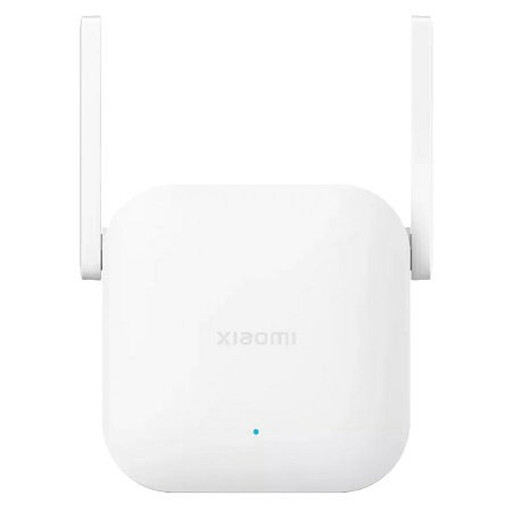 No image available
Worth considering for wireless coverage if there’s a midway spot where the router is still reachable; don’t place the extender only in the room with no signal.
The model name in the product title is N300.
Place the repeater somewhere it can still reach the router, not just in the room where the Wi-Fi signal is missing. Use the signal indicator if needed, then test the connection from the workshop.
No. If the repeater itself connects to the router wirelessly, that part of the connection is still wireless. For a wired connection, the Wi-Fi point must be connected to the network via Ethernet and support the right mode.
Plug the adapters directly into the wall sockets you plan to use, then test the connection with a trial call. devolo warns that some sockets and electrical appliances can affect performance.
According to ACM ConsuWijzer, a standard online product purchase usually comes with a statutory cooling-off period of up to 14 days after delivery; check whether an exception applies. Your statutory guarantee is separate from any manufacturer’s warranty. If a product develops a fault too soon under normal use, the seller must offer an appropriate remedy at no extra cost.
The Radiocommunications Agency Netherlands states that equipment sold must carry the correct CE marking. Check the marking on the device being offered and follow the installation instructions; a model listed on a manufacturer’s website doesn’t, by itself, confirm the marking on the specific item you’re buying.