First, choose a solution that starts the exact news source you want, in the way you prefer: by voice, through an app or with a preset button. An all-in-one Wi-Fi speaker is a good choice if you don’t want to use a separate amplifier. A network player makes most sense if you already have suitable active speakers or an amplifier. Also consider how clearly you’ll hear the news from your listening spot, platform requirements and your privacy preferences around using a microphone.
Who listens to the daily news?
The daily bulletin listener
Wants a particular news source to start each morning with minimal effort, so checks the source, language and controls in advance. Apple Netherlands lists news bulletins as an audio source for HomePod mini; the Denon manual explains how to listen to the radio through TuneIn.
The listener in an open-plan living space
Wants to follow spoken news from their usual listening spot without turning the volume up unnecessarily throughout the room. The Consumers’ Association also covers speech playback when reviewing Wi-Fi speakers.
The owner of an existing hi-fi system
Wants to stream the news to existing active speakers or an amplifier rather than buy another standalone speaker, so checks the connections first. The WiiM Audio Help Centre explains how to connect the WiiM Mini to external audio equipment.
What should you look for when choosing?
First decide whether the right news source, clear speech, ease of use, privacy or reusing your existing audio equipment matters most to you.
| What to consider |
What to look for when buying |
Who is this important for? |
| The right news source |
Check whether the programme is live radio, a podcast or an on-demand bulletin, and whether it’s available through the service you want. |
If I want to hear the same bulletin every morning, I need to know whether it’s available through my preferred playback method. Around 31% of consumers prioritise being able to play the exact news source they want. |
| Clear speech from your listening spot |
Consider speaker placement and speech reproduction. Bass or speaker size alone won’t tell you how clearly spoken news will sound. |
If I listen from different parts of an open-plan room, I want to be able to follow the briefing from my usual spot. Around 25% of consumers give clear speech from their listening spot top priority. |
| Controls and platform |
Check which app, voice controls or physical buttons are available, and what’s needed to set up the device. |
If I want to start the news each day with minimal effort, I need controls that work with my phone and existing audio setup. Around 19% of consumers prioritise ease of use and platform compatibility. |
| Privacy |
Read the privacy policy and information about data security; decide whether you want a built-in voice assistant. |
If I use connected features but would rather not use voice commands, I want to weigh up the privacy implications in advance. Around 13% of consumers prioritise privacy with connected or voice-controlled devices. |
| Existing audio equipment |
Check the connections and whether you have active speakers or an amplifier; passive speakers need an amplifier. |
If I want to keep using my existing hi-fi system, I need to know whether it can connect to the network player. Around 12% of consumers give reusing existing audio equipment top priority. |
Avoid common buying mistakes
-
‘Supports news’ doesn’t automatically mean your bulletin is available
A news bulletin, live internet radio and a podcast are different ways to listen to the news.
Search for the exact programme and check whether you can play it live, on demand or through the app or voice command you want to use.
-
Mistaking a network player for a complete speaker
A standalone network player such as the WiiM Mini sends audio to external equipment; it isn’t a speaker itself.
Check your whole setup, including which speakers, amplification and inputs you already have. Passive speakers need an amplifier.
-
Assuming Bluetooth replaces the initial setup
Sonos says the Era 100 must first be set up over Wi-Fi before you can use it as a Bluetooth speaker.
Check the setup requirements for the exact model before choosing it for its Bluetooth feature.
-
Judging spoken news by size or bass alone
A stated bass or power specification alone won’t tell you how clearly you’ll hear a briefing from your listening spot.
Where possible, compare independent reviews of speech reproduction and listen from your usual distance and at your usual volume.
Brands to consider
Apple
HomePod mini is a Wi-Fi speaker for people who use Apple devices and want to choose news bulletins as an audio source.
- Apple lists news bulletins and AirPlay 2; setup requires Wi-Fi and a compatible iPhone, iPad or iPod touch model.
- Check that your preferred Dutch-language briefing is available and that you meet the setup requirements.
JBL
JBL Authentics 200 is a Wi-Fi and Bluetooth speaker for people who want to use Google Assistant or Alexa, as listed by JBL.
- JBL lists Wi-Fi, Bluetooth and both voice assistants for this model.
- The listed assistants don’t guarantee that your preferred Dutch-language bulletin or voice command will work.
Denon
Denon Home 150 is a HEOS speaker for people who value internet radio, physical preset buttons or the option to add more HEOS equipment.
- Denon lists three Quick Select buttons, HEOS and TuneIn; the Denon manual explains how to select radio through TuneIn.
- Denon says that the availability of individual services varies by region. A radio station is also different from an on-demand bulletin.
Sonos
Sonos Era 100 offers app, touch and radio controls as part of a Sonos setup.
- Sonos lists Sonos Radio, Bluetooth and AirPlay 2.
- According to the Sonos setup guide, the Era 100 must first be set up over Wi-Fi before you can use Bluetooth. Also check whether the news service you want is available in the app.
WiiM
WiiM Mini is a standalone network player for people who want to keep using their existing active speakers, amplifier or other suitable audio equipment.
- WiiM lists AUX and optical outputs, with control through the WiiM Home app.
- The WiiM Mini needs external audio equipment; passive speakers also require an amplifier.
Joybuy products for listening at home
These Joybuy products are designed for playing audio at home through a soundbar or speaker. Check that your specific news source and preferred controls are available for each model.
 No image available
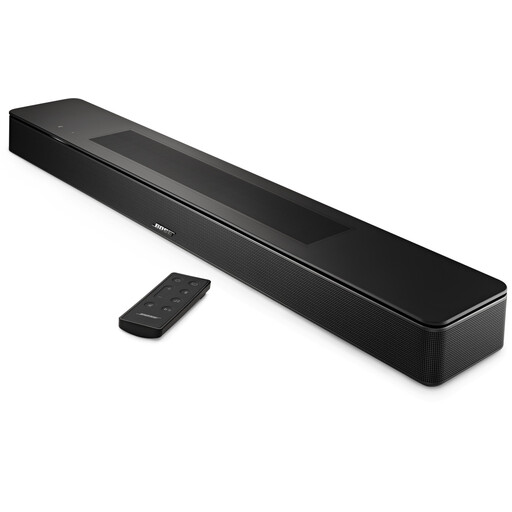
Bose Smart Soundbar, black
This could suit you if you want to listen to spoken TV audio as well as the news through a soundbar; the product description mentions a dialogue mode for clearer voices.
The description lists AirPlay 2, Spotify Connect and Chromecast as streaming options.
Joybuy
 No image available
Edifier ES300 Wi-Fi and Bluetooth speaker, 60W
This could suit you if you want to play audio over Wi-Fi or AirPlay 2 and control it through an app.
The product title lists 60W, multi-room, USB, AUX and app control. Check whether your preferred news source is available through the services on offer.
Joybuy
Frequently asked questions
Does my daily news bulletin have to be available through internet radio?
No. First check whether your programme is a live station, an on-demand bulletin or a podcast, and whether your chosen speaker and service can play that specific source. Apple lists news bulletins for HomePod mini; the Denon manual explains how to listen to internet radio through TuneIn. These are different ways to listen.
Can I use a Sonos Era 100 as a Bluetooth speaker straight away, without setting it up over Wi-Fi?
No. Sonos says the Era 100 must first be set up on a Wi-Fi network; you can then switch to Bluetooth.
Do I need speakers as well as a WiiM Mini?
Yes. WiiM says the Mini must be connected to external audio equipment, such as active speakers or an amplifier. Passive speakers need an amplifier; also check that the AUX or optical connection is suitable.
What if a speaker I bought online doesn’t work properly?
If you buy as a consumer in the Netherlands and the product is faulty, you can raise the issue with the seller. According to the Dutch government, the Netherlands has no fixed statutory guarantee period. Distance sales that qualify generally also come with a 14-day cooling-off period; this is a separate right from a guarantee.
How can I reduce privacy risks when setting up my device?
The Dutch Data Protection Authority advises checking the privacy policy, data security and provider before you buy. During setup, decide which connected features and voice services you actually want to use.


