Who is this setup for?

The music library manager

Wants to make a single local collection available and checks that the storage, file-sharing features and players all support the same access protocol. FRITZ! documents, among other features, SMB access and a media server for the FRITZ!Box 4060.

Someone in a busy household

Wants to know whether the network will remain usable when housemates are playing music and doing other online activities at the same time. Compare networking features, but don’t treat advertised speeds as a measure of performance in your own home.

Someone with poor Wi-Fi in one room

Is mainly affected by the distance or obstacles between the room and the router, so it may be worth first looking at router placement or adding extra Wi-Fi access points. The Consumers’ Association points out that walls and ceilings can interfere with the signal.

What should you look for?

Router with USB storage and a media server

Choose this option if: you want to make music stored on a drive connected to your router available on your home network.

Trade-off: a USB port alone doesn’t guarantee compatibility. For the FRITZ!Box 4060’s media server, FRITZ! specifies that the player must support UPnP AV; the drive’s file system also matters.

Router or mesh system with an existing music server

Choose this option if: your library is already on a computer or network drive and the main issue is poor coverage in certain rooms.

Trade-off: extra Wi-Fi access points don’t provide music storage by themselves. The Consumers’ Association recommends checking placement first; TP-Link also describes an access point mode for Deco that works alongside an existing router.

Configurable router with file access permissions

Choose this option if: you want to decide which housemates can open shared files.

Trade-off: the settings need careful attention. ASUS lists shared folder permissions and a guest network that restricts access to the local network for the RT-AX58U; check the version and settings you need.

Key consideration What should you check? Who is this important for?
Access to your music library Check the storage feature, supported drive format and whether your players support SMB or the media server protocol for the exact model. FRITZ! specifies UPnP AV for the FRITZ!Box 4060’s media server. I want my players to be able to open the collection, so I check the storage and protocol. Around 33% of consumers put access to their music library first.
Multiple devices using the network Check the Wi-Fi standard and features for simultaneous connections on the exact model; assess coverage separately. TP-Link lists OFDMA for the Archer AX55. If housemates are playing music and doing other online activities at the same time, I want to assess the networking features as well as coverage. Around 27% of consumers give simultaneous use the highest priority.
Coverage in every room Map out where the signal is weak and check whether an access point or mesh system will work with your existing router. The Consumers’ Association lists walls and ceilings as possible sources of interference. If my room is affected by distance or obstacles, I’ll look at placement and ways to extend the network first. Around 20% of consumers put coverage in their own room first.
Access for housemates and guests Check shared folder permissions and guest network settings. ASUS states that the RT-AX58U’s guest network restricts access to the local network. I want to share files with housemates without automatically giving visitors the same access. Around 20% of consumers put access management first.

Pitfalls to avoid

  • Assuming a USB port guarantees music compatibility

    For the FRITZ!Box 4060, FRITZ! sets out requirements for the file system and media player protocol. A USB port alone doesn’t tell you whether your existing devices can open the library.

    Before buying, check the drive format, available sharing method and protocols supported by your players.

    An incompatible drive or player may mean you need a different storage or playback setup.

  • Buying a faster main router when one room has poor coverage

    Distance, walls and ceilings can interfere with the Wi-Fi signal. The Consumers’ Association therefore recommends checking placement and coverage too.

    First, try moving the router to a more central position. Then decide whether you need an access point or mesh extender.

    If you skip the placement check, you may still end up buying an extra Wi-Fi access point after replacing your router.

  • Expecting a music server to be available over a restricted guest network

    ASUS describes the RT-AX58U’s guest network as restricting access to the local network. As a result, a player on that network may not be able to reach your local library.

    Decide which household devices need access and check that they can connect after setting up the guest network.

Brands to compare

FRITZ!

Worth considering if you want to use storage connected to your router for file sharing or music on your home network.

  • FRITZ! documents SMB access and a media server for the FRITZ!Box 4060.
  • The player must support UPnP AV to use the media server; USB storage also has file system requirements.

ASUS

Worth considering if you want to set up local file sharing, folder permissions or a separate guest network.

  • ASUS lists a Samba Server, Media Server, shared folder permissions and AiMesh for the RT-AX58U.
  • The specifications distinguish between V1 and V2 processor versions. Check which version you’re buying; feature specifications don’t measure performance when playing music.

TP-Link

Worth considering if you want to assess simultaneous Wi-Fi use or extend coverage with a separate mesh system.

  • TP-Link lists OFDMA, gigabit ports and USB 3.0 for the Archer AX55. For Deco, TP-Link describes an access point mode that works alongside an existing router.
  • The listed router features don’t in themselves confirm that a specific music player will work with a connected drive. Check storage and player compatibility for your setup.

Joybuy products for Wi-Fi coverage and simultaneous use

This selection focuses on routers and mesh Wi-Fi for an existing music library, with an emphasis on coverage across multiple rooms and simultaneous Wi-Fi use.

ASUS ZenWiFi BD4 Dual-Band Wi-Fi 7, white

ASUS ZenWiFi BD4 Dual-Band (2.4 GHz / 5 GHz) Wi-Fi 7, white

Worth considering if Wi-Fi coverage in several rooms is important; this product is described as a mesh Wi-Fi system.

Wi-Fi 7; dual-band (2.4 GHz / 5 GHz).

View at Joybuy

ASUS RT-AX52 AX1800 AiMesh dual-band router, black

ASUS RT-AX52 AX1800 AiMesh Dual-band (2.4 GHz / 5 GHz), black

Worth considering if several devices use Wi-Fi at the same time and you’re looking at ways to extend your network.

AX1800; AiMesh; dual-band (2.4 GHz / 5 GHz); Gigabit Ethernet.

View at Joybuy

TP-Link Deco X50 mesh system with 3 units, Wi-Fi 6, white

TP-Link Deco X50 (3-Pack) Dual-Band (2.4 GHz / 5 GHz) Wi-Fi 6 (802.11ax), white

Worth considering if you want to improve Wi-Fi coverage in several rooms while housemates are using Wi-Fi at the same time.

Mesh system with 3 units; Wi-Fi 6 (802.11ax); dual-band (2.4 GHz / 5 GHz).

View at Joybuy
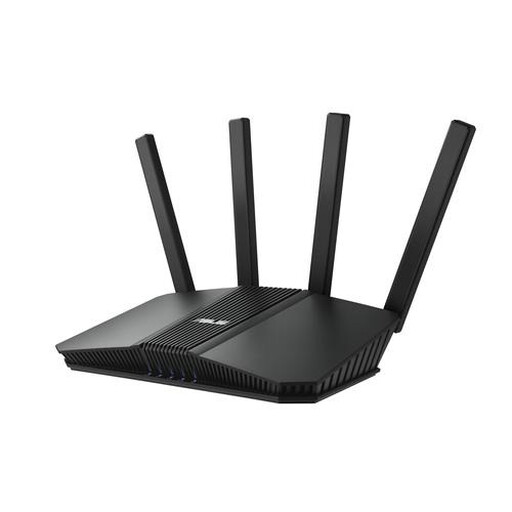
ASUS RT-BE82U BE6500 dual-band router with 2.5 Gigabit Ethernet, black

ASUS RT-BE82U BE6500 Dual-band (2.4 GHz / 5 GHz), black

Worth considering if several devices use Wi-Fi at the same time and you’re also looking at wired network connections.

BE6500; 2.5 Gigabit Ethernet; dual-band (2.4 GHz / 5 GHz).

View at Joybuy

ASUS RT-AX52 Pro AX3000 dual-band router, black

ASUS RT-AX52 Pro AX3000 Dual-Band (2.4 GHz / 5 GHz), black

Worth considering if several devices use Wi-Fi at the same time and you’re looking at ways to extend your network.

AX3000; AiMesh; Gigabit Ethernet; dual-band (2.4 GHz / 5 GHz).

View at Joybuy

Frequently asked questions

Is a USB port enough to play music on any speaker?

No. Also check the media server feature and the protocol supported by your speaker or playback software. For the FRITZ!Box 4060’s media server, FRITZ! specifies that the playback device must support UPnP AV.

Can a mesh system work alongside your existing router?

It can with the TP-Link Deco setup described, which has an access point mode that lets the existing router keep handling network functions. Check the setup instructions for your chosen Deco model and follow the manufacturer’s guidance.

What should you check before setting up shared storage?

Check that the drive uses a supported file system and that your playback devices support the chosen sharing method. The FRITZ!Box 4060 manual also states that USB remote connection must be switched off to allow multiple devices to access the drive at the same time. Keep your router software up to date in line with the advice from the Dutch Data Protection Authority.

Can you choose your own router in the Netherlands?

Yes. ACM ConsuWijzer says you have the freedom to choose your router. The connection settings you need depend on your provider and connection; any equipment you use must meet the applicable safety requirements.

Can you share protected music files with housemates?

Being able to share files technically doesn’t automatically mean you have permission to do so. The Dutch government says that making a private copy for personal use is allowed, but it must not be distributed or made available to the public. So check the rights to your collection before sharing files with others.
