
Vandaag of morgen in huis

Kwaliteit gegarandeerd

Welkomstaanbiedingen ontgrendelen: GRATIS bezorging | Tot 80% korting | Gratis 30 dagen JoyPlus-proefperiode
Download de app
A Wi-Fi security camera can help you keep an eye on your home, shop, nursery or pets remotely. However, comparing the options can be tricky. A camera with lots of features isn’t automatically right for your needs. Storage, Wi-Fi range and placement are particularly important for a system that works reliably day to day.
A camera with 2K or 4MP footage may sound appealing, but resolution isn’t everything. A fixed camera can still miss part of the room. For a living room, hallway or shop floor, a 360-degree camera with pan and tilt may be more practical. A fixed viewing direction is often enough for a front door or garden.
Also consider the frame rate, lens angle and whether you can position the camera at the right height. A wide viewing angle won’t always prevent blind spots if furniture or walls block the view.
A wireless security camera will usually still need a power socket, unless it has a battery or solar panel. So check:
A 2.4GHz connection usually has a longer range through walls. 5GHz can provide a fast connection over short distances, but is more likely to struggle with thick walls and longer distances.
Before you buy, check how videos are stored. Some brands offer cloud storage with a paid subscription. Other models support a microSD card, making them suitable as a camera with no subscription, although you’ll need to pay once for a compatible card.
Also look out for features that may require a subscription, such as a longer video history, advanced alerts or off-site backups. “Local storage” usually means that footage is saved to a microSD card in the camera or base station. Check the maximum capacity and whether a card is included.
For general home security, 1080p Full HD is often enough for live footage and motion alerts. 2K or 3MP can show more detail, for example in a larger garden or driveway. Night vision usually uses infrared. The stated range is a guide; walls, rain, reflections and low ambient light can all affect the results.
A camera with colour night vision often uses extra lighting or a wider lens aperture. This can show more detail, but consider whether the light might disturb neighbours or passers-by.
Motion detection sends an alert to the app when movement is detected. Adjustable motion zones are useful if, for example, a busy road, window or tree regularly triggers alerts. Some models can distinguish between people, vehicles, parcels and pets. This recognition depends on the conditions, so don’t treat it as foolproof identification.
An IP rating is important for an outdoor security camera. According to the product specification, IP65 means protection against dust and water jets; it doesn’t mean the camera can be submerged. An outdoor model should also be securely mounted, and its power connection should be protected from moisture.
For indoor use, avoid placing an indoor security camera in a bathroom or other private space. Let housemates, visitors or staff know if they may be recorded, and don’t point the camera at a neighbour’s home without good reason.

Why it suits this profile: This model is designed for indoor desktop use and offers 1080p footage, 360° horizontal movement, night vision up to 9 metres and control via the Tapo app.
The product specification states that it supports local storage via microSD up to 128 GB. Check whether the card needs to be bought separately and which cloud features are paid for.
1080p resolution, two-way audio, motion alerts and privacy mode with local storage.
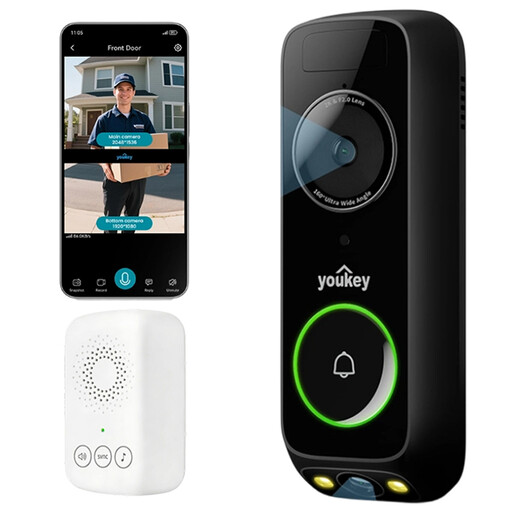
Why it suits this profile: The dual-camera setup is designed for the front door, combining a view of visitors with a lower view for parcels.
The product specification states that it has 8 GB of built-in eMMC storage and no monthly fees. Check the mounting requirements and installation instructions before buying.
2K footage, dual viewing angle, colour night vision, radar and PIR detection, and two-way audio.
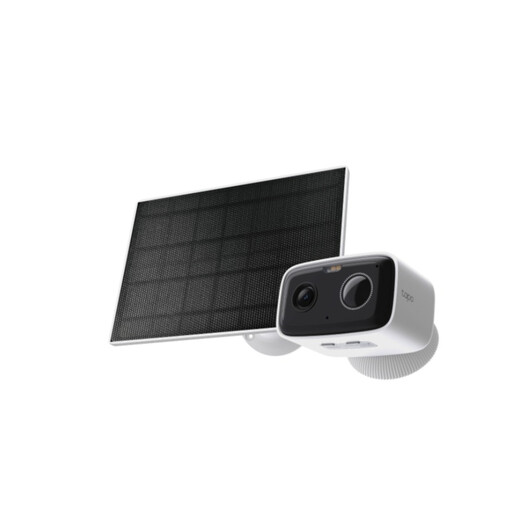
Why it suits this profile: This model is suitable if you want outdoor surveillance without a fixed network cable. It runs on a battery and is rated IP65 according to the product specification.
The battery means you don’t need a power socket right next to the mounting position. Battery life depends on usage, settings and conditions.
1080p footage, person detection, colour night vision, local storage up to 512 GB and two-way audio.
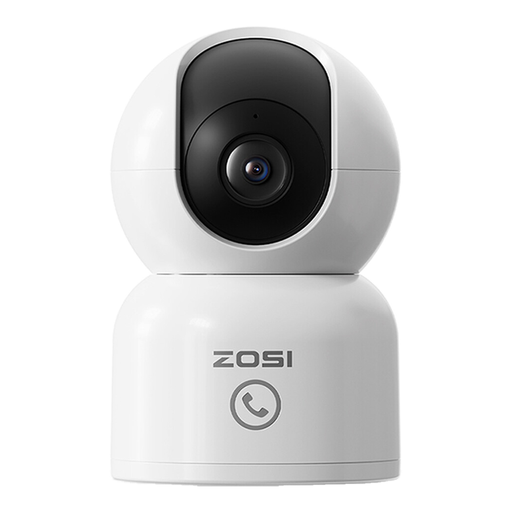
Why it suits this profile: This indoor camera is designed for a nursery, living room or room where pets spend time. The app offers live viewing, alerts and a feature that automatically follows a detected person.
You can set privacy zones and choose local storage on a microSD card up to 256 GB. Check the free cloud trial and any paid services separately.
1080p footage, 10-metre night vision, two-way audio, motion alerts and microSD storage.
We’ve put together a complete, up-to-date list of products that meet these strict selection criteria and the current European safety regulations.
An internet connection is usually needed for live viewing and app alerts. Some cameras can record locally to a microSD card if the internet connection temporarily drops. Check whether local recording continues to work without an active cloud connection for each model.
Lifespan depends on placement, heat, moisture, the power adapter and software support. An indoor model shouldn’t be used outdoors. For a battery-powered camera, the number of alerts, live viewing and temperature affect how often it needs charging. Keep the firmware and app up to date when the manufacturer provides updates.
A camera with local storage can be used without a regular subscription. Cloud storage, a longer video history or additional recognition features may involve extra costs. So look beyond the purchase price and check storage capacity, subscription fees and the price of a suitable microSD card.
