
Vandaag of morgen in huis

Kwaliteit gegarandeerd

Welkomstaanbiedingen ontgrendelen: GRATIS bezorging | Tot 80% korting | Gratis 30 dagen JoyPlus-proefperiode
Download de app
Keeping an eye on things when you're not home. That's the simple desire behind the search for a good security camera. Whether you want to check if the kids are safe, make sure your pet isn't getting into mischief, or secure your property, a reliable camera provides peace of mind. But the technical specifications can be overwhelming.
My name is Joy, and as a Product Recommendation Officer at Joybuy, I'm here to help you make the right choices. In this article, I'll filter the information for you. No complex jargon, just practical advice and a few concrete recommendations for a Wi-Fi security camera that fits your needs.
Before we look at the products, here are three key points to help you choose the right camera.
The first question is simple: where will the camera be placed? An indoor camera has different requirements than an outdoor camera. Outdoor cameras must be able to withstand rain, wind, and temperature fluctuations. Pay close attention to the IP rating. For example, a camera with an IP66 rating is dust and waterproof, making it suitable for most weather conditions. An indoor camera doesn't need this, but may have other useful features, such as a more compact design or a pan-and-tilt function.
A camera is only as good as its image. Full HD (1080p) is the standard today, but a 2K camera (or higher) offers significantly sharper video. This can make all the difference when identifying details like faces or license plates.
Just as important is a camera with night vision. Most cameras use infrared (IR) LEDs for black-and-white footage in the dark. However, some advanced models offer colour night vision, which provides a much clearer and more informative view of the situation.
Modern Wi-Fi cameras are much more than just a lens. Features that significantly enhance the user experience include:
Based on specifications and functionality, we have highlighted three popular choices for you.
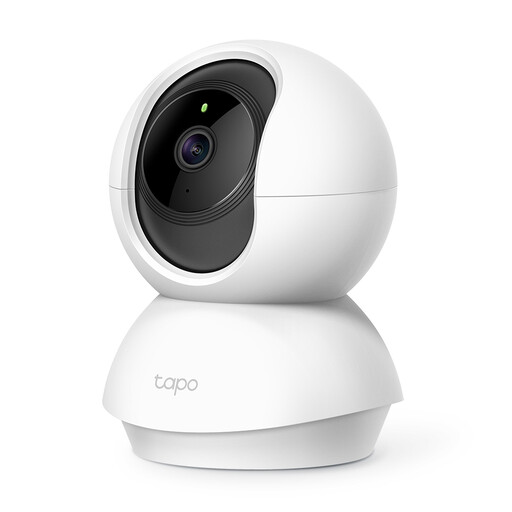
Why It Stands Out: This camera offers a complete overview of any indoor space thanks to its smooth pan and tilt function.
The Tapo C210 is a versatile pan-tilt camera for indoor use. The app allows you to move the lens 360 degrees horizontally and 114 degrees vertically, ensuring no corner is left unseen. The camera records in sharp 1080p resolution, and its motion detection sends an instant notification to your phone.
Pros:
Who is it for? Ideal for anyone looking for a flexible indoor camera to monitor a living room, nursery, or playroom. Also highly suitable as an advanced baby monitor or as a pet camera.
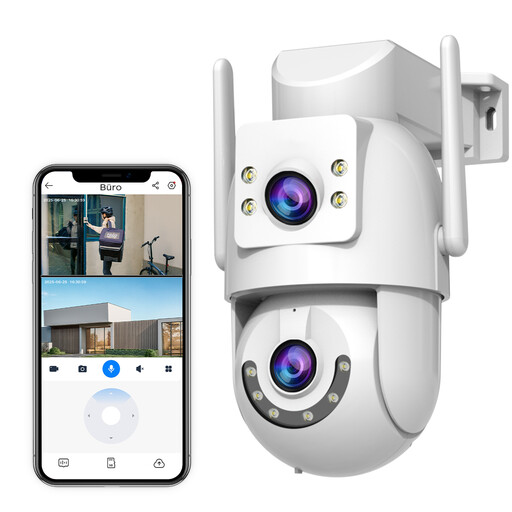
Why It Stands Out: A robust outdoor camera with a dual lens and support for both 2.4Ghz and 5Ghz Wi-Fi for a more stable connection.
This outdoor camera from JOOAN is built for performance. The dual lens provides a sharp 2K image, and the camera can automatically track moving objects. Thanks to its IP66 rating, it withstands the elements. A key advantage is its support for dual-band Wi-Fi, which ensures a faster and more reliable connection than cameras that only support 2.4Ghz.
Pros:
Who is it for? For homeowners or small business owners seeking a reliable and feature-rich surveillance solution for outdoors, such as monitoring a driveway, garden, or entrance.

Why It Stands Out: Specially designed to film through glass without reflection, ideal for apartments or rental homes.
A common problem is the glare that occurs when a camera films from indoors to outdoors. The ZOSI C680 addresses this with special anti-reflection technology. You simply place the camera against the window without any drilling. The 2K camera delivers sharp images, and the colour night vision ensures clarity even at night. According to the manufacturer ZOSI, its AI detection reduces false alerts by 90%.
Pros:
Who is it for? The perfect solution for residents of apartments and rental homes who want to monitor the outside environment without drilling holes in the wall. Also useful for the storefronts of small shops.
Haven't found the perfect match for you? Every situation is unique and sometimes requires a different solution. For a wider range of smart security products and other gadgets, you can browse our full collection of smart electronics.
How does a Wi-Fi security camera work? A Wi-Fi security camera connects to your wireless home network. This allows the camera to send footage that you can view live via an accompanying camera with an app on your smartphone or tablet, wherever you are. Most cameras are powered by plugging them into a power outlet.
Is local storage or cloud storage better? Both have their pros and cons. Local storage (usually a microSD card) is a one-time purchase, your footage remains private, and there are no subscription fees. The downside is that the footage is lost if the camera is stolen. Cloud storage keeps your footage safe on a remote server, but this often involves subscription fees. Many cameras, including the ones mentioned above, offer both options.
Do I need a professional to install a Wi-Fi camera? No, most Wi-Fi cameras are designed for easy DIY installation. The process is typically: power the camera, download the app, follow the instructions to connect the camera to your Wi-Fi network, and then place it in the desired location. You'll be up and running in minutes.
