
Designer who uploads work
You send design files and want to find out whether your upload speed is being limited by your broadband package or by Wi-Fi.


First, test your connection using an Ethernet cable to see whether your internet service is limiting your upload speed: a different router can’t make a slow connection faster. If shelf space is the issue, compare where the router can go and how many ports you need. Only choose mesh if Wi-Fi coverage at your workspace is inadequate. ACM ConsuWijzer recommends using a cable for a reliable speed test, close to the connection point.
You send design files and want to find out whether your upload speed is being limited by your broadband package or by Wi-Fi.
You’re looking for a router that fits without overlooking the need for a cable connection or space for its power supply.
Your workspace doesn’t have enough coverage, and you want to know whether an additional Wi-Fi point can be placed there.
A good fit when: your workspace is already within range of a single router and lack of space is your main constraint.
Bear in mind: ASUS Netherlands lists wall mounting for the RT-AX57 Go; the specifications for these models each list one separate LAN port as well as the WAN connection. Check the version and your cable requirements.
A good fit when: coverage from your current router is inadequate at your workspace. TP-Link describes optional Ethernet backhaul between Deco X50 units.
Bear in mind: each unit needs a suitable spot and a power supply, so this option takes up more space than a single router.
A good fit when: Wi-Fi works well at your workspace, or a wired test already shows a low upload speed.
Bear in mind: this may prevent an unnecessary replacement, but it won’t fix a genuine coverage problem by itself. ACM ConsuWijzer recommends testing with a cable, close to the connection point.
Compare these four points before choosing a model. ACM ConsuWijzer recommends testing your internet speed with a cable, close to the connection point. This lets you assess your connection before blaming the router for a Wi-Fi problem.
| What to consider | What should you check? | Who should pay particular attention? |
|---|---|---|
| Upload connection | Compare wired test results taken close to the connection point with the upload speed in your contract. | I want to know whether my broadband package or Wi-Fi is limiting uploads before replacing anything. Around 36% of consumers considering this purchase put reliable uploads first. |
| Size and placement | Measure the space for the router, power supply and cables; also check mounting options and available ports. | If my shelf is small, I want to know whether the device will fit with its plugs and cables. Around 29% of consumers considering this purchase prioritise finding a suitable place for it. |
| Coverage at your workspace | Check Wi-Fi where you work, and whether an additional point can be supplied with power and, if needed, a network cable. | If Wi-Fi is inadequate at my workspace, I want to know whether an additional point can be placed there in practice. Around 21% of consumers considering this purchase prioritise coverage. |
| Connecting and managing | Check the connection settings you need and whether the router will work with your existing network setup. | I only want to replace my provider’s equipment if I can manage the connection and settings. Around 14% of consumers considering this purchase prioritise connection and management. |
The stated Wi-Fi speed and the speed of your internet connection describe different parts of the connection. A new router won’t fix a limit on your internet service.
First, test with a cable close to the connection point and compare the result with your contract; then check Wi-Fi at your workspace.
You also need room for the power supply, WAN cable and, if needed, a LAN cable. A limited number of wired ports can also affect which devices you can connect directly.
Check the complete setup and count how many wired connections you need once the router is connected to the modem.
Each mesh point needs a suitable spot. You don’t automatically need more points if one router already provides good coverage at your workspace.
Choose this option when poor coverage at your workspace is genuinely the reason you’re replacing your router.
The RT-AX57 Go is a compact standalone router option. ASUS Netherlands lists router mode and wall mounting for this model.
The TL-WR1502X is a portable router, while the Deco X50 is a separate mesh system. They are different types of product.
GL.iNet describes the Beryl AX (GL-MT3000) as a compact Wi-Fi 6 travel router that is also designed for home use.
The FRITZ!Box 4050 is designed to connect to an existing fibre, cable or DSL modem.
These picks range from a portable mobile hotspot to Wi-Fi routers and a mesh kit. Check what type of connection you need and how much room the equipment and cables will take up.
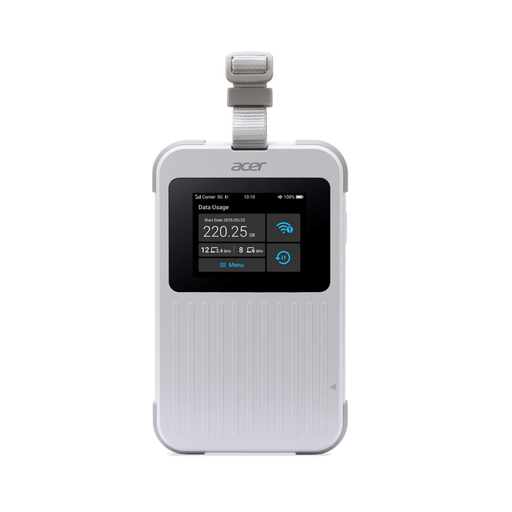 Image unavailable
A good fit if you’re looking for a portable hotspot for mobile internet access; the product title lists 5G, Wi-Fi 6E, dual-band and Nano SIM.
You’ll need a suitable SIM or eSIM and mobile network coverage. The product listing includes 1 GB of data; check which data plan suits your needs.
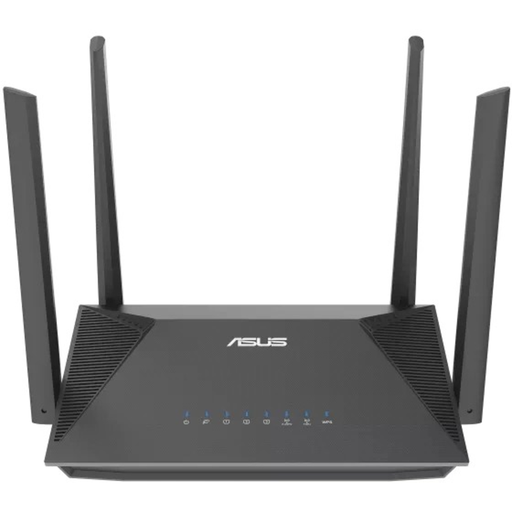 Image unavailable
A router option to compare if you’re looking for a Wi-Fi router to use behind an existing modem.
The product title lists AX1800, Gigabit Ethernet and dual-band (2.4 and 5 GHz); the product information lists Wi-Fi 6 and AiMesh.
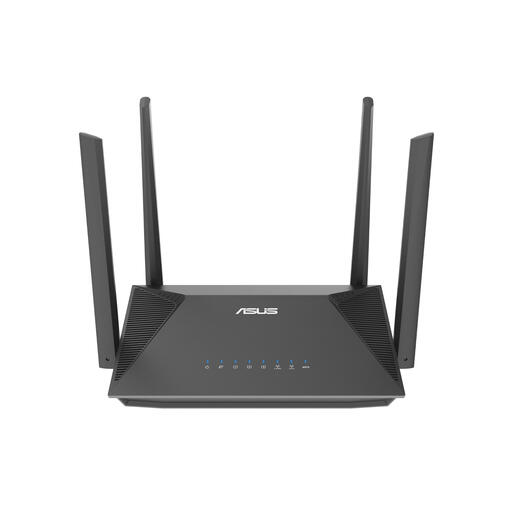 Image unavailable
A router option to compare if you’re looking for a Wi-Fi router to use behind an existing modem and AiMesh is relevant to your setup.
The product title lists AX3000, Gigabit Ethernet and dual-band (2.4 and 5 GHz); the product information lists Wi-Fi 6 and AiMesh.
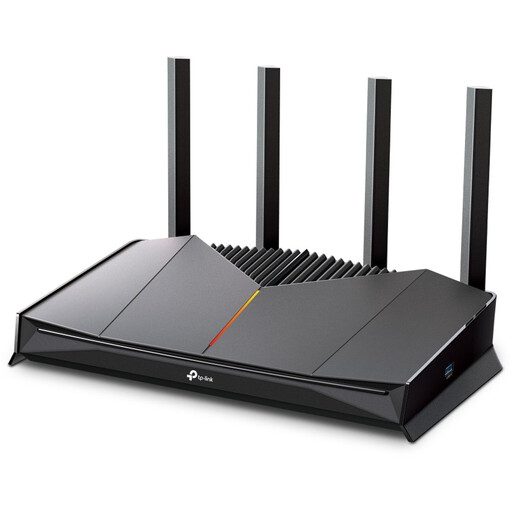 Image unavailable
A router option to compare if you need a wired connection with a 2.5-Gigabit port.
The product information lists Wi-Fi 7 and Quality of Service; the product title lists dual-band (2.4 and 5 GHz).
 Image unavailable
A good fit for a workspace that needs an additional Wi-Fi point; this kit contains two mesh units, each of which needs a suitable spot and power supply.
The product information lists Gigabit Ethernet and optional Ethernet backhaul. TP-Link also describes router and access point modes for the Deco X50.
A router can’t increase the upload speed of your internet connection. Compare the upload speed in your contract with wired test results taken close to the connection point; ACM ConsuWijzer recommends this approach for assessing your connection.
Yes, ACM ConsuWijzer confirms that you can choose your own router in the Netherlands. Check the applicable security requirements and ask your provider for the connection settings you need.
Install any available updates and check that your chosen model still receives updates and supports management. ACM ConsuWijzer highlights the importance of updates for network security and protecting personal data.
Not necessarily: first check whether Wi-Fi coverage at your workspace is inadequate. A mesh kit such as the Deco X50 can distribute points and use optional Ethernet backhaul, but each point needs its own suitable spot.
No, the statutory warranty isn’t automatically exactly two years for every product. ACM ConsuWijzer explains that you can expect a product to last when used normally; the seller is responsible if it turns out to be faulty too soon.