
People working from home while others watch
You want a film to keep playing while other people work online. Check the connection on both devices and in both locations.


First, measure your wired internet speed and Wi-Fi separately at the places where you watch and work. If both connections are good there, you may not need a new router. If your measurements reveal a weak spot, try moving the router first, then consider a wired access point or mesh. For one 4K stream, Netflix recommends a stable connection of at least 15 Mbps, according to the Netflix Help Centre; this is not a required router speed for the whole household.
You want a film to keep playing while other people work online. Check the connection on both devices and in both locations.
Your viewing or working area is outside the good coverage of your current router. Check its position first, then decide whether you need extra Wi-Fi access points.
You want to know whether a standalone router will work with your modem and how many cable ports you need, without paying for unnecessary network features.
Choose this if: the wired connection and Wi-Fi work well in both locations, or moving the router solves the problem.
The trade-off: you may not need to buy anything new, but this won’t automatically solve a lack of internet capacity or coverage.
Choose this if: your viewing and working areas are within good range of one centrally positioned router.
The trade-off: walls, distance and the modem’s location can limit coverage. Also check how many connections you need.
Choose this if: your measurements show a weak Wi-Fi spot, for example on another floor or behind obstacles.
The trade-off: you’ll need more devices and sockets, and may use more electricity. Mesh won’t make a slow internet connection faster; check whether you can connect the points with a cable.
| What to consider | What should you check? | Who is this important to? |
|---|---|---|
| Films without interruptions | Measure the connection where you watch while other devices are in use. For one Netflix stream in 4K, Netflix recommends a stable connection of at least 15 Mbps; other services may have different requirements. | If I want to keep watching a film while others work, I want to know how the connection performs by the TV. Around 31% of consumers prioritise uninterrupted viewing. |
| Work connection | Check the connection where you work while other devices are in use, and see whether a cable and enough LAN ports are available. | When I work online at the same time, I want my work device to stay connected while others stream. That’s why around 31% of consumers prioritise their work connection. |
| Coverage in both locations | Measure the connection where you watch and work, and try moving the router first. If you’re considering mesh, check whether the points can be connected by cable. | If my viewing and working areas are on different floors or behind obstacles, I mainly need good coverage in both places. Around 23% of consumers prioritise coverage. |
| Management and running costs | Compare the number of devices and power supplies you need, and check whether updates are available. Use a strong password and install updates. | I don’t want to manage more network devices or use more electricity than necessary, and I want to be able to update my network. Around 15% of consumers focus mainly on management and total running costs. |
Your internet plan speed and the Wi-Fi connection where you watch are separate considerations. A higher stated router speed won’t make up for a shortfall from your internet provider.
Before choosing a router based on its stated speed, measure your wired internet speed and your Wi-Fi while using the connection as you intend to.
This could help you avoid buying a router you don’t need if the limitation is your internet plan or reception in one location.
The position of the points and the connection between them affect your choice. Ethernet backhaul only works if you can run a cable between the points.
First, identify where the signal is weak. Then check how many points and ports each version includes, and whether a wired connection is possible.
Multiple points require extra devices and power supplies; a wired connection may also involve running cables.
In the Netherlands, the manufacturer’s warranty is not the only protection available. According to ACM ConsuWijzer, in addition to any guarantee from the seller or manufacturer, you’re entitled to a product that works properly for as long as you could reasonably expect it to.
Keep your proof of purchase and product details. If you think a product is faulty, contact the seller.
The Archer AX55 is a standalone dual-band Wi-Fi 6 router, while the Deco X50 is a mesh system. The choice here is between one central point and multiple points.
The FRITZ!Box 4060 is a tri-band Wi-Fi 6 router designed for use behind a modem, with options for mesh expansion.
ZenWiFi AX (XT8) is a tri-band mesh range to consider if you’re looking at multiple wireless points and different ways to connect them.
This selection of Joybuy products includes both standalone Wi-Fi routers and mesh models for streaming and working. If you’re choosing mesh, check how many points are included in the version you select.
 Image unavailable
A mesh option for separate viewing and working areas; the product title specifies a two-pack.
Wi-Fi 7, tri-band and 10 Gbps, 2.5 Gbps and 1 Gbps WAN/LAN ports per unit.
 Image unavailable
A mesh option if you need Wi-Fi points in several locations; check whether they can be connected by cable.
Wi-Fi 6, dual-band, optional Ethernet backhaul and three gigabit ports per unit.
 Image unavailable
A mesh router for a household where people stream at the same time and several devices are connected.
AX3000, dual-band and Wi-Fi 6; the product description lists band steering and roaming.
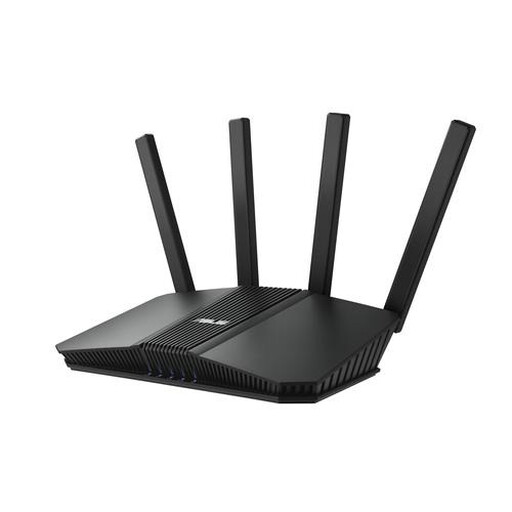 Image unavailable
A standalone router to consider if your viewing and working areas are within range of one central point.
Dual-band, Wi-Fi 7, four Ethernet ports and WPA3-Personal.
 Image unavailable
A standalone router for use around one central point; check that coverage is good where you watch and work.
Wi-Fi 6, dual-band, MU-MIMO, OFDMA and AiMesh compatibility.
First, measure your internet speed using a cable and check Wi-Fi separately where you watch and work. Simply moving your existing router may help. If the wired connection is slower than the speed promised by your provider, contact them.
For one 4K stream, Netflix recommends a stable connection of at least 15 Mbps, according to the Netflix Help Centre. This doesn’t guarantee that your connection can also handle work traffic at the same time, and it isn’t a requirement for a router’s advertised Wi-Fi speed. Check the service and connection you use.
Yes. According to ACM ConsuWijzer, you have the freedom to choose your router. However, there are connection and safety requirements for connecting your own device. Check these especially if you want to replace your provider’s device rather than connect your own router behind it.
Use a strong password and install software updates. The Dutch government recommends this for security; ACM ConsuWijzer also stresses that your own connected device should be kept up to date.
No. According to ACM ConsuWijzer, in addition to any guarantee from the seller or manufacturer, you’re entitled to a product that works properly for as long as you could reasonably expect it to. If a product is faulty and the applicable conditions are met, contact the seller.