What should you look for?
Router with USB storage and file sharing
Suitable if: viewers can play video files directly on their own devices. TP-Link lists USB media sharing for the Archer AX73; FRITZ! describes FRITZ!NAS for the FRITZ!Box 4060.
Bear in mind: sharing files isn’t the same as transcoding videos for different devices. Check the features of the specific router and storage device.
Router with a separate media server or NAS
Suitable if: viewers use different devices or the videos may need to be transcoded. Plex Support identifies both upload capacity and the media server’s processing power as relevant factors.
Bear in mind: you’ll need to install and assess the server, storage and playback software separately.
Router with expandable Wi-Fi coverage
Suitable if: devices at home are in areas with a weak Wi-Fi signal. FRITZ! lists Mesh for the FRITZ!Box 4060, while ASUS lists AiMesh for the RT-AX86U Pro.
Bear in mind: better coverage at home won’t automatically increase upload capacity for viewers outside the home.
If you’re sharing a home video library over the internet, these are four buying considerations that could influence your choice. Decide which matters most in your situation, then check the relevant features and terms.
| What to consider |
What should you check? |
Who is this most relevant to? |
| Watching at the same time |
Check your actual upload speed and whether the media server needs to transcode video. |
If several people are watching from outside the home at the same time, I want to know whether my connection and server can handle it. Around 36% of consumers therefore give simultaneous streams the highest priority. |
| Access and permissions |
Check which accounts and permissions are available with your chosen method, and what requirements the router has. |
If you want to avoid making shared storage unnecessarily accessible, how you set up remote access is an important consideration. Around 29% of consumers prioritise restricted access. |
| Storage and playback |
Check USB and storage support for the exact router version, and whether you’ll also need a media server. |
If your main concern is whether router storage will be enough, consider both file sharing and whether video transcoding is needed. Around 21% of consumers make the choice between simple file sharing and a separate server their main priority. |
| Coverage at home |
Check where the Wi-Fi signal is weak and consider mesh expansion or a wired connection; assess internet upload separately. |
If devices at home struggle to connect to Wi-Fi in certain areas, you’ll want to improve the connection in those spots. Around 14% of consumers prioritise coverage at home. |
Joybuy products for Wi-Fi coverage at home
This Joybuy selection focuses on mesh routers for Wi-Fi coverage at home. Assess your internet upload capacity and any media server separately from coverage.
 Image unavailable
TP-Link Deco BE68, 2-pack
Suitable if you want to extend mesh coverage at home; assess your upload connection and any media server separately.
View at Joybuy
 Image unavailable
ASUS RT-AX52 AX1800 AiMesh dual-band Wi-Fi router
Suitable if you want to extend Wi-Fi coverage later with compatible AiMesh routers; check which network points will work with your set-up.
View at Joybuy
 Image unavailable
Huawei eKit OptiX FG736 BE3600 dual-band Wi-Fi 7 mesh router
Suitable if you’re looking for a mesh set-up to improve Wi-Fi coverage at home; also check that your internet upload capacity and playback solution are suitable for remote viewers.
View at Joybuy
 Image unavailable
Huawei eKit OptiX FG630 AX3000 dual-band Wi-Fi 6 mesh router
Suitable if you want to improve mesh coverage at home; assess upload capacity and the option of a separate media server as separate considerations.
View at Joybuy
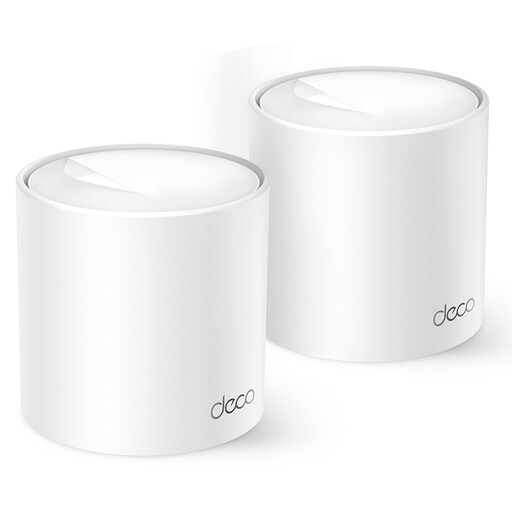 Image unavailable
TP-Link Deco X10 dual-band Wi-Fi 6 (2.4/5 GHz), white
Suitable if you want to extend mesh coverage across several rooms; check where the Wi-Fi signal is weak and consider internet upload capacity separately.
View at Joybuy
Frequently asked questions
Do I need a media server as well as a router?
Not for every type of file sharing. If videos need to be transcoded for viewers, you’ll also need to assess the processing power of a suitable media server. A USB sharing feature or high Wi-Fi speed doesn’t prove that the router can handle this transcoding.
Why doesn’t remote access work straight after connecting?
You need to set up your chosen service for remote access. Plex Support lists incorrectly configured port forwarding and double NAT among the possible causes of problems. For the WireGuard set-up described for the FRITZ!Box 4060, FRITZ! specifies an IPv6 address or public IPv4 address as a requirement.
How can I keep access to my video library secure?
Set up access carefully, keep your router up to date and back up important files. Get Safe Online warns that UPnP can make devices accessible from outside your home; a backup is no substitute for access security.
Are there any terms for watching videos remotely through Plex?
Yes. According to Plex Support, since 29 April 2025, watching videos outside the local network in supported apps is subject to a subscription requirement: the server administrator must have an active Plex Pass, or the viewer must have a Plex Pass or Remote Watch Pass. This is a Plex product requirement, not a legal requirement or a general condition for other ways of sharing videos.
Can I share films and videos online with others in the Netherlands?
For copyright-protected films, the Dutch government says you need the creator’s permission, and a private copy for personal use must not be distributed or made public. If people can be recognised in your own videos, whether privacy rules apply also depends on who you share them with; the Dutch Data Protection Authority describes the private-use exception as limited to personal use or sharing within a very small circle.


