Don’t rush to buy a new router if a theatre recording keeps buffering: first test your internet connection using a wired connection, then check the Wi-Fi where you watch, as the Dutch Consumers’ Association advises. If your connection is fine but the signal is weak, consider router placement, a wired access point or mesh Wi-Fi. If several people are online at once, both your connection and your router’s capabilities matter. Before buying, also check that the router will work with your existing modem and that the specific version carries the correct CE marking.
Who should consider this?
Watching where the Wi-Fi is weak
Your theatre recording buffers mainly in your home office, behind walls or on another floor. First, test the connection where you watch, then see whether moving your router, adding an access point or using mesh Wi-Fi could address the cause.
Watching on a busy home network
You’re watching while other people at home use their devices. Compare the connection where you watch with the router’s ability to handle multiple devices. A quoted Wi-Fi speed doesn’t guarantee the speed you’ll get when streaming.
Finding the cause before making a change
You want to find out whether the problem lies with your internet connection, Wi-Fi or streaming service before replacing your router. The Dutch Consumers’ Association recommends using a wired test as the starting point for investigating your internet speed.
What should you look for?
Keep your existing equipment and test first
Choose this if: you’re not yet sure what’s causing the buffering, or the problem only occurs occasionally.
Bear in mind: you’ll need time to test using a wired connection and where you watch, and to try different settings or placements.
Separate router or wired access point
Choose this if: your wired internet connection is good, but the Wi-Fi where you work isn’t up to the job. An access point is a good choice if you can run an Ethernet cable to your workspace or to a better position for the transmitter.
Bear in mind: a separate router needs to be configured to work with your existing modem and network mode; an access point needs a cable.
Mesh system with multiple nodes
Choose this if: distance, walls or another floor weaken the Wi-Fi where you work, and a single well-placed transmitter isn’t enough.
Bear in mind: you’ll need extra equipment and setup. A cable between mesh nodes avoids a wireless link between them, but a quoted coverage area doesn’t guarantee coverage in your home.
The percentages below refer to consumers who want to watch a theatre recording streamed over the internet in a home office. Internet speed isn’t a factor when watching a local offline recording.
| Concern |
What to look for when buying |
Who is this important for? |
| Signal where you work |
Test where you watch and compare moving your router with adding an access point or mesh Wi-Fi; check whether you can run a cable between nodes. |
If the signal drops out behind walls or on another floor, I want to know whether moving the router or adding nodes will help. Around 40% of consumers prioritise signal strength where they watch. |
| Several people using the network at once |
Check how many devices are in use at the same time and compare router features without treating advertised Mbps as streaming speed. |
When other people at home are online too, I want to assess the connection where I watch during normal use. Around 30% of consumers focus mainly on simultaneous use. |
| Finding the cause |
Compare a wired test with Wi-Fi where you work before choosing a router. |
I want to find out first whether the problem is caused by my internet connection, Wi-Fi or streaming service, so I don’t replace equipment that won’t address it. Around 20% of consumers prioritise diagnosing the problem. |
| Security and running costs |
Check the security settings and updates for the exact model, as well as any subscriptions for extra features. |
If I’m choosing a router for the long term, I want to know which security features are available and whether they come with ongoing costs. Around 10% of consumers make this their main buying concern. |
Common buying mistakes
-
Buying a router when your internet connection is the bottleneck
A wireless test alone won’t tell you whether the problem lies with your internet connection or your Wi-Fi.
First, test using an Ethernet cable, then compare the result with the connection where you watch. If the wired connection is still too slow, investigate your internet service before choosing a router.
-
Assuming one new device will fix every signal problem
Distance, walls and ceilings affect the signal. A quoted mesh coverage area isn’t a measurement of coverage in your home.
Test where you work, then choose the right solution for the weak spot: better placement, a wired access point or mesh Wi-Fi.
-
Assuming all security features are included at no extra cost
The security features available can vary by model and service.
Check which features work without a subscription on the exact model and which ones you actually want to use.
TP-Link says that HomeShield Security+ requires a subscription. Factor in the ongoing cost if you want to use these features.
Brands to compare
TP-Link
TP-Link describes the Archer AX55 as a standalone router and the Deco X50 as a mesh system with multiple nodes. They’re different ways to set up a home network, not directly comparable real-world tests.
- According to TP-Link, the Archer AX55 supports Wi-Fi 6 and OFDMA; optional Ethernet backhaul is available for the Deco X50.
- Not all HomeShield features are available without a subscription. Check what applies to the exact model and service you want.
ASUS
ASUS positions the RT-AX57 as a standalone Wi-Fi 6 router that can be expanded with an AiMesh-compatible router.
- According to ASUS, the RT-AX57 supports OFDMA and can be expanded with an AiMesh-compatible router.
- Quoted wireless speeds and coverage don’t tell you how the connection will perform in your home office. Check what extra equipment you’ll need to expand the system.
FRITZ!
FRITZ! describes the FRITZ!Box 4050 as a router to use behind a modem, and the 4060 as a more advanced model.
- According to FRITZ!, the 4060 has three Gigabit LAN ports, a 2.5 Gigabit WAN port and DECT telephony, among other features.
- You may not need the extra features to watch a recording. Check how both models connect to your existing provider equipment.
Joybuy routers and mesh products
This selection includes standalone Wi-Fi routers and mesh products for home networks. First, work out whether the problem is with your internet connection, signal coverage or several people using the network at once. The Dutch Radiocommunications Agency states that Wi-Fi routers sold in Europe must carry the correct CE marking; check the specific version you’re buying.
 No image available
ASUS RT-AX52 AX1800 AiMesh router, dual-band
A standalone router to consider if you want to compare using a single transmitter with the placement of your current equipment.
The product name lists AiMesh, Gigabit Ethernet and dual-band (2.4 GHz / 5 GHz).
View at Joybuy
 No image available
TP-Link Deco X50 (3-pack), dual-band Wi-Fi 6
A three-unit mesh system to consider if a single transmitter doesn’t provide enough coverage where you work.
The product name lists Wi-Fi 6 (802.11ax) and dual-band (2.4 GHz / 5 GHz).
View at Joybuy
 No image available
Huawei eKit OptiX FG736 BE3600 dual-band Wi-Fi 7 mesh router
A mesh router to consider if you’re thinking about a mesh setup. The product name alone doesn’t tell you what coverage you’ll get at home.
The product name lists Wi-Fi 7, dual-band and BE3600.
View at Joybuy
 No image available
Huawei eKit OptiX LG8245B7N BE3600 dual-band Wi-Fi 7 4G dongle router
The product name describes a 4G dongle router. Check that it’s compatible with your intended internet connection and network setup.
The product name lists Wi-Fi 7, dual-band and BE3600.
View at Joybuy
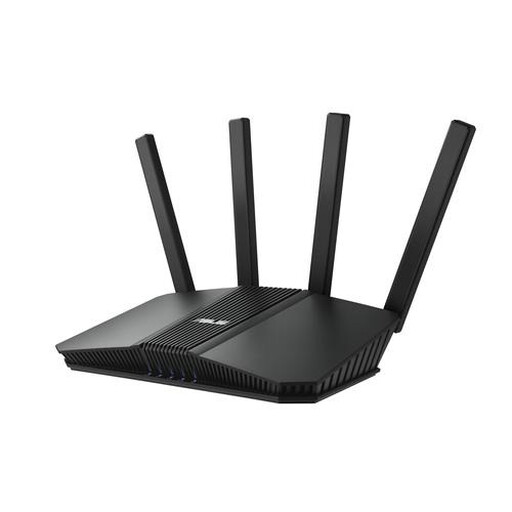 No image available
ASUS RT-BE82U BE6500 dual-band Wi-Fi 7 router
A standalone router to consider if you want Ethernet connections as well as Wi-Fi.
The product name lists 2.5 Gigabit Ethernet and dual-band (2.4 GHz / 5 GHz).
View at Joybuy
Frequently asked questions
Will a faster router always stop a theatre recording from buffering?
No. First, compare a wired speed test with a test where you watch, as the Dutch Consumers’ Association advises. If the wired connection repeatedly falls short, changing your Wi-Fi router won’t fix it. A problem with the streaming service could also be to blame.
Can I use my own router instead of my provider’s equipment?
Yes. In the Netherlands, you have the right to choose your own router under the ACM ConsuWijzer rules. However, using your own router behind an existing modem is different from replacing a modem connected directly to the internet connection. Check which settings your setup requires.
Do I need to run cables for mesh Wi-Fi in my home office?
Not necessarily: mesh nodes can connect to each other wirelessly. If you can run a cable between them, Ethernet backhaul avoids the wireless link; follow the connection instructions for the system you choose.
Are all security features and a two-year guarantee automatically included?
No. TP-Link says that HomeShield Security+ requires a subscription. The Dutch Government says there is no fixed statutory two-year guarantee period in the Netherlands; this doesn’t mean you have no legal rights if a product is faulty. Contact the seller if you have a problem.
What should I check to make sure a Wi-Fi router complies with requirements in the Netherlands?
Check that the specific version carries the correct CE marking. The Dutch Radiocommunications Agency states that Wi-Fi routers sold in Europe must meet the applicable requirements; a model name alone doesn’t confirm that the version you’re buying has the correct marking.


