
People with weak Wi-Fi upstairs
If coverage drops out on one or more floors, first check where your existing Wi-Fi is still usable and whether a point in between can pick up the signal.


If you have one weak spot, a well-placed repeater may be enough. If several floors have poor coverage, an expandable mesh system is a more suitable option. If you have an Ethernet cable between floors, it’s worth considering a wired access point or mesh with Ethernet backhaul. Also check that your music source and playback devices can communicate over your local network: extending Wi-Fi coverage won’t automatically share a music library.
If coverage drops out on one or more floors, first check where your existing Wi-Fi is still usable and whether a point in between can pick up the signal.
If you want to play music from a computer or NAS on other devices, you’ll need both sufficient Wi-Fi coverage and access to the shared folder over your local network.
If you have a cable running to another floor, it’s worth considering a wired access point or Ethernet backhaul alongside a wireless connection.
Best for: when coverage is poor mainly in one room or on one floor, and the repeater can still receive a usable signal from the router when placed somewhere in between.
Consider: the wireless connection back to the router and the repeater’s position are still crucial; one repeater won’t necessarily solve the problem across all three floors.
Best for: when you need coverage across several floors and want the option to add more points later.
Consider: more points mean extra devices and power use. A manufacturer’s stated coverage won’t predict how the signal will travel around your home.
Best for: when there’s a usable Ethernet cable to another floor, or you can install one.
Consider: installing cables may take some work. For mesh systems, check which cabling options are compatible with the selected router or access point mode.
| What to consider | What to look for when buying | Who is this important for? |
|---|---|---|
| Coverage across three floors | Map out weak spots and possible positions in between; check whether you can add Wi-Fi points later. | If I want to play music upstairs, I need to know where a point can still maintain a usable connection to the router. Around 36% of consumers prioritise coverage across multiple floors. |
| Stable connection during playback | Check whether the equipment supports Ethernet backhaul if you can use cables between points; otherwise, test the connection where you plan to place them. | If you want to play music throughout your home, you’ll want a reliable connection between floors. Around 29% of consumers prioritise playback stability. |
| Library access and compatibility | Check the mesh features you want and whether they’re compatible with your router; separately test whether the music source and player can access the shared folder. | If I want to share music from a computer or NAS, both the Wi-Fi and access to the local music library need to work. Around 21% of consumers prioritise access and compatibility. |
| Number of devices and power use | Compare how many points you’ll need and check the energy-use specifications for each model; factor in any cabling work too. | If you want to limit the number of points that stay on all the time, weigh up the coverage you need against power use. Around 14% of consumers prioritise the number of devices and running costs. |
The repeater needs a usable connection to your existing network. If you place it where the signal has already dropped out, it won’t be able to restore it by itself.
Try a position in between with as few obstacles as possible, and check the connection there before deciding how many points you need.
If one point isn’t enough, you may need another point or a wired connection after all.
The OneMesh features of the TP-Link RE700X and the AiMesh features of the ASUS RP-AX58 each require a compatible router.
Compare the full model names of your router and extender, and check which mesh features you actually want to use.
Brand-specific mesh features may require additional compatible equipment.
Extending your Wi-Fi won’t automatically make a folder on a computer or NAS available to your playback devices.
First, test access to the shared folder over your local network. Troubleshoot sharing or permissions separately.
The RE700X is a standalone extender with access point mode; the Deco X50 is an expandable mesh range, available as individual points and in sets.
The FRITZ!Repeater 1200 AX is a standalone Wi-Fi 6 extender, particularly worth considering if you already have a FRITZ!Box.
The RP-AX58 is a standalone extender for extending existing Wi-Fi, with AiMesh available when used with compatible ASUS equipment.
These products are mesh options for extending Wi-Fi coverage from multiple points; the sets vary in design and number of points.
 Image unavailable
A set of two mesh points for extending Wi-Fi coverage to several areas of your home.
 Image unavailable
A mesh set with three points to consider if you want to explore coverage across multiple floors; the number you need will depend on your home.
The product name specifies dual-band (2.4 GHz/5 GHz) and Wi-Fi 6 (802.11ax).
 Image unavailable
A mesh set with two points to consider if you want to extend your Wi-Fi coverage using multiple points.
The product name specifies PoE, dual-band (2.4 GHz/5 GHz) and Wi-Fi 6 (802.11ax).
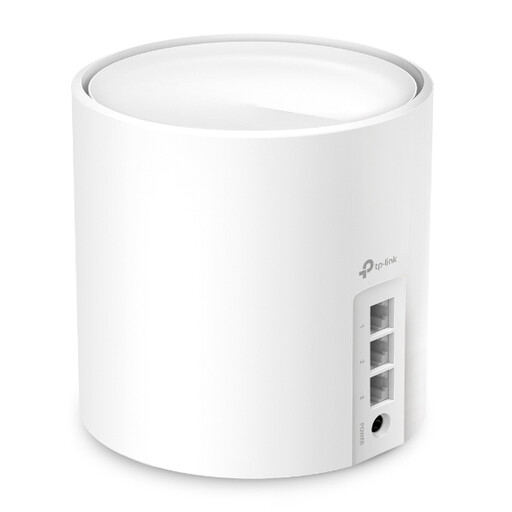 Image unavailable
A mesh unit to consider if you want to start with one point and expand later.
The product name specifies Wi-Fi 6.
 Image unavailable
A set of three mesh points to consider if you want to connect several areas of your home.
The product name specifies tri-band (2.4 GHz/5 GHz/6 GHz) and Wi-Fi 6E (802.11ax).
You can’t determine this just by counting the floors. The Consumentenbond suggests three points as an option for a three-storey home, but also says that many homes can start with two and add another if needed. Check the coverage and the connection between points in your home.
Place the extender where it can still receive the existing signal well, not where that signal has already dropped out. The Consumentenbond recommends keeping obstacles between Wi-Fi points to a minimum; use the positioning guide or signal indicator if available.
No. With Sonos, the music library needs to be shared on the local network. For the NAS setup described, Sonos specifies SMBv2 or SMBv3; other playback systems may have different requirements.
Wi-Fi points use electricity, so compare the power-use specifications for the models you’re considering and the number of points you plan to install. Also check the warranty and support terms for your chosen model. Without comparable power-use figures and an electricity tariff, it isn’t possible to give a reliable annual cost.
According to the Rijksinspectie Digitale Infrastructuur, you don’t need a licence for home-network Wi-Fi if you use the designated frequencies and comply with the conditions of use. Radio equipment sold in the Netherlands must meet European product requirements; check that the specific model carries a CE mark.