
Student with a single Wi-Fi dead spot
You take lessons in a fixed spot with a weak router signal and want to find a midway position for a repeater. The Consumentenbond recommends considering both the placement and the signal at the intended spot.


A wireless repeater can help if Wi-Fi coverage is poor where you take your lessons and there’s a suitable midway spot where the router’s signal is still strong. The Consumentenbond (Dutch Consumers’ Association) stresses that placement matters. If a suitable spot isn’t practical in a narrow hallway, consider a wired access point or powerline as an alternative. First, compare the connection next to the router with the one where you take your lessons, then check the device’s dimensions and router compatibility.
You take lessons in a fixed spot with a weak router signal and want to find a midway position for a repeater. The Consumentenbond recommends considering both the placement and the signal at the intended spot.
You need to consider whether there’s a usable socket, enough room in the passageway and a good signal where the Wi-Fi device can be placed.
You also have weak Wi-Fi in other areas, or can use cabling, and want to compare a repeater with a more extensive solution.
Suitable when: one study spot has poor coverage and there’s a suitable midway position with a socket.
Consider: the repeater still needs to receive a usable signal from the router, and a narrow passageway may limit where you can place it.
Suitable when: you can run a network cable to a suitable location.
Consider: check in advance whether the cable route and installation are practical.
Suitable when: you need Wi-Fi in several areas of your home and have room for the units.
Consider: check that the mesh features are compatible with your existing router. TP-Link OneMesh requires a compatible OneMesh router.
Suitable when: you want to try using your home’s electrical wiring to carry the connection.
Consider: performance depends on your home’s wiring, so test the connection where you plan to use it.
| What to consider | What to look for when buying | Who should prioritise this? |
|---|---|---|
| Connection where you take your lessons | Compare the connection next to the router with the one where you take your lessons. Then check whether the intended midway spot has good coverage itself. | If I take lessons in a fixed spot, I want to know that the connection there is good enough and doesn’t already drop out next to the router. Around 33% of consumers prioritise a stable connection for lessons. |
| Placement in the hallway | Check the dimensions, socket, clear passageway and signal at the exact spot. | I want to place a Wi-Fi device without blocking the narrow passageway, while also checking that it has coverage there. Around 27% of consumers prioritise practical placement. |
| Alternative connection | Check whether you can run a network cable to an access point, and test powerline in your own home. | If there’s no suitable midway spot for a wireless device, I want to know whether cabling or powerline offers a practical alternative. Around 20% of consumers are primarily looking for an alternative to a wireless connection between devices. |
| Compatibility and management | Check the exact router and repeater combination, as well as the supported management and security settings. | I want the new Wi-Fi device to work with my router and the features I need—not just to have the same mesh label on the packaging. Around 20% of consumers prioritise compatibility and management. |
A repeater is designed to extend coverage. If the connection is slow even next to the router, adding another Wi-Fi device won’t solve the problem. Compare the connection next to the router with the one where you take your lessons before choosing your equipment.
Distance and obstacles can affect reception. First, check the signal, socket and clear passageway at the intended spot. A convenient socket at the end of the hallway isn’t automatically a suitable place for a strong signal.
Brand-specific mesh features may have certain requirements. For OneMesh, TP-Link specifies that you need a compatible TP-Link OneMesh router. So check the exact router and repeater combination rather than relying on the word ‘mesh’ alone.
The management features you expect may not be available with your existing router.
According to TP-Link, the RE605X is a Wi-Fi 6 repeater with a signal indicator, a gigabit Ethernet port and access point mode.
According to FRITZ!, the FRITZ!Repeater 1200 AX is a compact Wi-Fi 6 repeater, described primarily as an extender for use with a FRITZ!Box.
According to NETGEAR, the EAX15 is a plug-in Wi-Fi 6 extender with a gigabit Ethernet port.
devolo offers both repeaters and powerline products: two different ways to extend Wi-Fi around your home.
This Joybuy selection includes a wireless repeater, as well as powerline, mesh and wired access point options. Choose based on the space available, the connection next to the router and your cabling options.
 Image unavailable
An option to consider if there’s no suitable midway spot for a wireless device and you want to try Wi-Fi over powerline.
 Image unavailable
A wireless repeater to consider for a single Wi-Fi dead spot, provided the router’s signal still reaches a suitable midway spot.
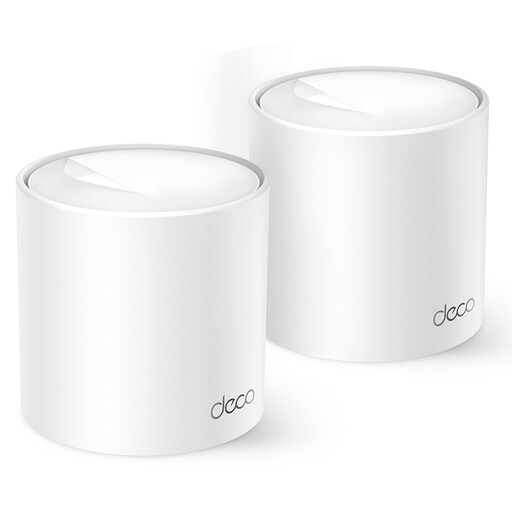 Image unavailable
A mesh option to consider if you need Wi-Fi not just where you take your lessons, but elsewhere in your home too.
 Image unavailable
A wired access point to consider if you can run a network cable to a suitable location.
No, the repeater doesn’t necessarily have to go in the hallway. Look for a suitable midway spot with good reception and check that the device won’t block the passageway. If there isn’t a suitable spot, compare wired options.
A repeater won’t fix a problem that’s already occurring at the router or with your internet connection. Compare the connection next to the router with the one where you take your lessons before choosing a range extender.
Test the connection at the intended spot during a video call and check that the Wi-Fi reception is usable there. Also review the installation and security settings, and follow the manufacturer’s guidance on updates.
Radio equipment sold in the Netherlands must meet the applicable European requirements. The Dutch Authority for Digital Infrastructure (Rijksinspectie Digitale Infrastructuur) states that the CE marking must be visible. For the exact model, also check that the relevant declaration of conformity is available.
For online consumer purchases, you’ll generally have a statutory 14-day cancellation period after delivery, although exceptions may apply. Your statutory guarantee for a faulty product is separate from any manufacturer’s guarantee. ACM ConsuWijzer explains these consumer rights.