
Student with poor coverage in their room
If your connection for online classes is weak mainly where you study, the repeater’s position matters. NETGEAR recommends placing it within the router’s range, between the router and your computer.


A wireless repeater is most useful when the problem is at your study spot and you can place the repeater somewhere the router can still reach. NETGEAR recommends positioning it between the router and your computer, within the router’s range. If classes also stutter right next to the router when housemates are online at the same time, first investigate the shared connection: an extra Wi-Fi point extends coverage, but won’t automatically fix a bottleneck in that connection. If you have permission to run a network cable to a suitable spot, a wired access point avoids a wireless connection to the router. Before buying, also check router compatibility and the exact model variant. The Dutch Authority for Digital Infrastructure (RDI) lists the correct CE marking as a product requirement for equipment sold in the Netherlands. Since 1 August 2025, stricter digital security requirements have also applied to almost all new wireless devices on the European market.
If your connection for online classes is weak mainly where you study, the repeater’s position matters. NETGEAR recommends placing it within the router’s range, between the router and your computer.
If classes stutter when housemates are online at the same time, first check whether the issue is Wi-Fi coverage or the shared internet connection. Zoom Support explains that Zoom’s bandwidth usage adapts to the available network conditions.
If you have permission to run a cable to a suitable spot, you could consider a wired access point. Devolo explains that an access point receives the router’s data over Ethernet, while a repeater does so wirelessly.
Best for: one study spot with weak coverage and an intermediate position where the router is still in range.
Trade-off: you don’t need a cable, but the connection back to the router remains wireless.
Best for: several rooms with poor coverage, if the router supports the chosen mesh technology.
Trade-off: brand-specific mesh features don’t automatically work with every router. A wireless mesh point also needs a usable connection to the existing network.
Best for: a situation where you can run a network cable to a suitable spot and the network administrator agrees to the installation.
Trade-off: the connection to the router runs over a cable, but running the cable and agreeing the installation takes extra effort.
| What to consider | What should you check? | Who should pay particular attention? |
|---|---|---|
| Coverage at your study spot | Compare the connection in your room and at a possible intermediate spot. Check whether the router can still reach the repeater there, and look for a signal indicator if available. | If my classes keep dropping out mainly in my room, I want to know whether a repeater can reach my study spot without being placed out of the router’s range; around 36% of consumers name coverage in one study spot as their main buying concern. |
| Dropouts when several people are online | Compare the connection for online classes next to the router and in your room, including when housemates are online. If the issue is with Wi-Fi, check the supported bands and compatibility with your devices. | If classes only start stuttering when housemates go online, I first want to find out whether the shared connection is the bottleneck; around 29% of consumers put simultaneous network use at the top of their list. |
| Wired connection | Check whether you’re allowed to run a cable and whether the exact model has access point mode and the Ethernet port you need. | If I’m allowed to run a cable to a suitable spot, I want to avoid a wireless backhaul; around 21% of consumers prioritise having a wired option. |
| Simplicity and ease of use | Compare the supported bands, set-up process and any additional Wi-Fi points. A stated radio speed is not the same as the speed measured during your online class. | For a single coverage problem, I don’t want to buy more networking features than I need; around 14% of consumers say keeping the purchase and day-to-day use simple is their main concern. |
A repeater can extend Wi-Fi coverage, but it won’t fix a bottleneck in the internet connection shared with your housemates.
First compare the connection for your online classes next to the router and in your room, including when housemates are online at the same time.
A stated radio speed is not the measured speed of the connection from the repeater to the internet. Placement and the other parts of the network matter too.
Use the specifications to compare models, but also consider the signal at the chosen spot, the frequency bands and the connection back to the router.
TP-Link OneMesh and ASUS AiMesh each require a compatible router for the mesh features described.
Check the exact router model and distinguish between standard Wi-Fi extension and brand-specific mesh features.
According to TP-Link, the RE505X is a Wi-Fi 6 repeater that can also be used as a wired access point.
The FRITZ!Repeater 1200 AX is a compact Wi-Fi 6 extender with a LAN connection, including for use with a compatible FRITZ! network.
The RP-AX58 is a Wi-Fi 6 repeater for anyone looking to extend an existing ASUS AiMesh set-up or considering access point mode.
According to devolo, the WiFi 6 Repeater 3000 can be used as a repeater or a wired access point.
The Mi Wi-Fi Range Extender Pro, model R03, is a wireless option for an isolated coverage problem.
These picks include a wired access point, wireless repeaters and a mesh extension. Before buying, check router compatibility, the exact version for the Dutch market and the applicable product requirements. A product listing alone does not show that these requirements have been met.
 No image available
A wired access point for situations where you can run a cable to a suitable spot.
Wi-Fi 6, dual-band, Ethernet and PoE are listed for this model. An access point needs an Ethernet connection to the existing network; agree the cable installation with the administrator of the shared network.
 No image available
A repeater option for a study spot with poor Wi-Fi coverage, provided the existing network is still reachable from the repeater’s position.
The product description lists dual-band, Wi-Fi 6 and an Ethernet port. The repeater needs to be within range of the existing network and won’t fix a bottleneck in the shared internet connection.
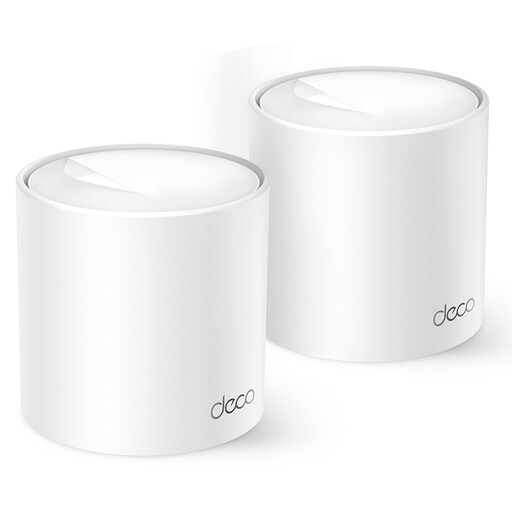 No image available
A mesh option for anyone looking to extend Wi-Fi coverage in several spots using additional Deco units.
The product listing specifies Wi-Fi 6 and dual-band operation at 2.4 GHz and 5 GHz. A mesh system extends Wi-Fi coverage, but won’t fix a bottleneck in the shared internet connection.
 No image available
A wireless repeater option for a coverage problem at a study spot where the existing network can still reach the repeater.
For model R03, Xiaomi lists 2.4 GHz and a radio speed of up to 300 Mbps. This model does not have a 5GHz band; the stated radio speed is not a measured speed for an online class.
 No image available
A model to compare if you’re looking for a Wi-Fi extender or want to use access point mode with a cable.
The product description lists 2.4 GHz, a radio speed of up to 300 Mbps and access point mode. Using it as an access point requires a cable connection to the existing network; the stated speed is not a measured speed for online classes.
Place a wireless repeater between the router and your study spot, somewhere the router can still reach. NETGEAR recommends this positioning, so a socket in a complete dead zone is not a good starting point. If your model has a signal indicator, use it to help you choose the right spot.
Not necessarily for standard Wi-Fi extension. Check brand-specific features separately: TP-Link describes OneMesh as requiring a compatible OneMesh router, while ASUS AiMesh requires an AiMesh-compatible router.
No. A stated radio speed is not the same as the measured speed of your connection for online classes. The repeater’s position and its connection back to the router matter too, so consider the frequency bands and conditions at the intended location.
Not necessarily. A repeater can extend Wi-Fi coverage, but it won’t fix a bottleneck in the shared internet connection. Before choosing extra equipment, compare the connection next to the router and in your room, including when housemates are online.
For an online consumer purchase in the Netherlands, you generally have a statutory 14-day cooling-off period after delivery, subject to applicable exceptions; ACM ConsuWijzer explains this period. This is separate from your statutory rights if a product is faulty, damaged or described misleadingly. The legal guarantee does not replace any manufacturer’s warranty.