
Student with a permanent workspace in the garden office
Wants a reliable connection to the study portal during study sessions and may be able to connect a Wi-Fi access point near the desk.


First, check that your home internet connection is working and that there’s a usable Wi-Fi signal along the route to your garden office. A faster router won’t automatically solve a lack of connection between the buildings. Running a network cable to a Wi-Fi access point near your desk can avoid relying on a wireless connection between the house and office. Wireless mesh depends on a usable signal at each intermediate point, while powerline depends on the electrical route. If you’re planning to install equipment outdoors, also check that the exact model and intended connection method are suitable.
Wants a reliable connection to the study portal during study sessions and may be able to connect a Wi-Fi access point near the desk.
Wants to connect the office without installing a new network cable and needs to check whether a wireless connection or the existing electrical wiring will work.
Has space for a Wi-Fi access point outside the house or office and needs to consider weather resistance, power and the connection mode permitted for that location.
A good fit if: you can run a suitable network cable to the garden office and want to provide Wi-Fi for a permanent workspace.
Bear in mind: you’ll need to plan the cable route, installation and power supply. A stated Wi-Fi coverage area won’t tell you how the signal will travel through the walls of your office.
A good fit if: you can’t run a cable and there’s still a usable signal where you plan to place the intermediate point.
Bear in mind: the connection between the points remains wireless. According to the Dutch Authority for Digital Infrastructure, 5 GHz has a shorter range than 2.4 GHz.
A good fit if: you don’t want to run a network cable and would rather use the existing electrical wiring as a network route.
Bear in mind: the adapters need to be able to connect over the electrical route. TP-Link specifies that its powerline setup must use the same electrical circuit.
A good fit if: the required installation spot is outdoors and the manufacturer confirms that the chosen model is suitable for that location and connection method.
Bear in mind: a weather-resistant casing doesn’t guarantee reception indoors. For outdoor use of the 1610 Outdoor, FRITZ! specifies a LAN connection, not ‘Wi-Fi bridge’ mode.
| What to consider | What should you check? | Who is this important for? |
|---|---|---|
| Connection at your study space | Check whether there’s a suitable cable route and whether your chosen system supports wired backhaul or access point mode. | If I want to rely on a dependable connection while studying, I’ll first check whether it’s possible to run a cable. Around 42% of consumers prioritise a reliable connection at their regular study space. |
| Range without a network cable | Test the signal where you plan to place the intermediate point and in the garden office. Don’t base your decision on a stated speed or coverage area alone. | If I don’t want to install a new network cable, the wireless intermediate point still needs to connect to the house. Around 33% of consumers give top priority to range without a new cable. |
| Electrical wiring | Check that the chosen adapters can connect through the sockets you plan to use and that they’re compatible with each other. | If I want to use the existing electrical wiring as a network route, my choice depends on the electrical connection between the house and office. Around 25% of consumers prioritise this option. |
Product speeds and stated coverage areas don’t show how the connection will perform through the walls at your location.
First, work out where the signal drops and how the network can reach your garden office.
You may still need an additional Wi-Fi access point, cabling or another way to connect.
The extra point needs to exchange data with the rest of the network to pass the connection on.
Test the proposed location before permanently installing your setup.
The electrical route helps determine whether the adapters can connect. Devolo says Magic 2 WiFi next isn’t compatible with the older dLAN range.
Check the electrical route and adapter range before choosing powerline.
If your existing adapters aren’t compatible with the chosen kit, you may need a complete, compatible set.
Weather resistance and permitted operating modes vary by model. FRITZ! doesn’t permit outdoor use of the 1610 Outdoor in ‘Wi-Fi bridge’ mode.
Follow the outdoor instructions for the exact model and check the terms of use in the Netherlands.
Outdoor installation may require a suitable casing and an appropriate LAN or power route.
The range includes indoor mesh systems, a model for outdoor installation and Omada access points for a dedicated access point setup.
Repeater and mesh options for extending an existing network. According to FRITZ!, the 1200 AX can also connect via LAN.
Magic powerline with Wi-Fi for anyone wanting to check whether their existing electrical wiring can provide a network route to the office.
AiMesh and ZenWiFi systems for anyone looking to use compatible ASUS network points with wired backhaul.
Range extenders such as the EAX12, which can extend an existing wireless network from a location where there’s still reception.
These products are suited to wired mesh or an access point, powerline over electrical wiring, and wireless mesh. Suitability depends on the connection and placement at your garden office.
 No image available
A good fit for a mesh setup if you can run a suitable wired connection to the garden office.
Wi-Fi 7 mesh system with wired and wireless backhaul. Per unit: 10, 2.5 and 1 Gbps WAN/LAN ports.
 No image available
A good fit if you want to use your existing electrical wiring as a network route. Check that the adapters can connect at the relevant points.
Powerline starter kit with Wi-Fi and a wired network connection. Performance depends on the electrical route.
 No image available
A good fit for a wireless mesh setup if there’s a usable connection along the route to your garden office.
Mesh system with three units and 2.4, 5 and 6GHz bands. Per unit: three gigabit Ethernet ports.
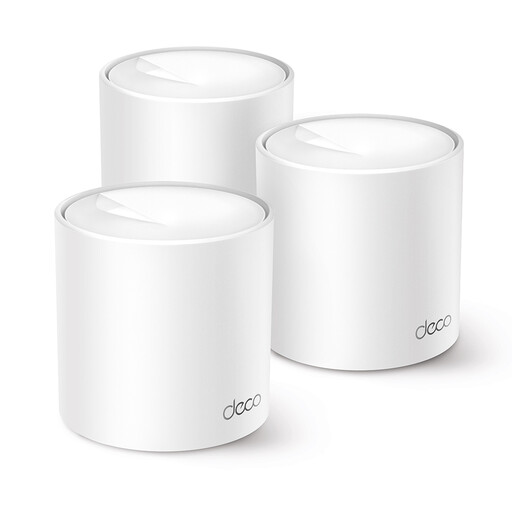 No image available
A good fit if you want to use wireless mesh and have a strong enough connection between the mesh units at the intended location.
Wi-Fi 6 mesh system with 2.4 and 5GHz bands; multiple Deco X10 units combine to form a single network. Per unit: two gigabit Ethernet ports.
 No image available
A good fit for a setup with a wired network connection to the garden office. Check the intended installation location and power supply.
Wi-Fi 6 access point for wall or ceiling mounting, with PoE, passive PoE and DC power. The product description warns against exposure to water, moisture and direct sunlight.
Not necessarily. If your home internet connection is working but the signal at your desk is too weak, an additional Wi-Fi access point connected in the right way could be an option. TP-Link describes access point mode for Deco as a way to extend an existing wired network. Check that your chosen equipment and setup support this mode.
No. Check that the exact model is suitable for the installation location, power supply and connection method. TP-Link lists an IP65-rated casing for the Deco X50-Outdoor. For the 1610 Outdoor, FRITZ! specifies a sheltered outdoor environment and a LAN connection, not ‘Wi-Fi bridge’ mode.
Check the internet connection at the main router, the connection between the network points and the signal at your study space separately. Only move a wireless intermediate point to a location where it still gets a usable signal. For powerline, check that the adapters can connect over the electrical route you’re using.
According to the Dutch Authority for Digital Infrastructure (RDI), Wi-Fi for home networks is licence-exempt when you use the designated frequencies and comply with the relevant conditions of use. The RDI also states that the equipment must carry the CE marking required by law. If you’re installing equipment outdoors, check the instructions and permitted settings for the specific device.