
Watching a concert in the workspace
You want to watch the live concert while others work online. The Consumentenbond recommends checking Wi-Fi at the point of use; test it there while work devices are active too.


A Wi-Fi extender can help when coverage is poor mainly in the concert or workspace, provided the extender itself can still receive a usable signal from the router. It won’t increase the speed of your internet connection, as the Consumentenbond explains. If you have an Ethernet cable available, consider a wired access point. If you’re streaming the concert yourself, check your upload speed and run a test stream too. For viewers, reception where they’re watching is what matters most.
You want to watch the live concert while others work online. The Consumentenbond recommends checking Wi-Fi at the point of use; test it there while work devices are active too.
You’re broadcasting live video and audio yourself and want to know whether your upload connection can handle it. YouTube Help recommends an upload test and a test stream for broadcasts on YouTube.
You want to provide coverage for several users while managing network access appropriately. Check the capabilities of your router and Wi-Fi access points together, including any mesh and guest network features.
Choose this if: the speed is disappointing even close to the router, or the problem could be caused by your current setup.
Bear in mind: this won’t require an extra Wi-Fi access point, but it may not fix a genuine coverage gap.
Choose this if: reception is poor mainly in the concert or workspace, there’s no Ethernet cable available, and there’s still a spot between the router and that area with a strong enough signal.
Bear in mind: the wireless connection back to the router still matters, even if the extender itself has an Ethernet port.
Choose this if: an Ethernet cable reaches the shared space and you want to connect the Wi-Fi access point using it.
Bear in mind: you’ll need a cable and suitable connections. Mesh features depend on the combination of router and Wi-Fi access point.
Compare the connection close to the router with the one at the concert location, ideally while the devices you normally use for work are active. If you’re streaming yourself, upload speed matters too; YouTube Help recommends an upload test and a test stream for YouTube.
| What to consider | What should you check? | Who is this important for? |
|---|---|---|
| Reliable concert viewing | Test reception where you’ll be using the device, with similar levels of simultaneous use. Check whether an available cable can be used with the access point mode you want. | If I don’t want interruptions during the concert, I want to know whether the connection where I’m watching can handle it. Around 36% of consumers prioritise reliable concert viewing. |
| Watching and working at the same time | Test the connection with the devices that will actually be in use during the event. Compare the connection by the router with the one in the workspace. | When several people are working and watching at the same time, I want to know how the connection holds up in a shared setting. Around 29% of consumers prioritise capacity for simultaneous use. |
| Workspace coverage | Place a wireless extender where it can still receive a strong enough signal from the router. If several areas are far away, check whether you need more than one Wi-Fi access point. | If Wi-Fi mainly drops out in the workspace, I want to get a signal there without putting the extender somewhere with no usable reception. Range is the main priority for around 21% of consumers. |
| Access and network management | Check whether the combination of router and Wi-Fi access points supports the guest network and mesh features you want. Also check which security updates are available. | When colleagues or visitors share the network, I want to be able to manage access appropriately. Around 14% of consumers prioritise network management. |
Extra Wi-Fi coverage won’t increase the available speed of your internet connection. If the connection is already poor close to the router, an extra Wi-Fi access point won’t fix the problem.
Test the connection close to the router and at the concert location first, ideally while the devices you normally use for work are active.
The extender needs a usable connection to the router itself in order to extend the signal.
Choose a spot in between where the signal is still strong enough. A placement indicator can help; if there’s a cable running to the room, consider a wired access point.
Manufacturers describe mesh features for specific combinations of devices. Seeing the word ‘mesh’ doesn’t confirm that all the features will work with your router.
Check your router’s full model name and the mesh features it supports before choosing an add-on.
Some mesh features may require additional compatible network equipment.
A statement for one hardware or firmware version doesn’t prove that another version meets the same requirements.
Before buying, check the exact model version and the CE marking on the device. The Rijksinspectie Digitale Infrastructuur states that the correct CE marking must be on the equipment.
TP-Link describes the RE705X as a Wi-Fi 6 extender with gigabit Ethernet and access point mode. This combination is worth considering if you want to choose between wireless placement and connecting it to an existing Ethernet cable.
According to the manufacturer, the FRITZ!Repeater 1200 AX offers Wi-Fi 6, a gigabit LAN port and the option to connect the access point via LAN. This may be relevant if you have a compatible FRITZ!Box.
devolo describes the WiFi 6 Repeater 5400 as a standalone repeater that can also be used as an access point. This makes it worth comparing if a desktop model or existing cabling suits the room.
According to the European product specification, the E15 is a Wi-Fi 6 extender with a gigabit LAN port and placement indicator, so you can compare its connection and placement options.
The products shown include TP-Link Deco mesh systems for multiple Wi-Fi access points and an Omada access point for a wired setup. Before buying, check that the version being offered carries the required CE marking.
 Image unavailable
Worth considering if you want to provide Wi-Fi coverage in several areas and the Deco mesh system suits your existing setup.
 Image unavailable
Worth considering if you want to compare a three-unit Deco mesh setup for coverage in several areas.
 Image unavailable
Worth considering if you want to compare a mesh system with multiple units and PoE suits your wired setup.
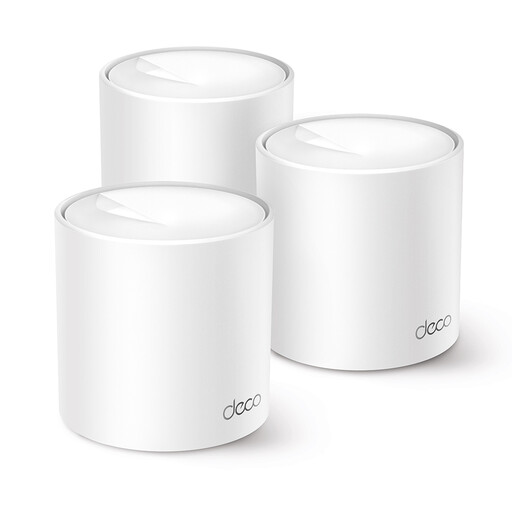 Image unavailable
Worth considering if you’re looking for a Deco mesh system that, according to the product description, can be expanded with additional Deco units.
 Image unavailable
Worth considering if you want to connect an access point via Ethernet; in this setup, the network connection comes through the Ethernet cable.
If you’re watching the concert, check reception on the playback device. If you’re streaming on YouTube yourself, YouTube Help recommends an upload test and a test stream with similar audio and movement. This isn’t a general speed threshold for every concert service.
Place it between the router and the workspace, somewhere it can still receive a usable signal from the router. The Consumentenbond mentions a placement light as a helpful guide; devolo also describes a signal indicator on the WiFi 6 Repeater 5400.
No. In extender mode, the Ethernet port may be intended for a connected device, while the connection to the router remains wireless. For access point mode, connect the Wi-Fi access point using an Ethernet cable; check which modes the specific model supports.
No. A maximum radio speed doesn’t guarantee the same internet speed at the concert location. Test your existing connection where you’ll be using it before choosing extra equipment, and remember to factor in power consumption for additional Wi-Fi access points.
Check the exact version and the CE marking on the device. The Rijksinspectie Digitale Infrastructuur states that equipment must carry the correct CE marking; a declaration for a different hardware version doesn’t prove that your device is the same version.