What should you look for when choosing?
First, check whether the bottleneck is your internet connection or the Wi-Fi coverage in the room. Then choose between extending the signal wirelessly and connecting an access point by cable. Check mesh compatibility separately if you want to use that feature.
| What to consider |
What should you check? |
Who should pay particular attention? |
| Coverage in the room |
Compare the connection next to your router with the one in the room, and check whether there’s a suitable spot where the router signal is still usable. |
If I mainly share family videos from one room, I want a usable connection there. Around 31% of consumers say coverage in their own room is their main concern when buying. |
| Simultaneous use |
Check the Wi-Fi support of your router and devices, and take measurements in the place and at the times when your housemates are online. |
When housemates are streaming or sending files at the same time, I want to know how the connection performs where I use it. Around 25% of consumers prioritise performance under simultaneous network demand. |
| Router compatibility |
Note the exact router model and check standard repeater operation, mesh compatibility and access point mode separately. |
If I want the extender to work with my existing router, I check which features that model supports. Around 19% of consumers say compatibility with their existing router is their main concern when buying. |
| Cable and connections |
Check whether you can run an Ethernet cable to the required location, whether the model has an access point mode and how many Ethernet ports are available. |
If I already have a cable or can run one, I want to be able to route it to the right place. Around 13% of consumers prioritise the wired connection available. |
| Private access and management |
Check security and update options, router or guest access, and permissions for the shared folder or service. |
If I want to share family videos with only certain housemates, I also check who has permission to access the files. Around 12% of consumers put private access and network management first. |
Products to extend your coverage
This selection includes mesh systems, a wireless repeater and wired access points. Check each model’s compatibility with your router and whether you can run an Ethernet cable to the required location.
 Image unavailable
ASUS ZenWiFi BD4 dual-band Wi-Fi 7
Suited to anyone looking to extend their coverage with mesh who already has a compatible ASUS mesh system.
The product name lists Wi-Fi 7 (802.11be) and support for 2.4 and 5 GHz bands.
Joybuy
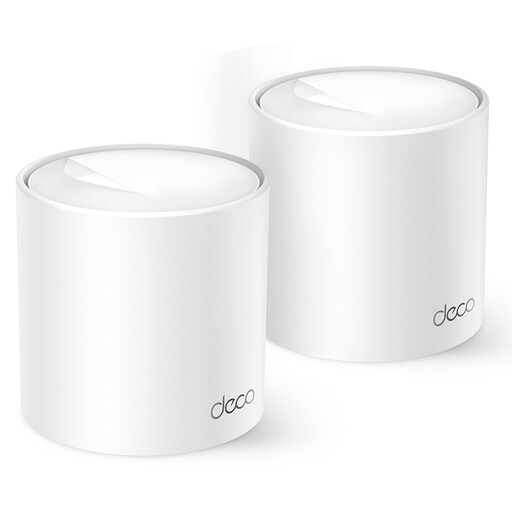 Image unavailable
TP-Link Deco X10 dual-band Wi-Fi 6
Suited to anyone looking to extend coverage with a Deco mesh network. Check that it works with your existing set-up.
The product name lists Wi-Fi 6 (802.11ax) and 2.4 and 5 GHz bands.
Joybuy
 Image unavailable
WiFi Repeater Pro Black
Designed to extend an existing wireless network. Check that the listed band and capacity suit your devices and how you use them.
The product information lists 2.4 GHz and an advertised maximum speed of 300 Mbps.
Joybuy
 Image unavailable
TP-Link TL-WA801N
Could suit you if you’re looking for an access point or extender. Check the cable route and the network equipment you’ll connect it to first.
The product name lists speeds of up to 300 Mbps, two antennas, WPS and Passive PoE. The product information lists only 2.4 GHz and a 10/100 Mbit/s Ethernet port.
Joybuy
 Image unavailable
TP-Link EAP725-Wall
Suited to a wired set-up with a compatible PoE supply. Check whether this type of installation is possible where you want to use it.
The product name lists 5012 Mbit/s and Power over Ethernet (PoE).
Joybuy
Frequently asked questions
How can I tell if a Wi-Fi booster will solve my problem?
First, take a measurement next to your router, ideally using an Ethernet cable as well, and then take another in the room with the problem. If the internet connection itself is slow, a repeater won’t make it faster. If coverage in the room is the main issue, consider where to place a suitable Wi-Fi point. The Consumers’ Association offers tips on measuring and positioning Wi-Fi boosters.
Where should I place the booster?
Don’t automatically put the booster in the room with the weakest signal. The Consumers’ Association recommends placing it between Wi-Fi points, with as few obstacles as possible. An indicator light or app can help you check its position.
Will Wi-Fi 6 give me the speed shown on the packaging?
No. An advertised product speed doesn’t guarantee the same speed when you’re sharing videos. According to the Consumers’ Association, your devices also need to support Wi-Fi 6 for you to benefit from it. Measure the connection where you share your videos.
How can I keep family videos private on a shared network?
Secure your Wi-Fi connection, keep your devices up to date and check who can access the files or sharing service you use. Adding another Wi-Fi point doesn’t automatically change access permissions for shared files. The Consumers’ Association highlights the importance of controlling access to files and devices.
What cooling-off period and rights apply to an online purchase?
For an online consumer purchase in the Netherlands, there is usually a statutory 14-day cooling-off period from the day of delivery, subject to legal exceptions. Separately, if a product doesn’t conform to the contract, you have statutory rights against the seller. ACM ConsuWijzer explains the cooling-off period and your guarantee rights.


