Start by testing whether moving your existing router to a better position improves the connection to your hobby room. Walls, distance and router placement can all affect the Wi-Fi signal. If you can run an Ethernet cable to the room, consider a wired access point or mesh node. Without a cable, a wireless extender is only worthwhile if you can place it in or near the hallway, where it still gets a good connection to the router.
Who is this guide for?
Hobby room user who can run a cable
You can run an Ethernet cable to the room and want to add a Wi-Fi access point without automatically replacing your existing router. The Consumers’ Association points out that walls, ceilings and other obstacles can interfere with the signal.
Hobby room user without an Ethernet cable
You’re looking for a wireless extender and want to work out where in or near the narrow hallway it can still connect to the rest of your network.
User who wants to keep their provider’s router
You want to keep using your existing router, so you’re checking how the extender connects and whether it supports access point mode. TP-Link explains that Deco can operate in access point mode alongside an existing router.
What should you look for in an extra Wi-Fi access point?
Move the router
Choose this if: your router is currently in a poor position and you can move it somewhere more central.
Bear in mind: you may need a longer cable, and moving the router won’t solve every obstacle.
Wired access point or mesh node
Choose this if: you can run an Ethernet cable to the hobby room or a suitable spot nearby.
Bear in mind: you’ll need to run a cable, have a suitable connection and possibly provide extra power.
Wireless mesh node or repeater
Choose this if: running a cable isn’t practical and there’s a spot in or near the hallway with a usable Wi-Fi signal.
Bear in mind: the extra node still depends on its wireless connection to the rest of your network.
Standalone router
Consider this if: your existing router itself isn’t up to the job, or moving it is necessary and possible.
Bear in mind: a new router in the same poor position may not improve the connection through the hallway and walls.
| What to consider |
What to check before buying |
Who is this important for? |
| Connection in the hobby room |
Test the Wi-Fi where you work and in potential locations for an extra access point. |
I want a usable connection in the hobby room and first want to find out whether the router’s position or the route through the hallway is the problem. Around 40% of consumers in this situation say a stable connection is their top priority. |
| Extending Wi-Fi without a cable |
Test the signal where you plan to place the extender and check that the system supports wireless expansion. |
I don’t want to run an Ethernet cable to the room and am looking for a spot where the extra node can still connect to the existing Wi-Fi. Around 30% of consumers say installation without a cable is their top priority. |
| Keeping your existing router |
Check for access point mode and the recommended connection for the main unit. |
I want my provider’s router to manage the network and need to know how the extra system connects to it. Around 20% of consumers say keeping their existing router is their top priority. |
| Purchase and after-sales support |
First compare moving the router with adding a single access point. Also check what’s included in the set and who to contact if something goes wrong. |
I want to avoid buying more equipment than my setup needs and know who to contact if something goes wrong. Around 10% of consumers say the purchase cost and after-sales support are their top priorities. |
Pitfalls to avoid when extending your Wi-Fi
-
Buying a faster router without changing its position
Distance, walls and the router’s position can still limit the connection further into your home.
First test your existing connection and try a better position for the router. Then decide whether the hobby room still needs an extra Wi-Fi access point.
-
Putting a wireless mesh node in the hobby room with poor signal
The extra node also needs a connection to the rest of your network.
Try a potential spot in or near the hallway. If running a cable is an option, compare systems and setups that support a wired connection between nodes.
-
Assuming every mesh system connects wirelessly to your provider’s router
For Deco, TP-Link requires the main unit to be physically connected to the existing router or internet connection via Ethernet.
Before buying, check how the specific system connects and whether it supports access point mode.
A planned wired setup may require extra cabling.
Brands worth comparing
TP-Link
Deco mesh systems are worth considering if you want to place Wi-Fi access points in several locations.
- TP-Link describes wireless connections and optional Ethernet backhaul for Deco. The manufacturer also documents an access point mode for use alongside an existing router.
- TP-Link says the main unit must be physically connected via Ethernet. Check the connection requirements and mode for the exact model.
ASUS
The ZenWiFi XD5 is a mesh option for a setup with Ethernet ports near your chosen Wi-Fi access points.
- ASUS describes Ethernet backhaul and the option to use one network name or separate names for each frequency band.
- The available information doesn’t say how much coverage the XD5 will provide in a particular hobby room, so consider the layout of your own home.
FRITZ!
The FRITZ!Repeater 1200 AX is an option if you’re looking for an extra Wi-Fi access point, including alongside a FRITZ!Box.
- According to the manufacturer, the model has a Gigabit LAN port and can also be used with other modem routers.
- The automatic transfer of Wi-Fi settings and FRITZ! mesh functionality described apply when used with a FRITZ!Box. Don’t assume the same features will work with every router.
Joybuy products for a wired Wi-Fi access point
These products are suited to a wired access point or a mesh setup with an extra Wi-Fi node. Check which connections and power supply you’ll need at your chosen location. For Deco, TP-Link says the main unit must be connected via Ethernet.
 Image unavailable
Ubiquiti U7 Pro, 5800 Mbit/s
An access point powered by PoE is an option if you can run a cable to its fixed location. Make sure you have a suitable PoE power supply or PoE connection.
The product description lists three Wi-Fi bands and one Ethernet port.
View at Joybuy
 Image unavailable
TP-Link Deco X50-PoE, 2-pack
This two-unit mesh system is designed to provide Wi-Fi in several locations. Check that you have the necessary cables and PoE connections where you plan to install the units.
The product description lists dual-band Wi-Fi 6, PoE and two Ethernet ports per unit.
View at Joybuy
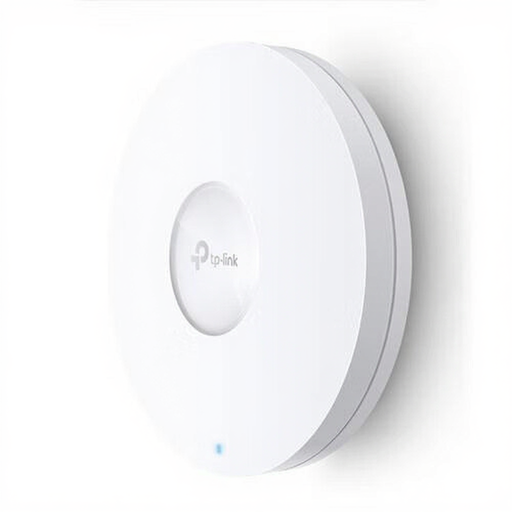 Image unavailable
TP-Link Omada EAP620 HD, 1201 Mbit/s
A wired access point could be a good fit if you can run Ethernet to the hallway or hobby room and want to install it in a fixed position.
The product description lists dual-band Wi-Fi, one Ethernet port and PoE. Wall or ceiling mounting and PoE are mentioned as installation options.
View at Joybuy
 Image unavailable
TP-Link Deco XE75, tri-band Wi-Fi 6E
This Deco mesh system is designed to provide Wi-Fi in several locations. If you want to keep your existing router, check the Ethernet connection required for the main unit.
The product description lists 2.4, 5 and 6GHz bands and Ethernet ports on each unit. The listing describes a three-unit set.
View at Joybuy
 Image unavailable
TP-Link Deco X50, 2-pack
This two-unit mesh system could be a good fit if you want Wi-Fi in several locations. TP-Link describes an access point mode for use alongside an existing router; according to the manufacturer, the main unit needs a physical Ethernet connection.
The product description lists dual-band Wi-Fi 6, optional Ethernet backhaul and three Gigabit ports per unit.
View at Joybuy
Frequently asked questions
Should I replace my broadband package or router first?
Not necessarily. First compare a wired speed test at the router with your Wi-Fi experience in the hobby room, and see whether you can move the router to a better position. The Consumers’ Association advises against immediately signing up for a more expensive package if your Wi-Fi is slow indoors.
How do I connect a Deco set if I want to keep my provider’s router?
According to TP-Link, you connect the main Deco unit physically via Ethernet. In access point mode, Deco can extend the existing wired network without creating its own subnet. Check the connection instructions for your setup.
What should I check after installation?
Test the connection where you work in the hobby room and check that the extra access point can still connect to the rest of your network from there. Keep your network equipment up to date; ACM ConsuWijzer highlights the importance of updates for network and data security.
Who should I contact if my router breaks down too soon?
If a product is faulty and doesn’t perform as you could reasonably expect under normal use, the seller may be responsible for providing an appropriate solution. ACM ConsuWijzer states that there is no single fixed statutory guarantee period for every product in the Netherlands.
What market requirements apply to Wi-Fi equipment in the Netherlands?
The Dutch Authority for Digital Infrastructure states that radio equipment sold in Europe must meet the applicable requirements and carry a CE mark. The mark alone doesn’t tell you whether a particular model will provide good coverage in your hobby room.


