
Vandaag of morgen in huis

Kwaliteit gegarandeerd

Welkomstaanbiedingen ontgrendelen: GRATIS bezorging | Tot 80% korting | Gratis 30 dagen JoyPlus-proefperiode
Download de app
Keeping an eye on your driveway, living room, or garden doesn't have to be complicated. You're looking for a simple, effective way to see what's happening when you're not there, without the hassle of complex installations. However, the market for Wi-Fi security cameras is vast, and making the right choice can be challenging.
As a Joybuy Product Recommendation Officer, my job is to help you get a clear overview. In this article, we'll discuss what to look for and highlight some popular choices to help you find a camera that fits your situation.
Before you make a choice, it's helpful to consider a few key features. This will help you better compare the specifications of different models.
The location largely determines which camera is suitable. An outdoor security camera must be able to withstand the weather. Pay attention to the IP rating. For example, a camera with an IP66 certification is completely dust-tight and can withstand powerful water jets, making it suitable for exposed installation.
For an indoor security camera, other factors are more important, such as its design and the ability to pan and tilt. A special category is filming through a window. Standard cameras often struggle with this due to reflections from the glass, especially at night. However, there are models with special technology that solve this problem.
A sharp image is essential. The resolution is expressed in pixels (such as 1080p or 3MP). A higher resolution means a more detailed image, which can be useful for recognizing faces or license plates.
Just as important is a good camera with night vision. Most cameras use infrared (IR) LEDs for black-and-white images in the dark. Some advanced models offer color night vision, which can provide extra detail in low-light situations. Check the specifications for the night vision distance to determine how far the camera can 'see' in the dark.
A wireless security camera is often a smart camera that you control with your smartphone. Check if the corresponding security camera with an app is available for your device (iOS or Android) and if the interface is user-friendly.
For storing footage, there are typically two options:
Based on objective specifications and common use cases, we have listed a few models for you.
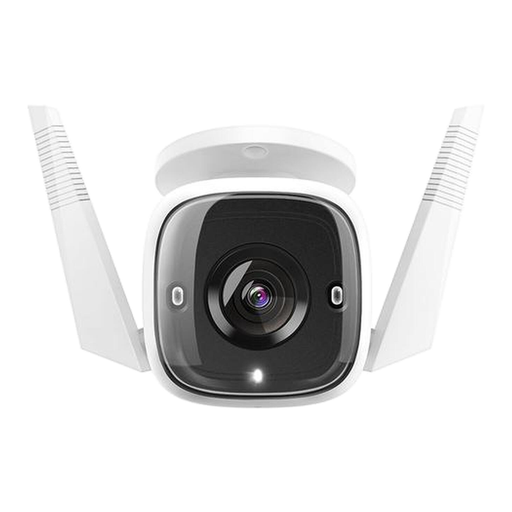
Why It Stands Out This TP-Link Tapo camera is a robust choice for outdoor use. It offers installation flexibility with both Wi-Fi and a wired network connection. The camera is designed to withstand the elements.
Key Features
Who Is It For? For homeowners looking for a reliable and sharp outdoor security camera to monitor a driveway, garden, or front door, without being tied to a cloud subscription.

Why It Stands Out The ZOSI C680 is specifically designed to solve a common problem: filming clearly through glass. According to the manufacturer ZOSI, its special lens technology reduces glare and reflections, allowing you to monitor your garden or driveway from inside.
Key Features
Who Is It For? For residents of apartments or rental homes who want to monitor their outdoor space without being able or allowed to drill a camera into the facade.
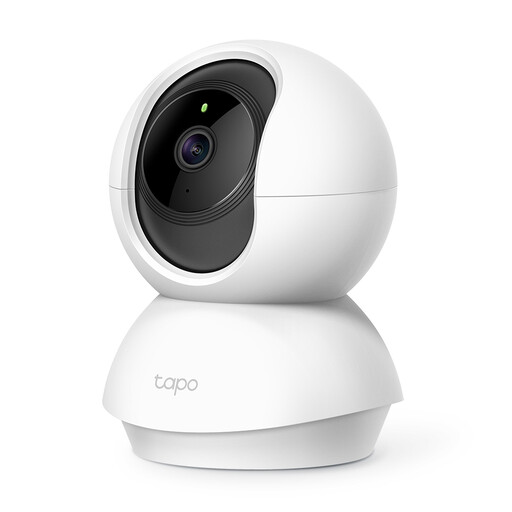
Why It Stands Out This indoor IP camera offers maximum flexibility. The pan/tilt function allows you to remotely rotate and tilt the camera via the app, enabling you to survey an entire room with just one device.
Key Features
Who Is It For? Ideal for monitoring large indoor spaces like a living room or playroom. Also a popular choice for keeping an eye on pets or children, thanks to its two-way audio and pan/tilt function.
The models mentioned above connect via Wi-Fi but still require a power cable. Are you looking for a camera that works completely wirelessly on a battery? These models offer more placement flexibility, as you don't have to worry about a nearby power outlet.
Discover our selection and find the perfect solution for your needs. -> Explore our battery-powered wireless outdoor security cameras
1. Can a Wi-Fi camera work without internet? A Wi-Fi camera needs an internet connection to stream live video to your app and send notifications. However, models with local storage (microSD card) can continue to record even if the internet connection is temporarily lost. You can then view the footage later once the connection is restored.
2. How do you set up a wireless security camera? The installation is usually straightforward. You position the camera, plug it into a power outlet, and follow the steps in the companion app on your smartphone. The app will guide you through the process of connecting the camera to your Wi-Fi network. This typically only takes a few minutes.
3. What is the difference between an IP camera and a Wi-Fi camera? The terms are often used interchangeably. An IP camera (Internet Protocol camera) is any camera that sends and receives data over a computer network. A Wi-Fi camera is a type of IP camera that does this wirelessly via a Wi-Fi network. Therefore, all the cameras discussed here are both IP cameras and Wi-Fi cameras.
