
Vandaag of morgen in huis

Kwaliteit gegarandeerd

Welkomstaanbiedingen ontgrendelen: GRATIS bezorging | Tot 80% korting | Gratis 30 dagen JoyPlus-proefperiode
Download de app
A Wi-Fi security camera lets you keep an eye on your home, children, pets or business from a distance. But a low price or a long list of features doesn't automatically mean it's the right purchase. The best choice depends mainly on where you place it, your network connection, storage options and how you want to receive alerts.
A camera with 2K or 4MP resolution sounds appealing, but the image quality still depends on light, viewing angle, distance and reflections. A camera that films through glass, for example, can suffer from glare. For an outdoor camera, the viewing direction also matters: a wide angle is handy for a garden, while a PTZ camera can pan and tilt to follow a moving subject.
Also pay attention to the difference between digital zoom and optical zoom. Digital zoom enlarges existing pixels and can make details less clear. Optical zoom uses an adjustable lens, so it's listed differently in the product specifications.
The term "colour night vision" doesn't tell you how much you'll actually see in the dark. Some models use infrared lighting, others use a spotlight or ambient light. So check the stated night vision range, for example 9 or 10 metres, and see whether the camera uses black-and-white or colour images.
According to product information from various brands, colour night vision may use additional lighting. That can be useful for a driveway, but could be annoying in a bedroom or near neighbours.
Cloud storage is often a paid option. Local storage via a microSD or TF card can be an alternative, but the maximum capacity varies from camera to camera. Also check whether the camera records continuously or only saves clips after motion detection.
A Wi-Fi camera with an app also depends on a stable connection. 2.4GHz Wi-Fi generally has better range through walls, while 5GHz Wi-Fi often offers higher transfer speeds over short distances. Not every model supports both bands. According to its product specifications, the JOOAN Triple Lens camera, for example, only works with 2.4GHz Wi-Fi and an RJ45 cable.
For an indoor and outdoor security camera, first check the protection rating:
An indoor camera should not be placed outdoors, even under a canopy, unless the manufacturer explicitly states it is suitable. For tenants, a window camera with adhesive mounting can be a good option, as drilling is not always allowed.
A camera with motion detection can send an alert to your phone. Pay attention to what type of detection is mentioned: general motion, people, vehicles, animals or sound. Adjustable activity zones can help reduce alerts from trees, traffic or a busy street.
Automatic tracking on a PTZ camera can follow a moving subject. In practice, how well this works depends on the viewing angle, lighting conditions and settings in the app. So treat "AI detection" as a feature to compare, not as a guarantee that every movement will be correctly recognised.
A camera with two-way audio has a built-in microphone and speaker. This lets you communicate with someone in view via the app, for example at a front door or with a pet. Check which app is required, whether multiple users can view the feed, and whether the camera works with Android and iOS.
Do not place a camera in other people's private spaces and inform visitors when they are being recorded. Check the current privacy regulations and be aware of the guidelines around camera surveillance. Use a strong Wi-Fi password, change any default password and install firmware updates when they become available.

Why it fits this profile: This indoor IP camera is designed for simple monitoring of a room, pet or entrance. The app supports live viewing and alerts.
The specifications list a resolution of 1920 × 1080, night vision up to 9 metres and local storage via a microSD card up to 128GB. Do check whether the card needs to be purchased separately.
360° horizontal and 114° vertical movement, two-way audio, motion alerts and privacy mode.
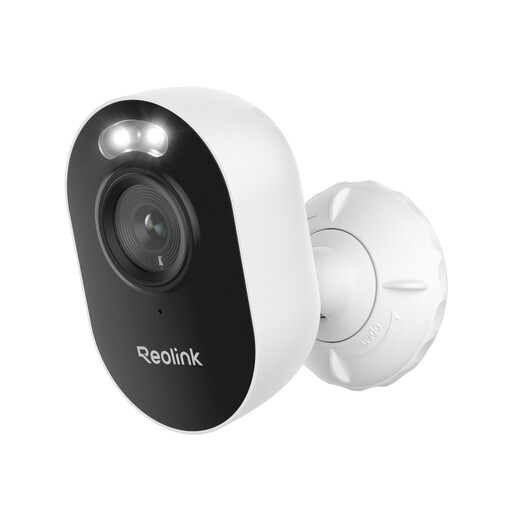
Why it fits this profile: Ideal for anyone looking for an outdoor camera with higher image resolution, dual-band Wi-Fi and multiple detection modes.
The product specifications mention 2.4GHz and 5GHz Wi-Fi, IP65 protection and night vision up to 10 metres. This lets you plan the connection and placement more effectively in advance.
2560 × 1440 resolution, person, vehicle and animal detection, two-way audio and microSD storage up to 512GB.
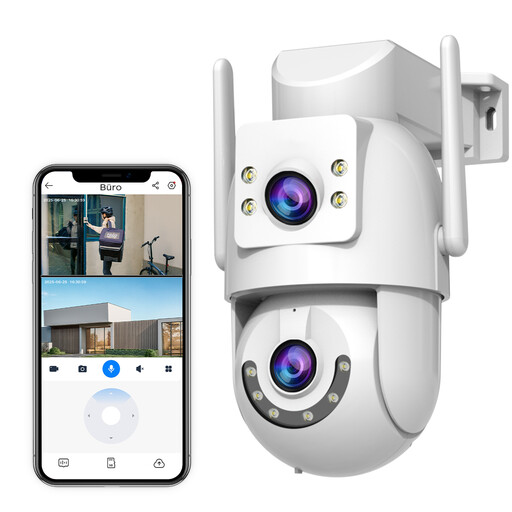
Why it fits this profile: The dual lens, pan-and-tilt function and outdoor support make it a good fit for a garden, driveway or small business premises.
The stated IP66 rating and support for 2.4GHz, 5GHz and a wired connection make the installation options clearer. Cloud storage is encrypted according to the description; check the terms and any costs.
Two 3MP lenses, 330° pan and 90° tilt, two-way audio, motion detection and card storage up to 256GB.
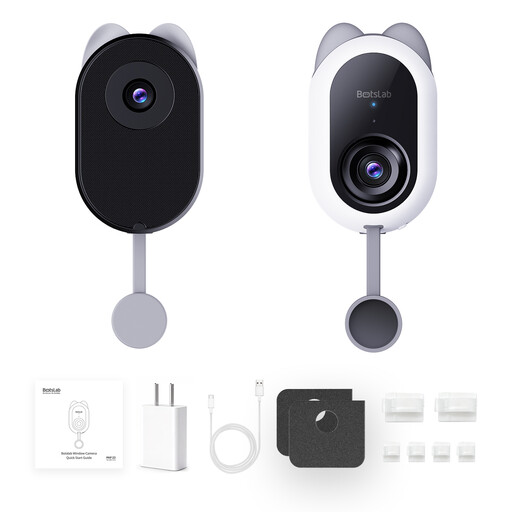
Why it fits this profile: This window camera is designed for situations where you want to see outside without drilling a camera into the exterior wall.
The description mentions an anti-reflective lens and adhesive mounting with no screws required. Check the distance to a power socket and possible glare on your window beforehand.
4MP image, 2.4GHz and 5GHz Wi-Fi, person and vehicle detection and local recording on a microSD card up to 512GB.
We've put together a full, up-to-date list of products that fully meet these strict selection criteria and comply with current European safety regulations.
No. Some models support local storage via a microSD card. Cloud storage may also be available as a paid service. Check per product which features work without a subscription, such as live viewing, alerts and playback.
A camera usually needs Wi-Fi for app control and remote alerts. Some models offer a local hotspot or network function, but the capabilities vary. During an internet outage, local recording may still continue if a suitable memory card is installed.
The lifespan depends on power supply, moisture, temperature, mounting and software support. Place an outdoor camera according to its stated IP rating, protect connections from water and keep the app and firmware updated. A good memory card for continuous recording can also be important for reliable local storage.
