
Vandaag of morgen in huis

Kwaliteit gegarandeerd

Welkomstaanbiedingen ontgrendelen: GRATIS bezorging | Tot 80% korting | Gratis 30 dagen JoyPlus-proefperiode
Download de app
A white wireless mouse complements a clean, organised desk, but colour says little about the actual user experience. The real differences lie in connectivity, sensor, weight, shape and battery life. If you focus only on DPI or RGB lighting, you may end up with a mouse that feels uncomfortable, runs out of power quickly or does not work well with your laptop.
In this buying guide from the Joybuy Product Recommendation Officer, we compare practical features and product specifications. This makes it easier to determine which white wireless mouse suits gaming, working from home, studying or use across multiple devices.
A high DPI value means the cursor can respond more sensitively. That does not automatically make a mouse more accurate or better suited to your display. For office work, 1,000 to 2,000 DPI is sufficient for many users. Gamers may need higher adjustable values, but the sensor, software and polling rate are at least as important.
Therefore, check:
A wireless mouse with a USB receiver usually connects directly via 2.4 GHz, but a laptop with few USB ports may benefit more from a wireless mouse with Bluetooth. Some gaming models use only a USB dongle, while others support both Bluetooth and a receiver.
Pay attention to the following:
A USB receiver can provide a stable connection, while Bluetooth is convenient for laptops and tablets. The most practical choice depends on your workspace.
An ergonomic wireless mouse designed for right-handed use will not suit everyone. Left-handed users need a symmetrical model or a mouse specifically shaped for the left hand. Your preferred grip — palm, claw or fingertip — also affects the choice.
Check the dimensions and weight. A lightweight gaming mouse weighing approximately 53 to 70 grams can feel comfortable during rapid movements. A heavier model may feel more stable for office work. A compact mouse is not necessarily comfortable for larger hands.
An optical sensor is standard in modern mice. DPI indicates how quickly the cursor moves across the screen. The polling rate, expressed in Hz, indicates how often the mouse sends position data to the computer. Gaming models may list polling rates of 1,000, 4,000 or 8,000 Hz.
A higher polling rate generally places greater demands on your system and battery. For word processing, spreadsheets and browsing, it is rarely a decisive factor. For fast-paced games, however, it can be relevant, provided your computer and display can make meaningful use of the setting.
Keep in mind that accuracy claims may come from the brand itself. Statements such as “99.8% accuracy”, for example, may be based on the brand’s own research and do not constitute a universal guarantee for every surface or user.
A mouse may use disposable batteries or a built-in rechargeable battery. A model with an AA or AAA battery can be practical if you do not want a charging cable on your desk. A rechargeable gaming mouse eliminates recurring battery purchases, but it does need to be charged regularly.
Check:
A quiet wireless mouse can be more comfortable in a shared workspace. Manufacturers may express noise reduction as a percentage; always check whether this is a claim based on the brand’s own research. If you also need a keyboard, consider a wireless keyboard and mouse set. Pay particular attention to the keyboard layout: QWERTY, QWERTZ and other layouts differ in the positioning of important keys.
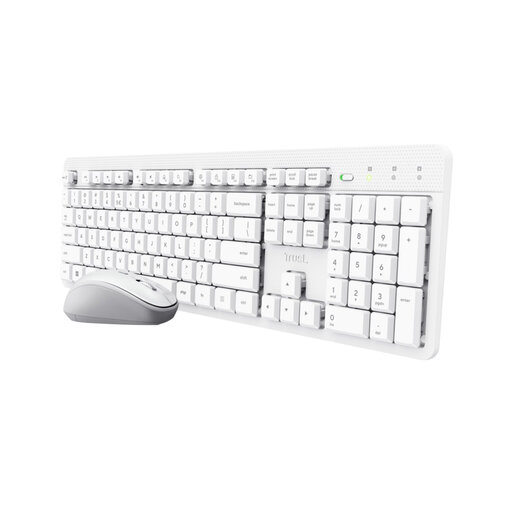
Why This Fits Their Persona: A practical set for students, remote workers and office setups that need a keyboard and mouse without multiple cables.
The specifications list one storable USB receiver and a mouse with adjustable 800–1600 DPI. However, check whether the US/QWERTY layout matches your preference.
Keyboard and mouse connected through one receiver; quiet keys and mouse clicks according to the product description.

Why This Fits Their Persona: Designed for right-handed PC gamers looking for a lightweight shape, high DPI and a high polling rate for fast-paced games.
The 54-gram weight and listed 8,000 Hz polling rate can be verified directly. Bluetooth is not included in the supplied specifications, so expect to use the wireless receiver.
54 grams; optical sensor with up to 35,000 DPI; rechargeable battery.
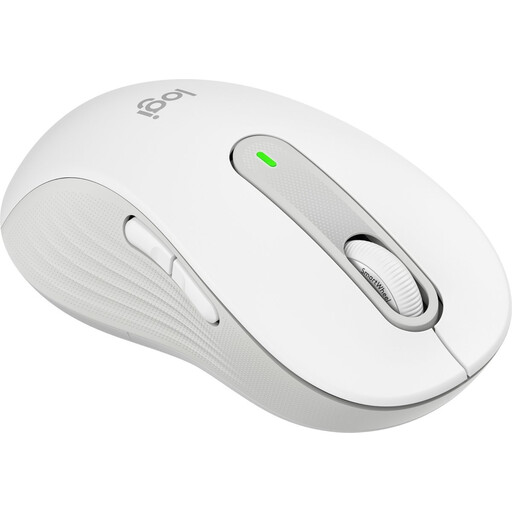
Why This Fits Their Persona: The left-handed design is intended for users with larger hands who want a quiet mouse for everyday work.
The product details explicitly mention left-handed use, Bluetooth Low Energy and a Logi Bolt receiver. This makes the shape more clearly defined than that of general ergonomic models.
2,000 DPI; five buttons; Bluetooth and USB receiver; SilentTouch is a claim based on Logitech’s own research.

Why This Fits Their Persona: For gamers seeking an ultra-light mouse with programmable buttons, a built-in battery and a high polling rate.
The product information lists a weight of 53 grams, ten programmable buttons, 30,000 DPI and 8,000 Hz. The stated battery life of up to 750 hours is based on Rapoo’s own information and depends on the settings used.
53 grams; optical switches; macro and button customisation through software for Windows and Mac.
We have put together a current selection of models that meet these practical selection criteria and applicable European product requirements.
Bluetooth is practical for laptops, tablets and devices with few available ports. A USB receiver is often easy to set up and well suited to desktops and gaming PCs. Check in advance which connection your device supports.
It varies by model, battery type, lighting, connection and polling rate. Manufacturers often state a maximum runtime under specific conditions. Treat this figure as a guideline and check whether the mouse remains usable while charging.
It can be, but pay attention to the shape, click noise and lighting. A model with numerous programmable buttons and RGB lighting is primarily designed for gaming. For office work, quiet operation, Bluetooth and a comfortable shape are often more important than 30,000 DPI.
