
Vandaag of morgen in huis

Kwaliteit gegarandeerd

Welkomstaanbiedingen ontgrendelen: GRATIS bezorging | Tot 80% korting | Gratis 30 dagen JoyPlus-proefperiode
Download de app
Buying a whiteboard sounds simple, until you have to choose between a small magnetic whiteboard, a large board for the meeting room or an interactive display. The key differences are not limited to size and price. The mounting method, surface type and accessories required also determine how comfortable the board is to use every day.
A small 50 x 35 cm board can be handy for shopping lists, reminders or a home office. For a meeting with several participants, however, this surface can quickly prove too small. Text is written smaller and important information disappears as soon as the board becomes full.
Measure the available wall space beforehand and decide how many people need to be able to read the board. A 200 x 100 cm whiteboard can be practical for a meeting room. A 1500 x 900 mm board takes up less space, while still offering more writing room than a compact planning board.
A magnetic whiteboard is not automatically suitable for every situation. Check whether magnets actually fit the way you work and whether the required magnets are included. According to the product description, the vidaXL 50 x 35 cm board comes with magnets, a marker, an eraser and mounting materials. The contents may differ with other models.
Pay attention to the type of wall, too. A lacquered steel panel, aluminium frame and corner protectors may form part of the construction, but stability also depends on correct installation. A wall-mounted whiteboard must be secured firmly to prevent it from tipping or coming loose.
An interactive whiteboard or digital whiteboard is essentially a large touchscreen. It offers features such as presentations, apps, connections and on-screen collaboration, but it also brings additional considerations:
A 75- or 86-inch BenQ interactive display weighs several dozen kilos. This requires a suitable wall structure or a stable mobile stand. A traditional dry-wipe whiteboard is easier to use and does not require a power connection.
For an office or meeting-room whiteboard, the dimensions and usable writing area are crucial. A 2000 x 1000 mm board is suitable when several topics need to remain visible at the same time. A 1500 x 900 mm board is more suitable for a smaller room.
For individual use, 24 x 18 inch or 50 x 35 cm may be sufficient. When choosing, take the following into account:
Only use a whiteboard marker designed for dry-wipe surfaces. Permanent markers can leave stains and, according to the Deli erasers’ product information, are not suitable for use with these accessories. A whiteboard with an eraser is convenient if you want to start using it straight away, but check which components are actually included.
According to the product description provided, a soft felt eraser with an ABS handle is intended for whiteboards, dry-wipe boards and glass boards. Clean the eraser by shaking out marker dust or washing it by hand in mild soapy water. Allow it to air-dry completely and do not use abrasive cleaning products.
Check whether screws, wall plugs or another mounting system are included. The vidaXL magnetic whiteboard is stated to include mounting materials. The manufacturer also says that the board must be securely attached to the wall; no maximum load capacity is specified.
For interactive displays, the VESA size is important. According to the product specifications, the BenQ models in this overview are suitable for wall mounting. Before buying, check that the bracket supports the weight and the correct mounting dimensions. Heavy displays require at least two people for lifting and installation, as stated in the safety information for the models concerned.

Why it suits this profile: The compact size is ideal for a home office, kitchen, student room or personal planning board. According to the product description, a marker, eraser, magnets and mounting materials are included.
The dimensions are clearly specified, allowing you to decide beforehand whether the writing surface is large enough. The included mounting materials make installation easier.
50 x 35 cm, magnetic, lacquered steel panel and aluminium frame; marker and eraser are included according to the description.
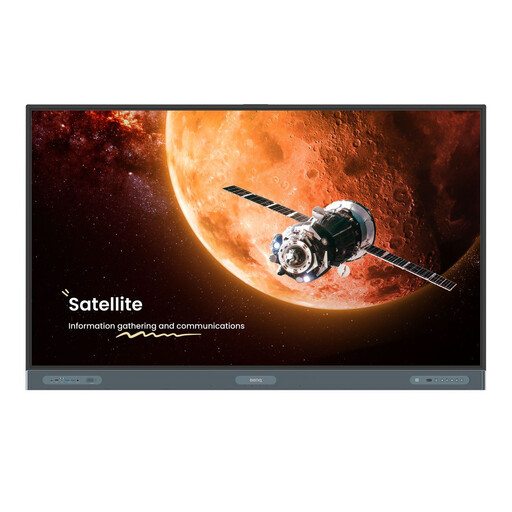
Why it suits this profile: This display is designed for presentations, education and collaboration, bringing digital content and touch interaction together.
The specifications include 4K resolution, an IPS panel, an anti-glare screen and VESA mounting. This allows you to assess the image quality and installation requirements in advance.
75 inch, 3840 x 2160 pixels, up to 50 simultaneous touch points, Android, Wi-Fi, Bluetooth and built-in microphone.
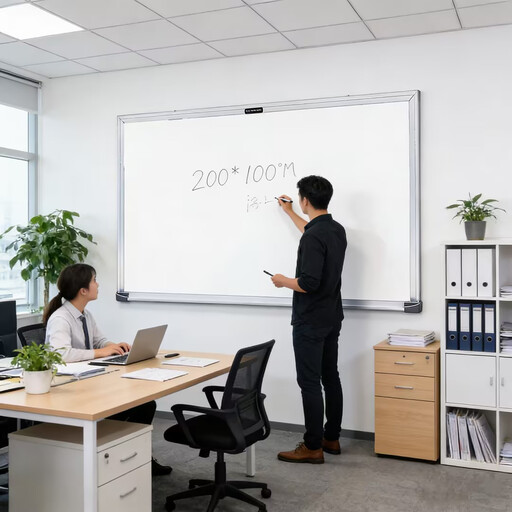
Why it suits this profile: The large format provides space for agendas, diagrams, project plans and notes during meetings.
The exact dimensions prevent you from buying a small board for a group space. However, check the wall width, access routes and mounting options beforehand.
2000 x 1000 mm, designed for offices and conference rooms; traditional use without a power supply.
We have put together a complete, up-to-date list of products that fully meet these strict selection criteria and the applicable European safety regulations.
Choose a traditional board if you mainly want to write, plan and erase quickly. A whiteboard for school or the office will usually benefit from a generous surface, clear markings and a dedicated place for markers and erasers.
Choose an interactive model if presentations, digital files, video calls or collaborative editing are part of the way you work. In that case, look beyond the screen size and consider the connections, storage, operating system, speakers and mounting.
After delivery, check that the board is undamaged and keep the manual. For a touchscreen, use a soft cloth and avoid harsh cleaning products. With a traditional board, prevent stains by keeping permanent markers well away from it.
Its lifespan depends on the quality of the surface, the markers used, cleaning and how often it is used. Erase marks regularly and do not leave writing on the board unnecessarily long. Do not use an abrasive sponge, as this can damage the surface.
This depends on the number of participants and the available wall space. For collaborative planning, a 2000 x 1000 mm board provides plenty of writing room. In a smaller room, 1500 x 900 mm may be a more practical compromise. Also measure the viewing distance and access routes before buying.
In addition to the purchase price, you need to consider power consumption, installation, any wall bracket and connection to the network. A traditional whiteboard has no electricity costs during use. With an interactive display, you can compare consumption based on the stated typical and standby power.
