
Vandaag of morgen in huis

Kwaliteit gegarandeerd

Welkomstaanbiedingen ontgrendelen: GRATIS bezorging | Tot 80% korting | Gratis 30 dagen JoyPlus-proefperiode
Download de app
A white wireless mouse suits a bright, tidy workspace, but colour is only the beginning of the decision. The difference between a mouse that is comfortable for working from home and one that quickly disappoints usually comes down to its shape, connection, power supply and sensor.
If you only look at DPI, battery claims or a low price, you may end up buying a mouse that does not suit your hand or computer. Below, we cover the key points to consider, along with several popular choices for office work, everyday use and gaming.
A mouse may be described as ergonomic, but that does not automatically mean it will be comfortable for every user. Pay attention to the length, width, height and weight. A large model may feel comfortable in larger hands, while a compact mouse may be better suited to a smaller hand or fingertip grip.
Also check the hand preference. Some models are designed specifically for right-handed use. A left-handed mouse or symmetrical model prevents you from discovering only after purchase that the buttons are awkwardly positioned.
A mouse with a USB receiver usually works via 2.4 GHz. This is practical for a desktop or laptop with a free USB port. A Bluetooth mouse connects directly to devices that support Bluetooth, so you do not need to use a receiver.
Pay attention to the difference between Bluetooth and a supplied radio receiver. Also check whether the receiver uses USB-A or another format, and whether your laptop needs an adapter. For gaming, the connection method can affect the available polling rate and software features.
“Up to” a certain number of hours or years is a maximum figure measured under specific conditions. Intensive lighting, a higher polling rate, lots of movement and software features can all affect power consumption.
A mouse with replaceable AA or AAA batteries can be put back into use quickly, but it involves ongoing costs. A rechargeable wireless mouse has a built-in battery and needs a USB cable. So do not only look at the claimed usage time. Also check the charging time, whether you can charge it while using it and whether the battery can be replaced.
For office work, Bluetooth is useful if you want to keep your USB ports free. A receiver can provide a straightforward plug-and-play solution. Models with both options are flexible when switching between a business laptop, desktop and tablet.
When using multiple devices, check whether the mouse can actually switch between them quickly. “Multi-device” can mean different things from one model to another: sometimes it refers to several paired devices, while in other cases only one connection can be active at a time.
DPI indicates how sensitively the cursor responds to movement. For word processing, spreadsheets and browsing, an adjustable setting of around 800 to 2,000 DPI is often sufficient. A higher DPI setting is mainly useful for specific screen sizes or gaming, but a higher number does not automatically make a mouse more accurate.
For a wireless gaming mouse, the sensor, polling rate and software support are also important. A polling rate of 1,000 Hz is a common specification for many gamers. Some models list 8,000 Hz; your computer, game, software and receiver must all support this setting. Also check whether the mouse comes with a wireless receiver and charging cable.
A lightweight gaming mouse weighing around 53 to 70 grams may feel comfortable for fast movements, but some users prefer a heavier model with more support. Look at the number of buttons and whether they can be programmed.
For shared spaces, a quiet wireless mouse is a sensible choice. However, pay attention to the wording: according to Logitech’s own information, SilentTouch can reduce click noise by up to 90 per cent on the Signature M650 L. This is a brand claim based on its own testing conditions, not a guarantee that every sound will disappear completely.
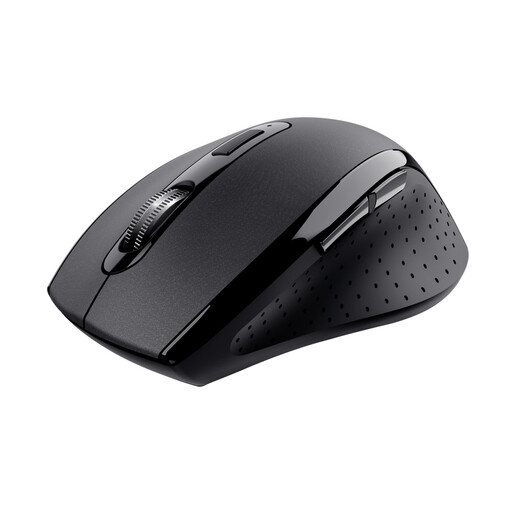
Why it suits this profile: A practical mouse for home workers and those setting up an office, with 1,500 DPI, a 2.4 GHz connection and a range of up to 10 metres according to the product information.
The key connection information is clear: the USB receiver is stored inside the mouse and it is powered by two AAA batteries. Bear in mind that this model is listed as right-handed.
Ergonomic shape, quiet clicking, six buttons and adjustable DPI up to 1,500.

Why it suits this profile: Designed for right-handed PC gamers looking for a lightweight mouse with high sensor resolution and wireless operation.
The specifications list a weight of 54 grams, a rechargeable battery and USB-C use. Bluetooth is not listed, so check that the supplied wireless solution is compatible with your computer.
54 grams, six buttons, a Focus Pro 35K sensor and a stated polling rate of up to 8,000 Hz.
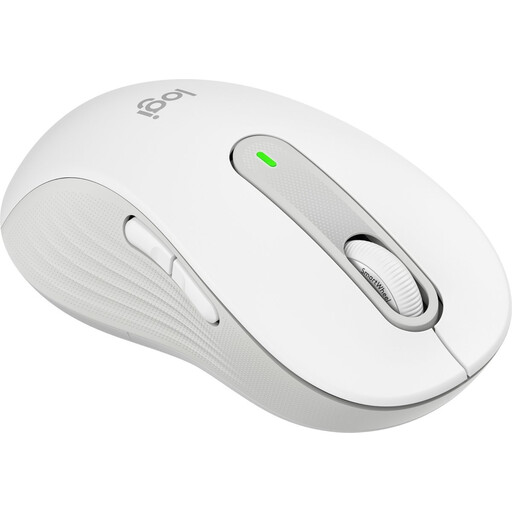
Why it suits this profile: This mouse is specifically designed for left-handed users with larger hands who work at a computer for long periods every day.
The hand preference and size are clearly specified. The mouse uses Bluetooth Low Energy or a Logi Bolt USB receiver, but according to the specifications, both connections support one paired device.
2,000 DPI, five buttons, 111.2 grams and a stated battery life of up to two years with a single AA battery.

Why it suits this profile: For gamers looking for an extremely lightweight model, programmable buttons and a high polling rate, and who are happy to install software.
The weight of 53 grams and the presence of ten programmable buttons are clearly specified. A driver update may be required for the stated 750-hour battery life; see the product information for this condition.
30,000 DPI, an 8,000 Hz polling rate, a rechargeable battery and optical switches with a stated lifespan of 120 million clicks.
We have put together a complete, up-to-date list of products that fully meet these strict selection criteria and the applicable European safety regulations.
Not necessarily. Bluetooth keeps a USB port free and works well with compatible laptops and tablets. A mouse with a USB receiver is often easy to connect to a desktop. Choose based on the ports, compatibility and number of devices you use.
Its lifespan depends on the switches, battery, casing and usage. A manufacturer may specify a certain number of clicks or hours, for example, but this is not a guarantee in every usage situation. Keep the mouse dry, avoid heavy impacts, and charge a built-in battery using a suitable cable and adapter.
Fingerprints and dust may be more noticeable on a white casing than on a dark model. Clean the mouse with a soft, slightly damp cloth and carefully clean the sensor opening. Do not use harsh liquids, and prevent moisture from getting inside the casing.
