
Vandaag of morgen in huis

Kwaliteit gegarandeerd

Welkomstaanbiedingen ontgrendelen: GRATIS bezorging | Tot 80% korting | Gratis 30 dagen JoyPlus-proefperiode
Download de app
A white wireless gaming mouse is a great fit for a clean, uncluttered PC set-up. But if you’re a keen PC gamer or FPS player, there’s more to consider than looks. A mouse may boast impressive figures on the box, yet still not suit your hand, grip or playing style.
Keep an eye out for these three common pitfalls:
An ultralight gaming mouse weighing around 50 to 65 grams is easy to lift and move quickly. This can be useful at low sensitivity, when you make wide arm movements in FPS games. A heavier model may feel more stable for everyday use.
As well as weight, consider:
A lighter mouse isn’t automatically more comfortable. An ergonomic gaming mouse should suit the size of your hand. For example, a mouse that’s too short may put extra strain on your fingers, while a wide shape may not suit a narrower hand.
An optical gaming mouse uses an optical sensor to track movement. Don’t focus solely on the maximum DPI figure. Values of 26,000, 30,000 or 44,000 DPI are mainly useful if you want to fine-tune your settings; many players use a lower setting in practice.
Useful features include:
According to RAPOO’s product information, the VT7 MAX and VT2 MAX have independent X/Y DPI settings of up to 30,000 DPI. Logitech lists a HERO 2 sensor with up to 44,000 DPI for the G PRO X Superlight 2c. These are verifiable product specifications, but they don’t determine on their own how accurate the mouse will feel in your game.
The polling rate tells you how often the mouse sends information each second. At 1000 Hz, it does so up to 1,000 times per second; at 8000 Hz, up to 8,000 times. A higher rate can reduce the time between movement and registration, but it’s most relevant if you have a fast monitor, a powerful PC and a competitive playing style.
Also check how the mouse connects:
A wireless gaming mouse with a stable receiver can help avoid unnecessary connection problems. You can also use an extension cable or position the dongle close to the mouse.

Why it suits this profile: This model combines a low weight with wireless 8K functionality, programmable buttons and a mechanical click feel.
The product information lists a weight of 53 grams, up to 26,000 DPI and battery life of up to 750 hours at 1000 Hz. Be sure to check the latest software settings before using 8K.
53 grams, 10 programmable buttons and mechanical switches rated for up to 100 million clicks.
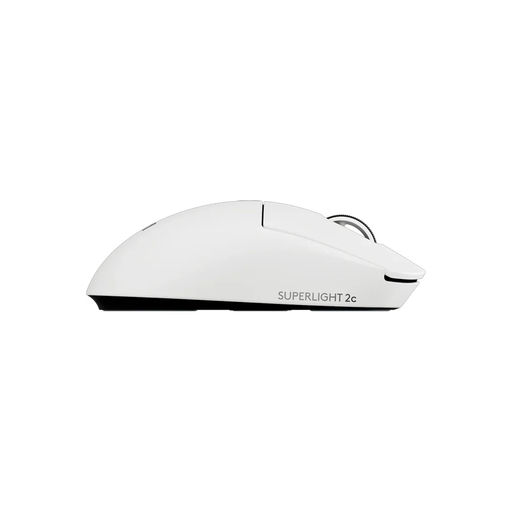
Why it suits this profile: Its compact shape and low weight make it a good fit for users with smaller hands or anyone who prefers a compact FPS mouse.
It’s not all about maximum DPI: Logitech lists the model at 53 grams, with five programmable buttons.
Optical HERO 2 sensor, adjustable up to 44,000 DPI, polling rate of up to 8 kHz and battery life of up to 95 hours according to the product information.

Why it suits this profile: This model is aimed at gamers who want to combine a lightweight mouse with plenty of adjustment options and long wireless sessions.
According to RAPOO, the optical switches are rated for 120 million clicks. The maximum battery life quoted in the product information applies to specific settings, and the low-power mode requires an up-to-date driver.
53 grams, up to 30,000 DPI, independent X/Y settings, 10 programmable buttons and quoted battery life of up to 750 hours at 1000 Hz.

Why it suits this profile: Its right-handed shape and 54-gram weight are designed for quick movements, flick shots and control in FPS games.
Alongside its high sensor specifications, the product information lists an optical Focus Pro 35K sensor, six buttons and a wireless connection with a polling rate of up to 8,000 Hz.
54 grams, optical sensor up to 35,000 DPI, programmable buttons and up to 95 hours of use between charges according to Razer.
We’ve put together a complete, up-to-date list of products that meet these strict selection criteria and comply with current European safety regulations.
Not every player does. A gaming mouse with an 8K polling rate may be worth considering if you have a fast monitor and a powerful PC. For many users, 1000 Hz is enough. Also check that the mouse driver, game and computer all support the setting properly.
It depends on the model and how you use it. Lighting, polling rate and wireless mode all affect power consumption. Manufacturers’ figures are maximum estimates under certain conditions. A model with a USB-C cable that you can use while charging means you won’t have to interrupt a gaming session.
Dust, fingerprints and discolouration can be more noticeable on a white casing. Clean the mouse with a soft, slightly damp cloth and follow the manufacturer’s safety instructions. Keep liquids away from the sensor, buttons and charging port. Check the warranty terms in advance too: in the EU, statutory conformity rights generally apply for at least two years, while additional terms can vary by brand and retailer.
