
Vandaag of morgen in huis

Kwaliteit gegarandeerd

Welkomstaanbiedingen ontgrendelen: GRATIS bezorging | Tot 80% korting | Gratis 30 dagen JoyPlus-proefperiode
Download de app
A white wireless gaming mouse combines a tidy desk setup with speed and freedom of movement. However, a high DPI rating or strikingly low weight doesn’t automatically mean a mouse is right for your hand, games or workspace. Online offers in particular sometimes use technical terms without explaining what they mean in practice.
Look out for these three common pitfalls:
A low weight can make it easier to lift and move your mouse in fast-paced FPS games. Models weighing around 53 to 54 grams fall into the ultra-light gaming mouse category. That doesn’t guarantee comfort, though. Also consider:
An ergonomic wireless mouse for office work often has a different shape from an esports model. A larger left-handed mouse, such as the Logitech Signature M650 L, weighs 111.2 grams and is designed for extended everyday use rather than fast gaming movements.
The polling rate shows how often the mouse sends information to your computer each second. At 1,000 Hz, it theoretically does this 1,000 times per second; at 8,000 Hz, the reporting frequency is higher. The difference can be most relevant for players with a fast monitor, low system latency and a competitive playing style.
A gaming mouse with an 8K polling rate usually requires a suitable USB connection, up-to-date software and enough system capacity. Also check whether 8K is available wirelessly or only via a cable or separate receiver.
DPI determines cursor sensitivity, not accuracy by itself. A high-DPI gaming mouse offers plenty of adjustment options, but a lower DPI can give you more control in some games. Independent X/Y settings are useful if you want to adjust horizontal and vertical movements differently.
Don’t just compare the stated battery capacity; also consider the connection:
A wireless mouse with long battery life can mean less frequent charging. Rapoo VT3 and VT3 MAX product information states up to 750 hours at 1,000 Hz. This is a manufacturer’s claim; actual battery life may vary depending on polling rate, lighting, power mode and usage.
Also consider the type of switch. Optical and mechanical switches feel different. According to Rapoo’s product information, the VT3 MAX has an optical switch with a stated lifespan of 120 million clicks. The VT3 uses a mechanical switch with a stated lifespan of 100 million clicks. Treat these figures as product specifications, not a guarantee for every usage scenario.
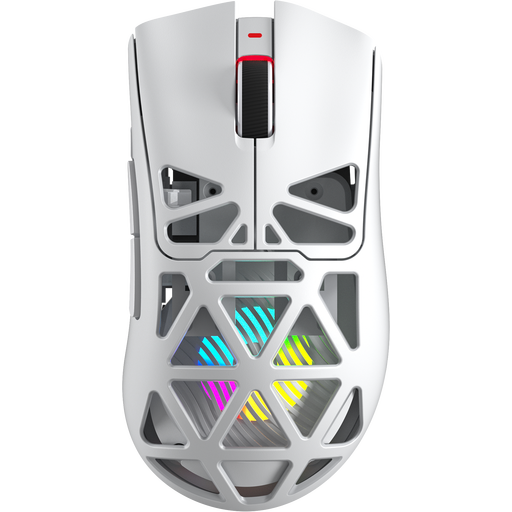
Why it suits this profile: This model combines 2.4G, Bluetooth 5.0 and USB-C in one white gaming mouse. It’s a good fit for beginners who want a choice of connections without jumping straight to a specialist esports model.
The specifications list several connection options, so you’re not reliant on just one wireless mode.
According to the product title: 67 grams, 12,000 DPI, 8KHz and seven programmable buttons.

Why it suits this profile: This mouse is designed for right-handed players looking for a lightweight build and plenty of customisation options for fast-paced games.
The product specifications list both wired and wireless use. That gives you an alternative if charging or wireless interference becomes an issue.
54 grams, optical Focus Pro 35K sensor, up to 8,000 Hz and six programmable buttons, according to the product information.

Why it suits this profile: For intensive gamers, low weight, a high polling rate, plenty of buttons and long stated battery life are all relevant factors to consider.
The product information specifies the conditions behind the battery claim: up to 750 hours at 1,000 Hz. The 8K mode may use power differently.
53 grams, up to 30,000 DPI, native 8K wireless, ten programmable buttons and an optical switch with a stated lifespan of 120 million clicks.
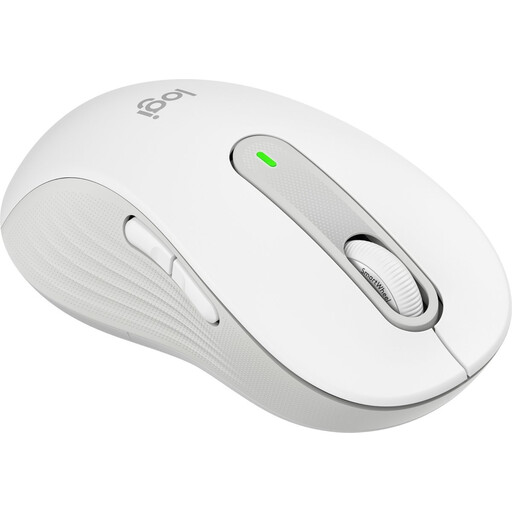
Why it suits this profile: This white computer mouse is designed for left-handed users with larger hands, for everyday use in the office or at home.
Choosing a left-handed design means you don’t have to adapt to a right-handed shape. According to Logitech, SilentTouch is designed to reduce clicking noise.
2,000 DPI, Bluetooth Low Energy or Logi Bolt, five buttons and a stated battery life of up to two years with one AA battery.
We’ve put together a complete, up-to-date list of products that meet these strict selection criteria and current European safety regulations.
It depends on your monitor, game, computer and settings. 8K reports to the computer more often than 1K, but not every player will notice a clear difference. Also check the power consumption and whether the mouse genuinely supports 8K wirelessly.
Battery life varies by model and settings. A high polling rate, RGB lighting and intensive use can all shorten it. Manufacturer claims such as “up to 750 hours” are therefore guidelines based on specific conditions. A model with USB-C and the option to use it wired means you won’t be left without a mouse mid-game.
A quiet wireless mouse can work well for casual games and everyday use, but quiet office mice often have a lower DPI, fewer programmable features and no high polling rate. For competitive games, the sensor, connection, shape and polling rate are generally more important than click noise alone.
