
Vandaag of morgen in huis

Kwaliteit gegarandeerd

Welkomstaanbiedingen ontgrendelen: GRATIS bezorging | Tot 80% korting | Gratis 30 dagen JoyPlus-proefperiode
Download de app
A sleek, white PC build is a dream for many gamers and content creators. But the search for the right white PC cooling can quickly become a frustrating task. The market is flooded with options that look great at first glance but disappoint in practice. Before you invest in a new white CPU cooler or a set of white case fans, it's crucial to understand the common pitfalls.
Many buyers fall into the same marketing traps. Here are the three most common problems you can avoid:
To make an informed choice, focus on the specifications that truly matter. Don't get distracted by marketing buzzwords.
This is the most important technical trade-off.
A fan that excels in airflow may struggle with a radiator, and vice versa. So, always check what you'll be using the fan for.
A fan is never completely silent under load. Look at the minimum and maximum dB values provided by the manufacturer. A fan that operates between 10 dB and 36 dB offers a good balance. PWM support (Pulse Width Modulation) is a must. This means the fan has a 4-pin connector, allowing your motherboard to precisely control its speed based on temperature. This way, the fan only runs fast when it's truly necessary.
To avoid the RGB nightmare, it's wise to stick to a single ecosystem. Systems like Corsair iCUE LINK, for example, use a single cable to connect multiple fans and components. This not only drastically simplifies cable management but also guarantees perfect synchronisation of your RGB fan lighting. Always check if the connectors (for both power and RGB) are compatible with your motherboard or the included controller.
Below are some popular choices, matched with specific user profiles.
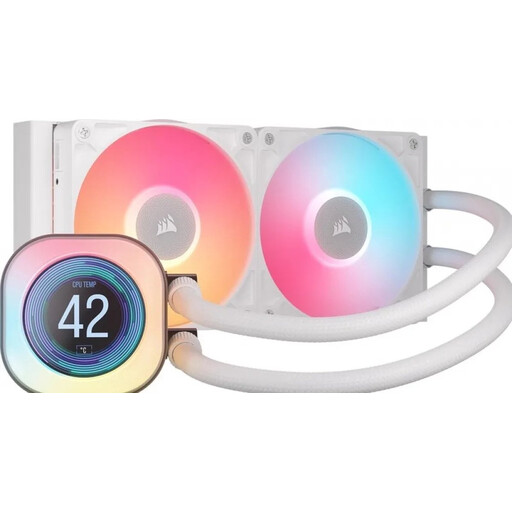
Why This Fits Their Persona: Perfect for those who want top-tier performance and a visually spectacular 'white build'. This white AIO water cooler combines powerful cooling with a customisable LCD screen for a premium look and minimal cable clutter.
The iCUE LINK ecosystem solves the RGB sync and cable trap. Everything works together seamlessly via a single cable type, ensuring a clean and functional build.
The combination of a 240mm radiator, powerful RX fans (high static pressure), and an LCD screen offers both excellent cooling performance and personalisation options.

Why This Fits Their Persona: Ideal for those starting a new build or performing a major upgrade. This pack provides three powerful 120mm fans and the necessary hub for a head start on a clean and synchronised system.
This starter pack guarantees compatibility. You don't have to worry about separate controllers or mismatched RGB headers. The performance is clearly specified (up to 2100 RPM), so there are no surprises.
A complete and cost-effective solution to equip your entire case with powerful, white RGB cooling. The included iCUE LINK System Hub is the foundation for a clean installation.
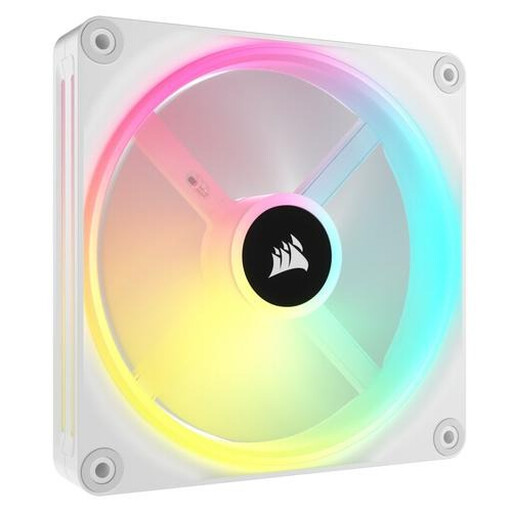
Why This Fits Their Persona: For those looking to upgrade a specific spot in their case with a larger, quieter, or more powerful fan. This 140mm RGB fan offers an excellent balance of performance and aesthetics for a targeted improvement.
The specs are clear: a noise range of 10 to 37 dB and PWM support. You know exactly what performance you're getting. As part of the iCUE LINK system, future expansion is possible without compatibility issues.
This 140mm RGB fan offers higher airflow at a lower RPM than a 120mm model, resulting in quieter operation. The 34 individually addressable LEDs provide vibrant lighting effects.
We have compiled a complete, up-to-date list of products that fully meet these strict selection criteria and adhere to all relevant standards.
An AIO (All-in-One) water cooler uses liquid to transport heat from the CPU to a radiator, where it is dissipated by fans. This often leads to lower temperatures under heavy load and can be quieter. A traditional white CPU cooler (air cooler) uses a metal heatsink and heatpipes to dissipate heat directly with a fan. Air coolers are typically easier to install and have no risk of leakage, while AIOs often provide better performance for overclocking and offer a cleaner look.
The lifespan of a fan depends on its bearing type. Cheaper fans with sleeve bearings often last 2 to 4 years. Models with a 'magnetic levitation bearing', like many Corsair fan models, have significantly less friction and can last 5 years or longer with normal use. White fans may slightly discolour over time due to dust and UV light, but regular cleaning helps to minimise this.
Not necessarily. A higher price may be due to more advanced RGB lighting (more LEDs, unique effects) or belonging to a premium ecosystem like Corsair iCUE LINK. The cooling performance itself, determined by CFM, static pressure, and bearing quality, is not always superior. Compare the specifications that are important to you. A more expensive fan might be worth the premium for the ease of installation and perfect synchronisation, even if its raw cooling performance is comparable to a cheaper model.
