
Vandaag of morgen in huis

Kwaliteit gegarandeerd

Welkomstaanbiedingen ontgrendelen: GRATIS bezorging | Tot 80% korting | Gratis 30 dagen JoyPlus-proefperiode
Download de app
A white computer setup looks smart, but colour alone says little about suitability. An attractive white PC case may not offer enough room for your graphics card. A white keyboard may have a different layout from the one you are used to. And an external SSD may quote a high speed that your laptop or cable does not support.
This buying guide helps gamers, PC builders, homeworkers and students compare white PC components and accessories for compatibility, size, connections and everyday use.
White cases vary considerably in size. A white midi tower generally offers more room than a white micro tower, but always check the maximum graphics card length, CPU cooler height and power supply size.
Tempered glass panels also require care. They show off RGB lighting beautifully, but need to be handled carefully during installation. Place the case on a stable, level surface and avoid knocks to the edges.
A USB-C port does not automatically mean that every device supports the same speed or charging function. Check the complete standard, such as USB 3.2 Gen 2 or USB 3.2 Gen 2x2, and make sure your computer supports that standard.
The same applies to a white monitor. A screen with HDMI, DisplayPort and VGA is more versatile, but your laptop or graphics card must have the correct output. With a keyboard, the layout is just as important: US QWERTY is not the same as a Dutch QWERTY or AZERTY layout.
A 1000W PC power supply is not necessary for every computer. The available power must match the processor, graphics card and other components. Also check the connections, the ATX version and whether the cables are modular.
With a motherboard, the socket is decisive. An AM5 motherboard is designed for compatible AMD Ryzen processors, but before buying, also check current processor support, the BIOS and the type of system memory. According to the product information, the Colorful BATTLE-AX B650M-WHITE WIFI V15 model supports AMD Ryzen 7000, 8000 and 9000 series processors with an AM5 socket and DDR5 memory.
When choosing a case, pay attention to the following:
The Corsair 5000T Midi Tower Case White supports ATX, E-ATX, micro-ATX and Mini-ITX, with room for graphics cards up to 450 mm and CPU coolers up to 170 mm. The more compact MSI MAG PANO M100R PZ Micro Tower White supports micro-ATX and Mini-ITX and accommodates graphics cards up to 350 mm.
A case with plenty of fan positions is not automatically quieter or cooler. Check how many fans are included, where they can be installed and whether dust filters are fitted. For a powerful gaming PC, support for a 240, 280 or 360 mm radiator may be relevant.
A RGB PC case adds lighting, but also check the connection: 5V ARGB headers or a specific controller are often required. The Corsair iCUE LINK 5000T LX RGB comes with three 120mm RGB fans and uses an iCUE LINK hub. Check that your power supply and motherboard provide the required connections.
Good cable management is useful during installation and maintenance. Cases with cable channels, a separate power supply compartment or back-connect support can help create a tidier build.
For an office or home-working setup, connections and ergonomics are often more important than lighting. The ASUS VA24EQSB-W has a 23.8-inch IPS panel with Full HD resolution, 75 Hz, HDMI, DisplayPort, VGA and two USB 3.2 ports. Its stand is height-adjustable and supports swivelling, tilting and rotation.
An all-in-one PC combines the computer and screen in a single enclosure. This saves space and reduces cable clutter, but upgrades are generally more limited than with a desktop. The Acer Aspire C24-A WI5418 NL features 16 GB DDR5, a 1TB PCIe NVMe SSD, a 23.8-inch Full HD IPS screen and a built-in webcam. For models supplied without an adapter, check whether the required power supply must be purchased separately.
For portable storage, the DigiEra 1TB Magnetic Portable SSD features USB 3.2 Gen 2x2 Type-C. Its quoted read speed of up to 2000 MB/s depends on the computer, cable and USB standard being used. According to the product information, the magnetic attachment is designed for iPhone 15 and 16 models; earlier models are not compatible according to the description.
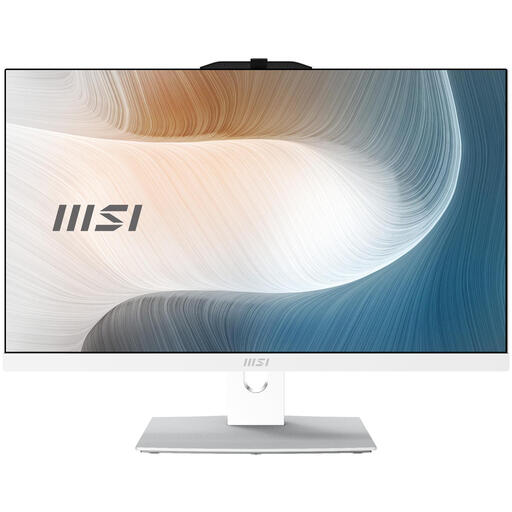
Why it suits this profile: This all-in-one PC combines a 23.8-inch Full HD touchscreen with 8 GB DDR5, a 256GB SSD and Windows 11 Pro. It is practical for studying, administration and everyday home use, with minimal cable clutter.
The key specifications are listed together: screen size, storage, memory and operating system. However, check that the required power adapter is included or available separately.
23.8-inch IPS touchscreen, 256GB M.2 SSD, Wi-Fi 6E and HDMI output.
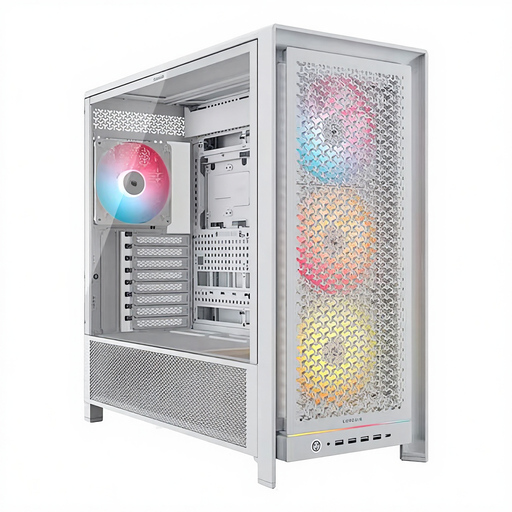
Why it suits this profile: A spacious choice for a workstation or gaming PC with multiple storage drives, a large graphics card and advanced cooling.
The case specifies clear limits: graphics cards up to 450 mm, CPU coolers up to 175 mm and radiator support up to 420 mm. Nevertheless, check the dimensions of every component.
Four included 140mm ARGB fans, six 2.5-inch bays and two 3.5-inch bays.
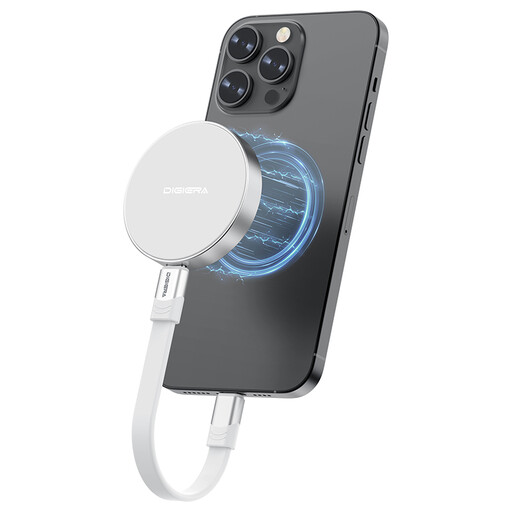
Why it suits this profile: Suitable for users who want to carry large files, video footage or backups with them while on the move via USB-C.
The interface is clearly specified as USB 3.2 Gen 2x2 Type-C. The stated transfer speed is therefore not guaranteed for every USB-C port; check your system and cable.
1TB storage, USB-C, quoted read speeds of up to 2000 MB/s and magnetic attachment for compatible iPhones.
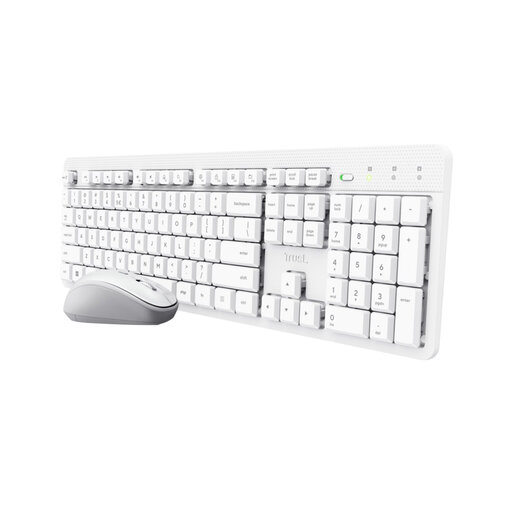
Why it suits this profile: A simple wireless combination for students, homeworkers and office professionals who want a tidy desk.
The product information explicitly states that it has a US QWERTY layout and no backlighting. This lets you check in advance whether the set suits your work and typing preferences.
One USB receiver for the keyboard and mouse, adjustable mouse speed of 800–1600 dpi and quiet keys according to the product description.
We have compiled a complete, up-to-date list of products that fully meet these strict selection criteria and the applicable European safety regulations.
It varies by brand, size and features. A white finish may come with tempered glass, ARGB lighting or additional cable management, but colour itself does not determine technical value. Instead, compare connections, dimensions, included components and warranty terms.
No. Check the supported sizes of both the case and the motherboard. A midi tower often supports ATX and micro-ATX, but not every model accepts E-ATX or Mini-ITX. Also check the position of the connections in back-connect systems.
A wireless keyboard and mouse, an adjustable monitor stand, a USB-C cable and, if required, an external SSD are practical additions. When choosing a cable, check its length, connectors and charging or data speed. The Samsung USB-C cable measuring 1.8 metres has USB-C connectors at both ends; for a USB-A port, you will need a different cable or adapter.
