
Vandaag of morgen in huis

Kwaliteit gegarandeerd

Welkomstaanbiedingen ontgrendelen: GRATIS bezorging | Tot 80% korting | Gratis 30 dagen JoyPlus-proefperiode
Download de app
A white PC case fan can give your computer case a clean look and help improve airflow. However, a white finish alone is not a good enough reason to buy a fan. The connection, size and difference between case and radiator cooling determine whether the fan is actually suitable for your build.
Many gamers and PC builders run into the same problems:
Below, you can find out which specifications to check in advance and which white Corsair PC fans are suitable for different uses.
A 120mm PC fan is the most commonly used size. Many computer cases, CPU radiators and liquid-cooling radiators have mounting points for this size. A 140mm PC fan can move more air at the same speed, but requires more space.
Therefore, check:
A 140mm fan will not automatically fit a 120mm mounting position. Also pay attention to the airflow direction. Arrows on the frame usually show the direction of rotation and the direction in which the air moves.
A PWM fan usually uses a 4-pin connection. This allows the motherboard or fan controller to adjust the speed according to the temperature. It is more practical than a fan that constantly runs at maximum speed.
Look at three values:
A stated range of, for example, 10 to 36 or 37 dB does not mean that the fan always produces 10 dB. At higher speeds, noise and airflow generally increase. A quiet PC fan is mainly achieved through PWM control and a suitable fan curve in the BIOS, UEFI or software.
An RGB case fan can use different types of lighting. With addressable RGB, often referred to as an ARGB PC fan, individual LEDs can display different colours. Always check the connector and the required controller.
Corsair iCUE LINK models require a suitable iCUE LINK System Hub. Some expansion fans are not designed to connect directly to a standard motherboard header. A standard 4-pin PWM connection and a lighting connection also serve different functions.
For a neat white PC cooling setup, it is sensible to choose all your fans from the same ecosystem. This avoids the need for extra controllers, adapter cables and dealing with software issues.

Why it suits this profile: This single 120mm fan is ideal if you want to add one more fan position without immediately buying a complete set. The 4-pin PWM connection enables speed control via a compatible motherboard.
The product listing specifies both PWM and a speed range of 480 to 2400 RPM. This allows you to fine-tune the fan instead of running it permanently at full speed.
120 mm, white housing, 34 individually addressable LEDs, up to 63,1 CFM, and suitable for case or radiator cooling.
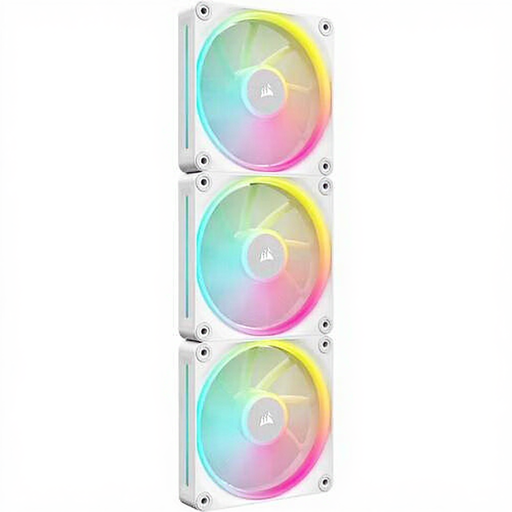
Why it suits this profile: This 3-pack of case fans is ideal for a uniform white build with multiple mounting points and central control via the iCUE LINK system.
The included hub and linkable setup help minimise loose cables. However, check beforehand that the hub and required power connection will fit in your PC.
Three 120mm fans, PWM control, 12 individually addressable RGB LEDs per fan, up to 2400 RPM, and a stated noise level of 10 to 36 dB.

Why it suits this profile: This set is designed for users who want to equip multiple 120mm positions or a radiator and manage the lighting through iCUE.
The specifications state static pressure of up to 5,22 mmH2O. This is relevant for a radiator, where air must be pushed through a denser structure.
Three fans, up to 74,2 m³/h airflow according to the stated product specification, PWM, magnetic bearings and iCUE LINK connectivity.
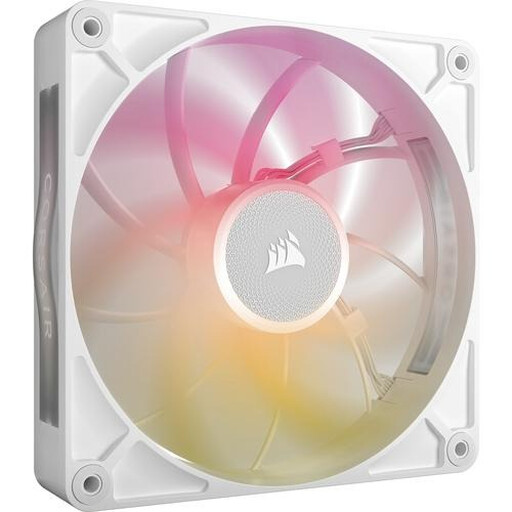
Why it suits this profile: For a case with 140mm mounting points, this fan can move a large volume of air at a stated maximum of 102,9 CFM, while the product information lists a maximum of 31 dB.
The combination of PWM and a range of 300 to 1600 RPM supports a fan curve that avoids unnecessarily high speeds. However, check the available clearance inside the case.
140 mm, white finish, PWM, RGB lighting, up to 102,9 CFM and suitable for case and radiator use according to the product listing.
We have put together a complete, up-to-date list of products that fully meet these strict selection criteria and the applicable European safety regulations.
Switch off the computer completely and unplug it from the mains before installing a fan. During installation, pay attention to the following:
According to the product information and EU consumer regulations, the Corsair products mentioned are covered by a statutory warranty of at least two years. Keep your purchase details and contact the seller if you encounter a problem.
It depends on your case and its mounting points. 120 mm is widely compatible. 140 mm can be a good choice if your case is designed for it and you want greater airflow at lower speeds.
No. Check whether it uses standard RGB, 5V ARGB or a proprietary system such as iCUE LINK. Connecting it to the wrong voltage can damage the lighting or hardware. Also check whether a hub is required.
A case fan generally uses very little power. Consumption increases at higher speeds and when additional controllers are used. With PWM and a customised fan curve, the fan runs more slowly under light loads, which can help reduce both noise and power consumption.
